Screen module
10.1 inch LVDS display module
Product parameters
- model: HSX101H40C-L28A
- size: 10.1 inch
- resolution: 800x1280
- display interface: LVDS
- visual Angle: 170°
- touch screen: multi-point capacitive touch
The officially released firmware and the firmware compiled by default support LVDS display, which can be displayed normally when connected to the screen.
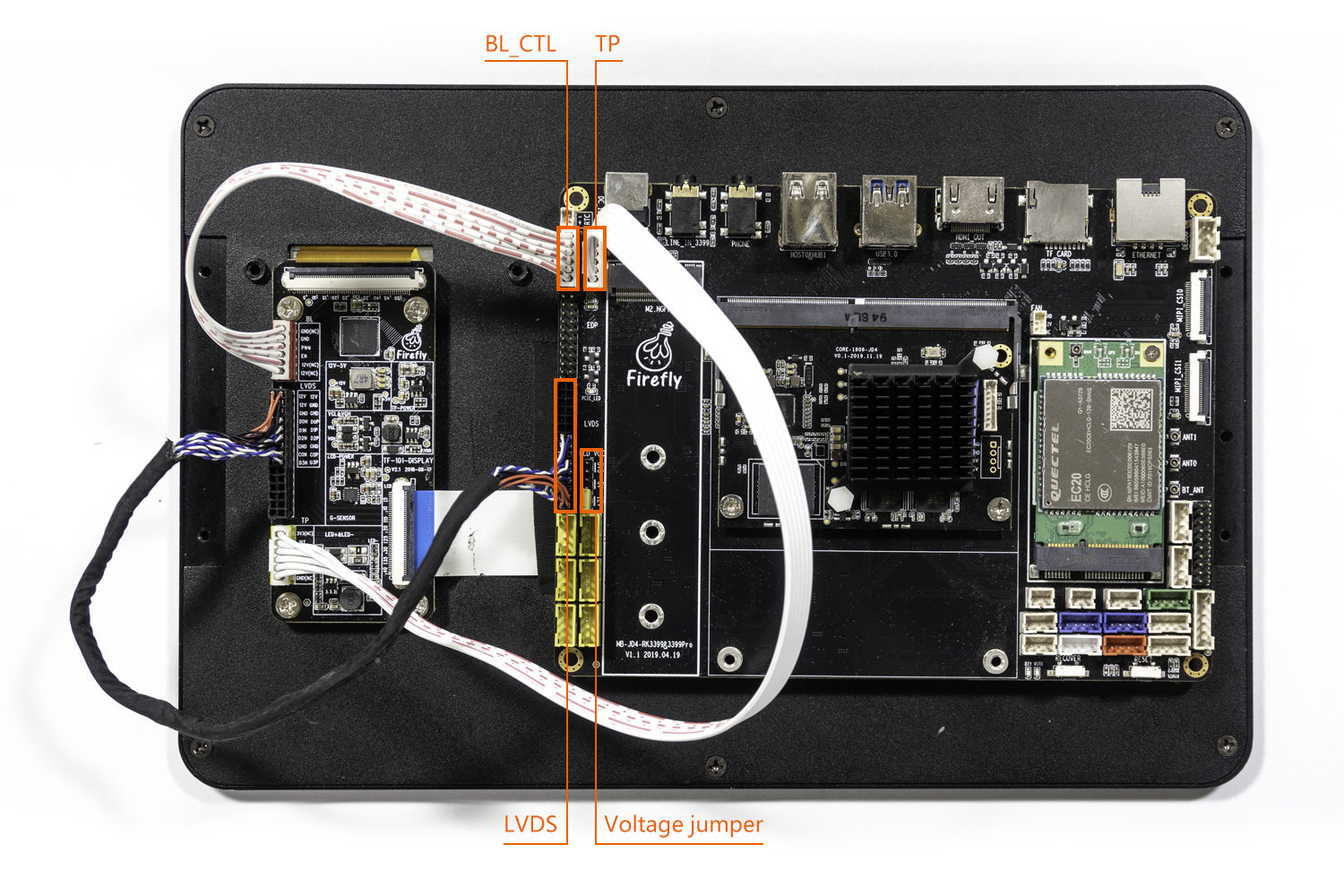
Real figure
Wiring precautions:
- TP interface: The TP interface on the LVDS wiring board is connected to the TP interface on the backplane (the yellow port)
- BL interface: The BL interface on the LVDS wiring board is connected to the BL interface on the backplane (the red port)
- LVDS interface: The BL interface on the LVDS wiring board is connected to the BL interface on the backplane (note the direction of the power interface, that is, the red line is VCC)
- Connect to 12V jumper cap: There are three power jumper ports next to the LVDS interface on the backplane. You need to use a jumper cap to connect the 12V jumper port.