RK 平台 U-Boot 适配 YT8521S
这篇记录在 RK3568 Linux 6.1 SDK 的 U-Boot 里添加 Motorcomm YT8521S PHY 支持,并通过 mdio read 和 ping 验证网口。
示例板卡是 LKD3568。这里使用的 GMAC 控制器是 ethernet@fe010000,PHY 在 MDIO 地址 0。
背景
如果 U-Boot 里没有注册 YT8521S PHY 驱动,网口控制器可能能识别到,但 PHY 链路起不来。常见表现是 U-Boot 下 ping 不通,或者一直卡在自动协商。
需要改的地方有:
- 把 Motorcomm PHY 驱动加进 U-Boot。
- 增加一个 Kconfig 配置项。
- 配置打开时编译
motorcomm.o。 - 在 PHY 初始化阶段调用
phy_yt_init()。 - 在
rk3568_defconfig里打开这个配置。
Patch 概览
最终提交大概是这样:
uboot: support yt8521s ethernet on lkd3568

configs/rk3568_defconfig    |    1 +
drivers/net/phy/Kconfig     |    6 +
drivers/net/phy/Makefile    |    1 +
drivers/net/phy/motorcomm.c | 3311 ++++++++++++++++++++++++++++++++++++++++++
drivers/net/phy/phy.c       |    3 +
include/phy.h               |    1 +
增加 Motorcomm PHY 配置项
在 drivers/net/phy/Kconfig 里增加:
+config MOTORCOMM_PHY
+    bool "Motorcomm PHY support"
+    depends on PHYLIB
+    help
+      Support for Motorcomm PHYs such as YT8521/YT8531
然后在 drivers/net/phy/Makefile 里加上编译规则:
+obj-$(CONFIG_MOTORCOMM_PHY) += motorcomm.o
添加驱动文件
把 Motorcomm PHY 驱动放到:
drivers/net/phy/motorcomm.c
这个文件里包含 YT 系列 PHY 的驱动逻辑,并提供初始化函数:
int phy_yt_init(void);
本文适配 RK3568 Linux 6.1 SDK U-Boot 时使用的参考驱动可以从这里下载:
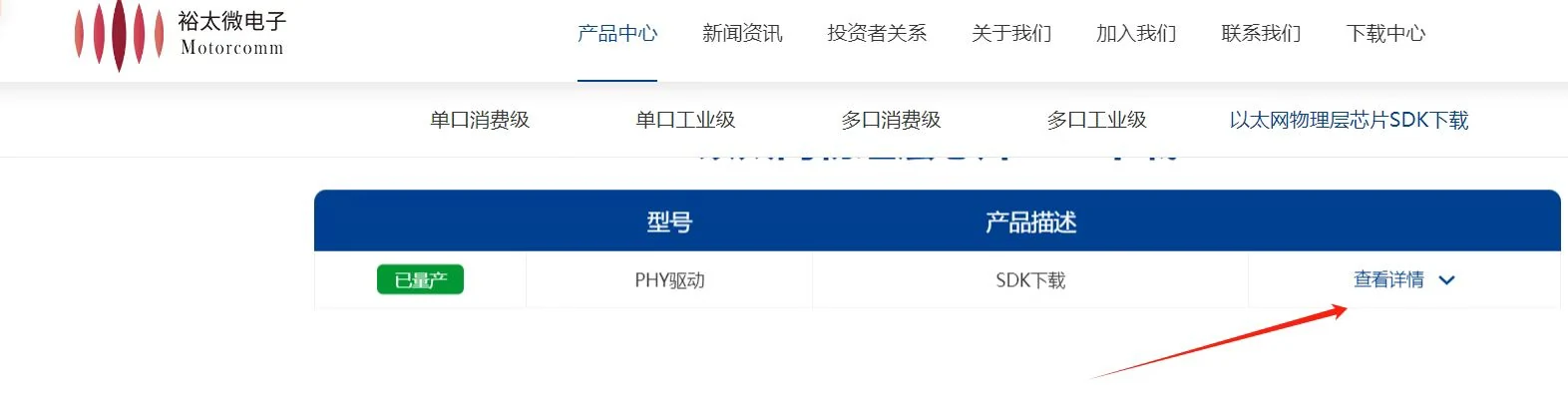
下载 rk3568-uboot-motorcomm-yt8521s.c
备注
这个文件已在 RK3568 Linux 6.1 SDK U-Boot 环境验证。如果需要更新的 Motorcomm PHY 驱动,可以到 Motorcomm 官网下载最新 SDK:以太网物理层芯片 SDK 下载。
在 PHY 初始化里注册驱动
先在 include/phy.h 里声明函数:
+int phy_yt_init(void);
然后在 drivers/net/phy/phy.c 里调用:
 int phy_init(void)
 {
     ...
 #ifdef CONFIG_PHY_FIXED
     phy_fixed_init();
+#endif
+#ifdef CONFIG_MOTORCOMM_PHY
+    phy_yt_init();
 #endif
     return 0;
 }
在 RK3568 配置里打开
在 configs/rk3568_defconfig 里打开配置:
+CONFIG_MOTORCOMM_PHY=y
之后按 SDK 原来的流程重新编译 U-Boot 即可。
U-Boot 下验证
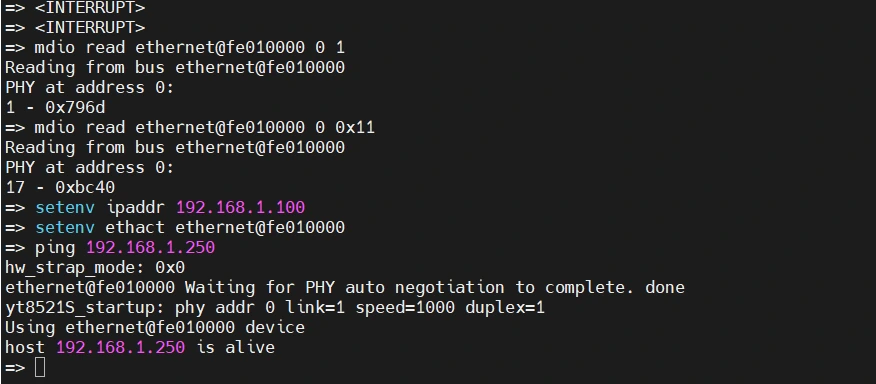
板子启动时打断 autoboot,停在 U-Boot 命令行:
=> <INTERRUPT>
先读一下 PHY 状态寄存器:
=> mdio read ethernet@fe010000 0 1
Reading from bus ethernet@fe010000
PHY at address 0:
1 - 0x796d
再读寄存器 0x11:
=> mdio read ethernet@fe010000 0 0x11
Reading from bus ethernet@fe010000
PHY at address 0:
17 - 0xbc40
设置开发板 IP,并指定当前使用的网口:
=> setenv ipaddr 192.168.1.100
=> setenv ethact ethernet@fe010000
然后 ping 同网段主机:
=> ping 192.168.1.250
hw_strap_mode: 0x0
ethernet@fe010000 Waiting for PHY auto negotiation to complete. done
yt8521S_startup: phy addr 0 link=1 speed=1000 duplex=1
Using ethernet@fe010000 device
host 192.168.1.250 is alive
重点看这一行:
yt8521S_startup: phy addr 0 link=1 speed=1000 duplex=1
它说明 YT8521S 链路已经起来,速率是 1000 Mbps,全双工。最后看到 host ... is alive,说明 U-Boot 阶段已经能 ping 通主机。
快速排查
如果还是 ping 不通,优先检查这些点:
- PHY 地址是否正确。本文示例是地址
0。 ethact是否选对网口,本文是ethernet@fe010000。- 开发板 IP 和电脑 IP 是否在同一网段。
- 网线、交换机、电脑防火墙是否影响 ping。
- 最终生成的 U-Boot 配置里是否真的包含
CONFIG_MOTORCOMM_PHY=y。 phy_yt_init()是否已经从phy_init()里调用。
对 LKD3568 + YT8521S 这个组合来说,合入上面的 patch 后,U-Boot 可以完成 PHY 自动协商,并 ping 通同网段主机。