接口定义
整机接口定义
LKB3562提供了丰富的接口,具体如下图:
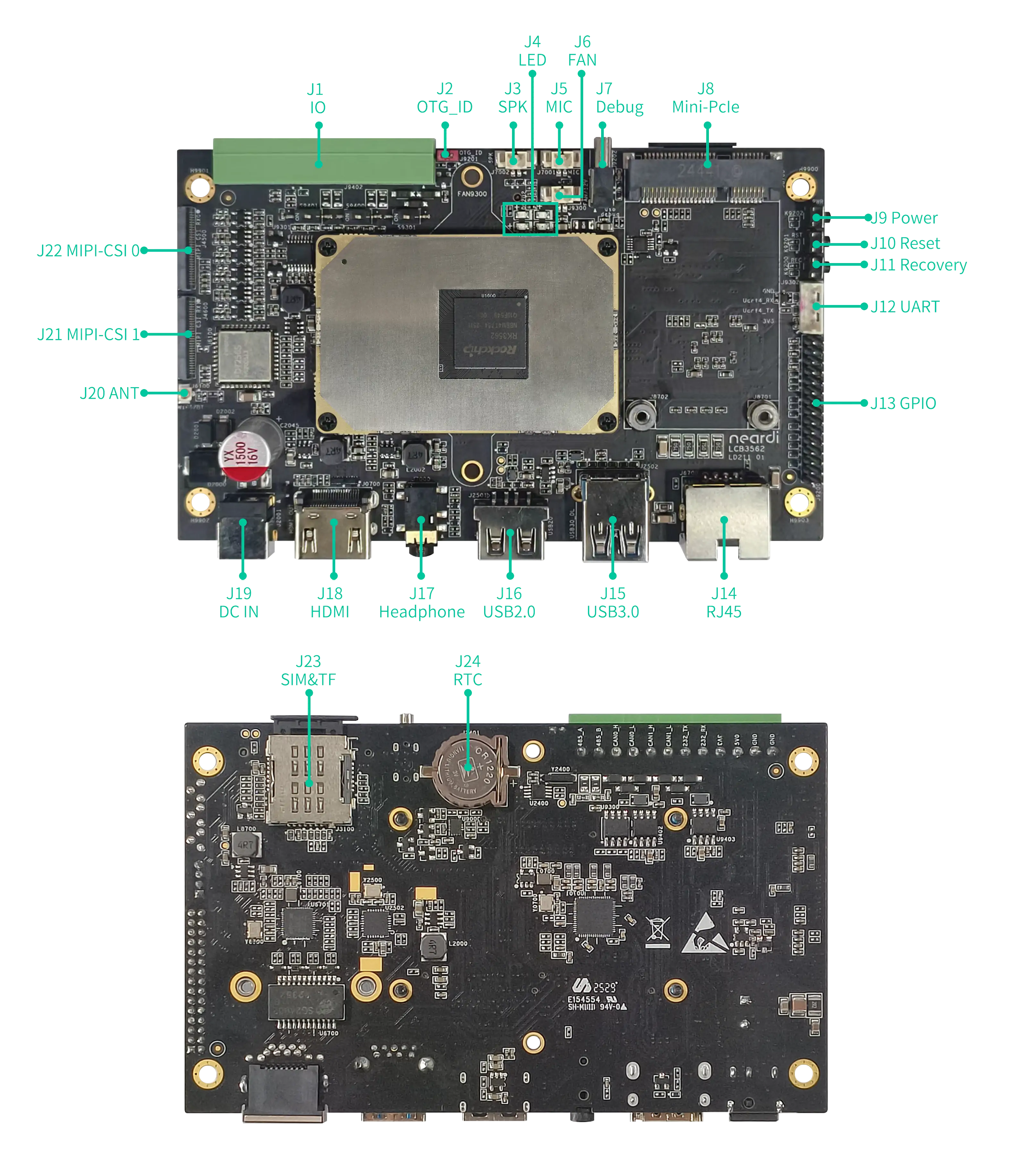
| 丝印 | 设备节点 | 备注 |
|---|---|---|
| MIC | 输入声音,录制音频文件 | |
| LINE/Headphone | 播放音频文件 | |
| ETH0 | eth0 | 千兆网卡 |
| WIFI | wlan0 | 2.4/5GHz |
| USB1 | Type-A USB3.0 host | |
| USB2 | Type-A USB2.0 host | |
| USB3 | Type-C USB2.0 OTG | |
| PWR LED | 电源灯 | |
| 4G LED | 4G灯 | |
| SYS LED | work1 | 系统灯 |
| STA LED | work2 | STA灯 |
| RTC | /dev/rtc0 | RTC时钟 |
| Mini-PCIe | 4G/5G模组 | |
| RS485 | /dev/ttyS2 | 串口,默认波特率9600 |
USB3.0 接口说明
当 OTG_ID 短接时为 USB3.0 接口,未短接时为OTG。
也可以通过命令切换:
~ $ sudo -i

# 进入 host 模式
~ $ echo host > /sys/devices/platform/ff740000.usb2-phy/otg_mode

# 进入 otg 模式
~ $ echo otg > /sys/devices/platform/ff740000.usb2-phy/otg_mode
切换 host 模式后可能需要重新插拔 USB 设备才能生效。
切换 otg 模式后可能需要重新上电 otg 才能生效,当进入 otg 模式时,windows 的烧录工具会显示识别到
ADB设备。
MINI-PCIE 接口
MINI-PCIE可选配4G模块,使用方法参考 4G/5G 拨号
MIC 使用
使用以下命令可以录制音频文件,支持wav、mp3等格式。
录制双声道的16位小端格式的音频,采样率为48000Hz,然后保存为001.wav文件。
arecord -Dhw:0,0 -r48000 -f S16_LE -c2 > 001.wav
• -Dhw:0,0 指定了录音设备,0,0 是card 0 device 0,也就是第一个声卡的第一个设备。
• -r48000 指定了采样率,单位是Hz,48000表示每秒采样48000次。
• -f S16_LE 指定了采样格式,S16_LE表示有符号的16位小端格式,也就是每个采样点占用2个字节,低位在前,高位在后。
• -c2 指定了声道数,2表示双声道,也就是立体声。
• > 001.wav 指定了输出文件,>表示重定向标准输出到文件,001.wav表示文件名,wav表示文件格式。
LINE 使用
使用第一个声卡的第一个设备播放001.wav文件。
aplay -D hw:0,0 001.wav
• -D hw:0,0 指定了播放设备,hw:0,0 是card 0 device 0,也就是第一个声卡的第一个设备。
• 001.wav 指定了音频文件,wav表示文件格式,001表示文件名。
ETH 说明
可以通过调试串口、ssh或者adb来查看IP地址,例如:
neardi@3562:~$ ifconfig -a
eth0: flags=4163<UP,BROADCAST,RUNNING,MULTICAST>  mtu 1500
        inet 192.168.1.65  netmask 255.255.255.0  broadcast 192.168.1.255
        inet6 fe80::7df7:e74d:497e:345d  prefixlen 64  scopeid 0x20<link>
        ether 62:ea:fb:ca:95:e7  txqueuelen 1000  (Ethernet)
        RX packets 2548  bytes 210938 (210.9 KB)
        RX errors 0  dropped 0  overruns 0  frame 0
        TX packets 338  bytes 46899 (46.8 KB)
        TX errors 0  dropped 0 overruns 0  carrier 0  collisions 0
        device interrupt 140  base 0xd000
Wi-Fi 说明
通过如下命令查看当前Wi-Fi型号:
cat /sys/bus/sdio/devices/mmc2\:8800\:1/vendor
cat /sys/bus/sdio/devices/mmc2\:8800\:1/device
0x02d0:0xaae8:AP6275S.0x024c:0xb852:RTL8852.0x024c:0xd723:RTL8723DS.0x024c:0xc821:RTL8821CS.0x1ffe:0x6316:FD7352S.0x0000:0x0000:FD7256S.
MIPI 摄像头
支持OV13855、OS08A20、OV16880摄像头,使用方法可参考摄像头模组
拉流命令:
v4l2-ctl --set-fmt-video=width=800,height=600 --stream-mmap --stream-count=10000000000 -d /dev/video29
v4l2-ctl --set-fmt-video=width=800,height=600 --stream-mmap --stream-count=10000000000 -d /dev/video22
出图命令:
gst-launch-1.0 v4l2src device=/dev/video29 ! video/x-raw,format=NV12,width=800,height=600, framerate=30/1 !  autovideosink
gst-launch-1.0 v4l2src device=/dev/video22 ! video/x-raw,format=NV12,width=800,height=600, framerate=30/1 !  autovideosink
RTC时钟
如何修改RTC时钟为'2025-11-11 12:00:00'
- Cmd
- C
#关闭网络时间协议(NTP)的服务,使得RTC时钟不受网络时间的影响
timedatectl set-ntp false
#设置RTC时钟的时间为2025年11月11日12时00分00秒
timedatectl set-time '2025-11-11 12:00:00'
#将RTC时钟的时间同步到系统时钟,使得系统时钟和RTC时钟保持一致,可加在/etc/init.d/rockchip.sh中
hwclock --hctosys
create time_setter.c
#include <stdio.h>
#include <stdlib.h>
#include <string.h>
#include <time.h>
#include <unistd.h>

void exec_command(const char *cmd) {
    int ret = system(cmd);
    if (ret != 0) {
        fprintf(stderr, "Command failed: %s\n", cmd);
        exit(1);
    }
}

// Set system time
void set_system_time(const char *time_str) {
    char cmd[128];
    snprintf(cmd, sizeof(cmd), "timedatectl set-time '%s'", time_str);
    exec_command(cmd);
}

// Disable NTP
void disable_ntp() {
    exec_command("timedatectl set-ntp false");
}

// Synchronize hardware clock to system clock
void sync_hwclock_to_system() {
    exec_command("hwclock --hctosys");
}

// Print help information
void print_usage() {
    printf("Usage: time_setter -t <time>\n");
    printf("  -t <time>   Set system time (format: 'YYYY-MM-DD HH:MM:SS')\n");
    printf("  -h          Show help\n");
}

int main(int argc, char *argv[]) {
    if (argc != 3) {
        print_usage();
        return 1;
    }

    const char *time_str = NULL;

    int opt;
    while ((opt = getopt(argc, argv, "t:h")) != -1) {
        switch (opt) {
            case 't':
                time_str = optarg;
                break;
            case 'h':
            default:
                print_usage();
                return 0;
        }
    }

    if (time_str == NULL) {
        fprintf(stderr, "Error: Time argument is required\n");
        print_usage();
        return 1;
    }

    // 1. Disable NTP
    disable_ntp();

    // 2. Set system time
    set_system_time(time_str);

    // 3. Synchronize hardware clock to system clock
    sync_hwclock_to_system();

    printf("Time has been set to: %s\n", time_str);
    return 0;
}
gcc -o time_setter time_setter.c
./time_setter -t "2025-11-11 12:00:00"