04.发布者
4、发布者Publisher
4.1、发布者
发布者,顾名思义就是起到发布消息的作用。这里的消息,可以是下位机传给上位机的传感器信息,然后通过上位机打包封装好发送到订阅了该话题的订阅者;也可以是上位机的数据做了运算后打包封装好发送给给订阅该话题的订阅者。
4.2、 创建工作空间和话题功能包
4.2.1、创建工作空间
xxxxxxxxxx mkdir -p ~/catkin_ws/src cd ~/catkin_ws/src catkin_init_workspace
4.2.2、编译工作空间
xxxxxxxxxx cd ~/catkin_ws/ catkin_make
4.2.3、更新环境变量
xxxxxxxxxx source devel/setup.bash
4.2.4、检查环境变量
xxxxxxxxxx echo $ROS_PACKAGE_PATH
4.2.5、创建功能包
xxxxxxxxxx cd ~/catkin_ws/src catkin_create_pkg learning_topic std_msgs rospy roscpp geometry_msgs turtlesim 解释说明:learning_topic为功能包的名字
4.2.6、编译功能包
xxxxxxxxxx cd ~/catkin_ws catkin_make source ~/catkin_ws/devel/setup.bash
4.3、创建一个发布者
4.3.1、创建步骤
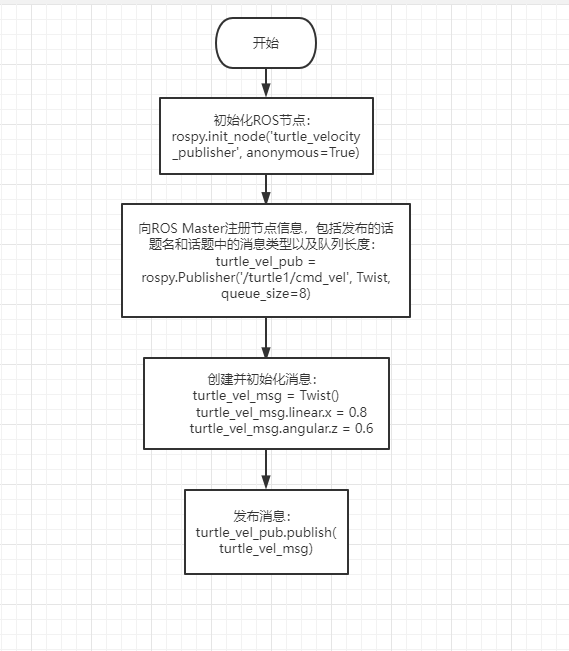
1)、初始化ROS节点
2)、创建句柄
3)、向ROS Master注册节点信息,包括发布的话题名和话题中的消息类型以及队列长度
4)、创建并且初始化消息数据
5)、按照一定频率循环发送消息
4.3.2、C++语言实现
1)、在功能包的src文件夹,创建一个c++文件(文件后缀为.cpp),命名为turtle_velocity_publisher.cpp
2)、把下边的程序代码复制粘贴到turtle_velocity_publisher.cpp文件中
xxxxxxxxxx /*创建一个小海龟的速度发布者*/ #include <ros/ros.h> #include <geometry_msgs/Twist.h> int main ( int argc , char ** argv ){ ros::init ( argc , argv , "turtle_velocity_publisher" ); //ROS节点初始化 ros::NodeHandle n ; //这里是创建句柄 //创建一个Publisher,发布名为/turtle1/cmd_vel的topic,消息类型为geometry_msgs::Twist,队列长度10 ros::Publisher turtle_vel_pub = n . advertise < geometry_msgs::Twist > ( "/turtle1/cmd_vel" , 10 ); ros::Rate loop_rate ( 10 ); //设置循环的频率 while ( ros::ok ()){ //初始化需要发布的消息,类型需与Publisher一致 geometry_msgs::Twist turtle_vel_msg ; turtle_vel_msg . linear . x = 0.8 ; turtle_vel_msg . angular . z = 0.6 ; turtle_vel_pub . publish ( turtle_vel_msg ); // 发布速度消息 //打印发布的速度内容 ROS_INFO ( "Publsh turtle velocity command[%0.2f m/s, %0.2f rad/s]" , turtle_vel_msg . linear . x , turtle_vel_msg . angular . z ); loop_rate . sleep (); //按照循环频率延时 } return 0 ; }
3)、程序流程图,可对应1.3.1内容查看
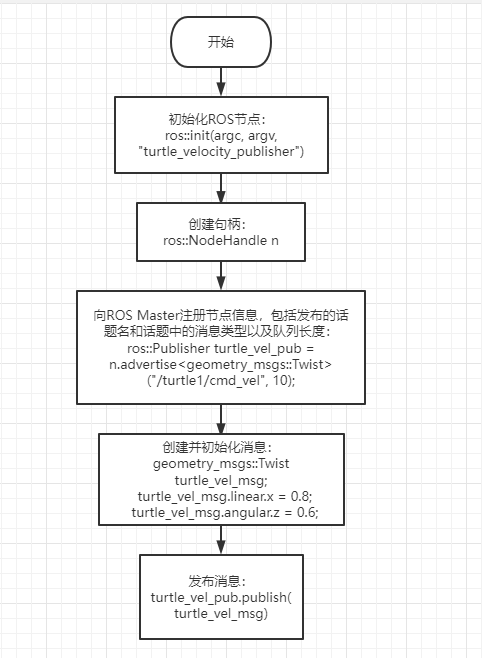
4)、在CMakelist.txt中配置,build区域下,添加如下内容
xxxxxxxxxx add_executable(turtle_velocity_publisher src/turtle_velocity_publisher.cpp) target_link_libraries(turtle_velocity_publisher ${catkin_LIBRARIES})
5)、工作空间目录下编译代码
xxxxxxxxxx cd ~/catkin_ws catkin_make source devel/setup.bash #需要配置环境变量,否则系统无法找到运行程序
6)、运行程序
- 运行roscore
xxxxxxxxxx roscore
- 运行小海龟节点
xxxxxxxxxx rosrun turtlesim turtlesim_node
- 运行发布者,持续给小海龟发送速度
xxxxxxxxxx rosrun learning_topic turtle_velocity_publisher
7)、运行效果截图
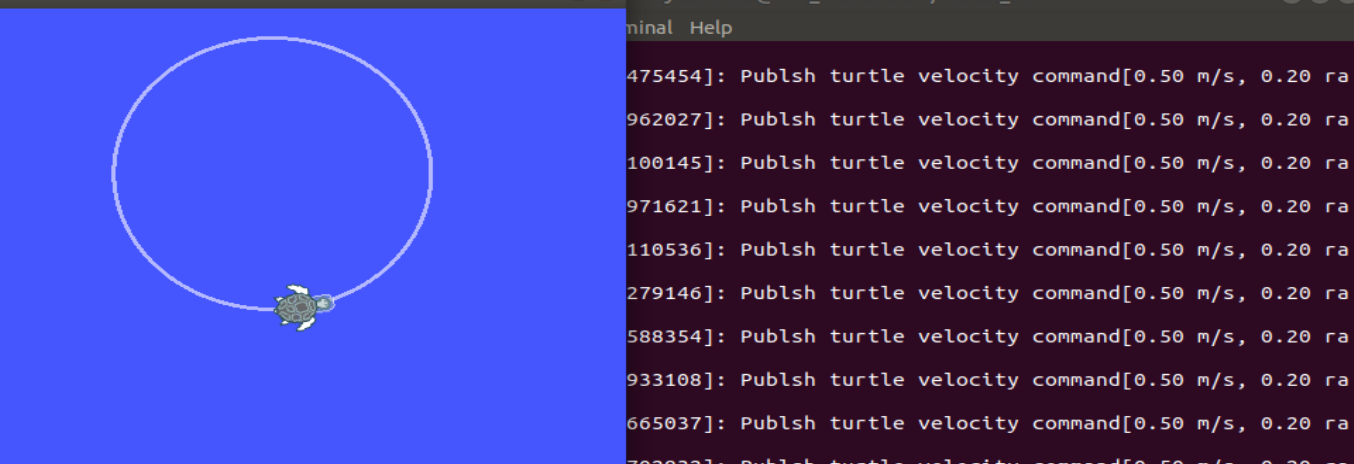
8)、程序运行说明
- 在终端输入rostopic list查看话题列表会发现/turtle1/cmd_vel这个话题
- 我们用rostopic info /turtle1/cmd_vel 查看会发现
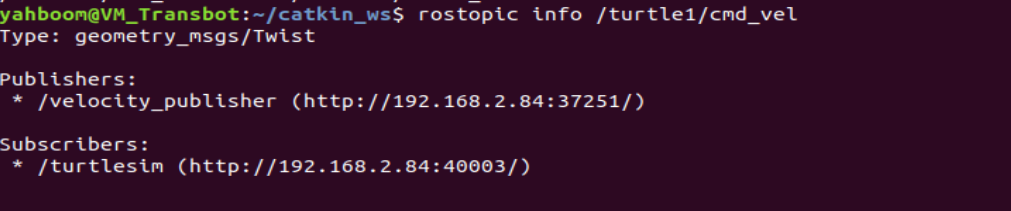
这说明小海龟是一个订阅/turtle1/cmd_vel这个速度话题的,所以,发布者不断发送速度数据,小海龟接收到后,就开始按照速度做运动。
4.3.3、Python语言实现
1)、在功能包目录下,新建以一个文件夹scripts,然后在scripts文件夹下新建一个python文件(文件后缀.py),命名为turtle_velocity_publisher.py
2)、把下边的程序代码复制粘贴到turtle_velocity_publisher.py文件中
xxxxxxxxxx #!/usr/bin/env python # -*- coding: utf-8 -*- # 该例程将发布turtle1/cmd_vel话题,消息类型geometry_msgs::Twist import rospy from geometry_msgs . msg import Twist def turtle_velocity_publisher (): rospy . init_node ( 'turtle_velocity_publisher' , anonymous = True ) # ROS节点初始化 # 创建一个小海龟速度发布者,发布名为/turtle1/cmd_vel的topic,消息类型为geometry_msgs::Twist,8代表消息队列长度 turtle_vel_pub = rospy . Publisher ( '/turtle1/cmd_vel' , Twist , queue_size = 8 ) rate = rospy . Rate ( 10 ) #设置循环的频率 while not rospy . is_shutdown (): # 初始化geometry_msgs::Twist类型的消息 turtle_vel_msg = Twist () turtle_vel_msg . linear . x = 0.8 turtle_vel_msg . angular . z = 0.6 # 发布消息 turtle_vel_pub . publish ( turtle_vel_msg ) rospy . loginfo ( "linear is :%0.2f m/s, angular is :%0.2f rad/s" , turtle_vel_msg . linear . x , turtle_vel_msg . angular . z ) rate . sleep () # 按照循环频率延时 if __name__ == '__main__' : try : turtle_velocity_publisher () except rospy . ROSInterruptException : pass
3)、程序流程图
4)、运行程序
- 运行roscore
xxxxxxxxxx roscore
- 运行小海龟节点
xxxxxxxxxx rosrun turtlesim turtlesim_node
- 运行发布者,持续给小海龟发送速度
xxxxxxxxxx rosrun learning_topic turtle_velocity_publisher.py
注意:在运行前,需要给turtle_velocity_publisher.py添加可执行的权限,在turtle_velocity_publisher.py文件夹内打开终端,
xxxxxxxxxx sudo chmod a+x turtle_velocity_publisher.py
所有的python都需要添加执行文件权限 ,否则就会报错!
5)、运行效果和程序说明参考1.3.2。