ESOS Development Guide
ESOS is a system built on RT-Thread that runs on the RCPU. Its functionality covers two main areas:
- Working alongside the main core to handle power and performance management, including frequency and voltage scaling, power-switch control, system reboot, and system sleep/wake.
- Working alongside the main core to handle real-time tasks, such as controlling motor rotation and relay switching.
Hardware and Software Requirements
- K3 CoM260 development board
- K3 Bianbu 4.0 or later operating system
ESOS Tag to System Version Mapping
| Tag | Bianbu Version |
|---|---|
| k3-br-v1.0.0 | 4.0.0 |
| k3-br-v1.0.2 | 4.0.1 |
The examples in this guide use Bianbu 4.0.0, so the k3-br-v1.0.0 tag is used. Make sure to match the tag to your system version — a mismatch may prevent the system from booting.
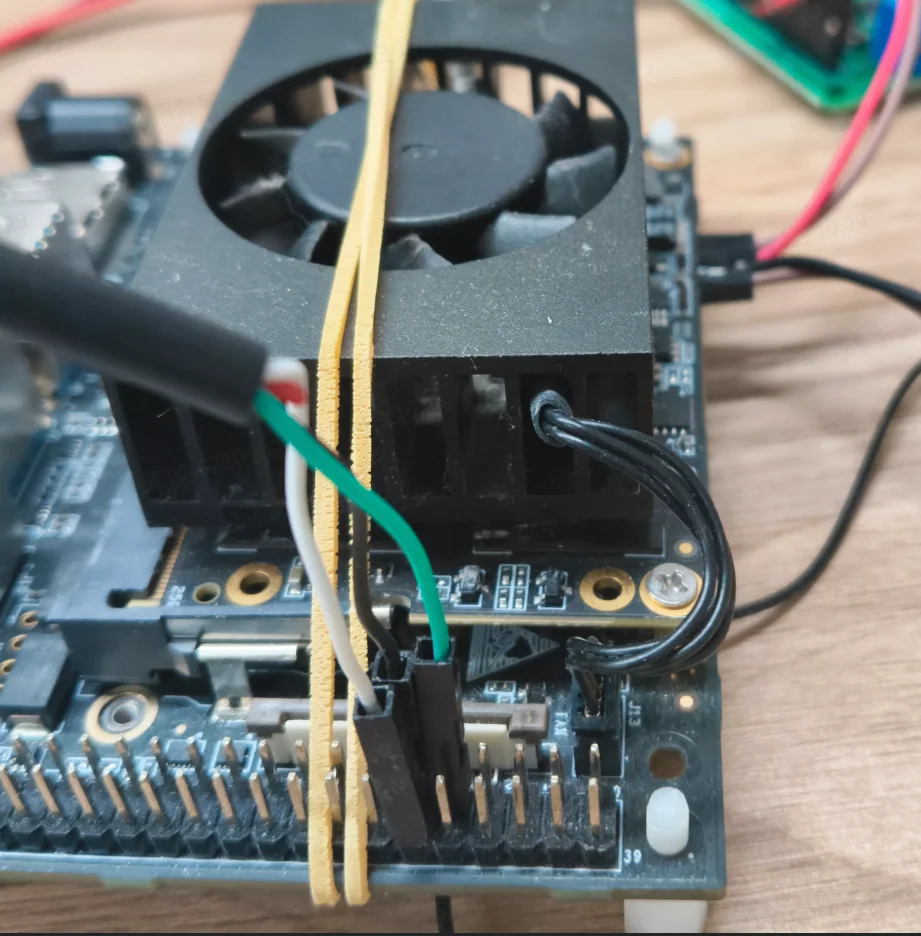
RCPU Debug Serial Connection
Build Methods
The ESOS firmware can be built using one of two approaches:
- Build directly on the K3 board: All steps — downloading the source code, installing dependencies, building, and installing the deb package — are performed on the K3 board. This approach requires no cross-compilation toolchain and is well-suited for quick validation and small-scale changes, though build times are slower.
- Cross-compile on a PC: Download the source code on an X86 Ubuntu 22.04 host and build using a cross-compilation toolchain. Then copy the generated
esos.itb,rt24_os0_rcpu.elf, andrt24_os1_rcpu.elfto the K3 board to replace the small-core firmware. This approach offers faster build times and is better suited for day-to-day development and frequent debugging.
If you only need to do a quick check of source code changes, building directly on the K3 board is sufficient. For application development, frequent code changes, or integrating a custom project, cross-compilation is recommended.
Building Directly on the K3 Board
All steps in this section are performed on the K3 development board.
Downloading the ESOS Source Code
cd ~
git clone https://github.com/spacemit-com/esos.git
cd ~/esos
git checkout k3-br-v1.0.0
cd ~/esos/components
git clone https://github.com/spacemit-com/esos-lite.git
cd ~/esos/components/esos-lite
git checkout k3-br-v1.0.0
Repository Structure
The ESOS repository is based on the RT-Thread source tree. The top-level layout is as follows:
| Directory / File | Description |
|---|---|
| bsp | Board support package directory. Contains porting code, boot configuration, peripheral driver adaptations, and project configurations for various chips and boards. |
| components | RT-Thread components directory. Contains upper-layer modules such as file systems, driver frameworks, FinSH, network stacks, C/C++ support, and lightweight components. |
| include | RT-Thread kernel and public interface header files. Provides API declarations for kernel objects, the device framework, and system services. |
| libcpu | CPU architecture porting code. Contains low-level implementations for context switching, interrupts, and startup across ARM, RISC-V, MIPS, and x86 architectures. |
| src | RT-Thread kernel source code. Contains core implementations for thread scheduling, IPC, timers, memory management, and object management. |
| tools | Build and utility scripts, primarily for SCons builds, project generation, configuration processing, and development helpers. |
| documentation | Project documentation, including coding standards, roadmap, Doxygen configuration, and related reference documents. |
| examples | Example code demonstrating usage of RT-Thread kernel features, components, and platform capabilities. |
| debian | Debian packaging directory, including package control files, install scripts, changelog, and packaging rules. |
| .github | GitHub platform configuration, typically including CI workflows, issue templates, and pull request templates. |
| .gitee | Gitee platform configuration directory. |
| README.md | English project readme covering RT-Thread architecture, features, directory structure, and resources. |
| README_zh.md | Chinese project readme covering RT-Thread architecture, features, directory structure, and development resources. |
| Kconfig | Top-level Kconfig entry point for enabling and disabling kernel features and trimming the system image. |
| build.sh | Project build script. |
| build_top.sh | Top-level build helper script. |
| Jenkinsfile | Jenkins CI pipeline configuration file. |
| ChangeLog.md | Project changelog. |
| LICENSE | Project license file. |
| AUTHORS | Project authors and contributors. |
| esos_rt24.its | ITS configuration file for image packaging. |
| esos_rt24_sign.its | ITS configuration file for signed image packaging. |
| null.spacemit | Spacemit platform placeholder or configuration file. |
Building and Installing
sudo apt install lzop
cd ~/esos
sudo apt-get build-dep .
dpkg-buildpackage -uc -us -b
A successful build produces output similar to the following:
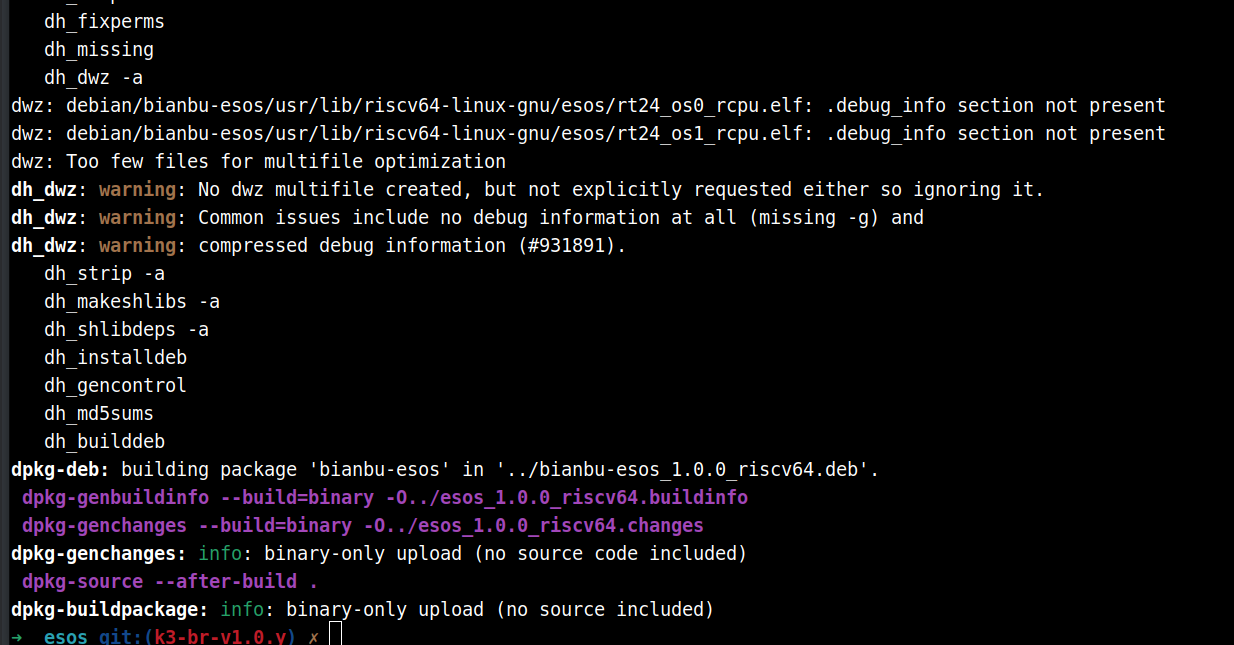
The generated deb package is placed in the parent directory.
Install the deb package:
cd ~/esos
dpkg -i ../bianbu-esos_1.0.0_riscv64.deb
After installation, reboot the development board.
After rebooting, the RCPU debug serial port will show new output:
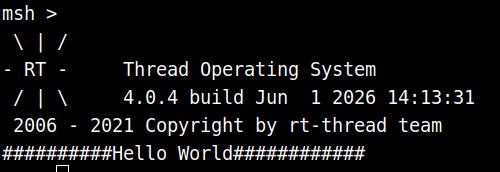
The main program producing this output is located at ~/esos/bsp/spacemit/applications/main.c. You can modify the printed string to verify that the firmware was replaced successfully.
Cross-Compilation
An x86 Ubuntu 22.04 host is recommended for cross-compiling the ESOS source code.
Downloading the Source Code (on the PC)
cd ~
git clone https://github.com/spacemit-com/esos.git
cd ~/esos
git checkout k3-br-v1.0.0
cd ~/esos/components
git clone https://github.com/spacemit-com/esos-lite.git
cd ~/esos/components/esos-lite
git checkout k3-br-v1.0.0
Building (on the PC)
cd ~/esos
Configure the toolchain
./build.sh config
Enter 1, then 0. The toolchain will be downloaded automatically — ensure your network is available and wait for it to finish.
Configure the build target
./build_top.sh config
Select 1.
Run the build
./build_top.sh
Build artifacts are placed in the ../output/esos directory. The files you need are rt24_os0_rcpu.elf, rt24_os1_rcpu.elf, and esos.itb.
Copy these three files to a directory on the K3 board, for example:
cd ~/esos/../output/esos
scp esos.itb rt24_os0_rcpu.elf rt24_os1_rcpu.elf root@10.0.91.102:~/firmware/
Replacing the Small-Core Firmware (on the K3 Board)
wget https://archive.spacemit.com/ros2/prebuilt/esos_sh/update_esos_from_dir.sh
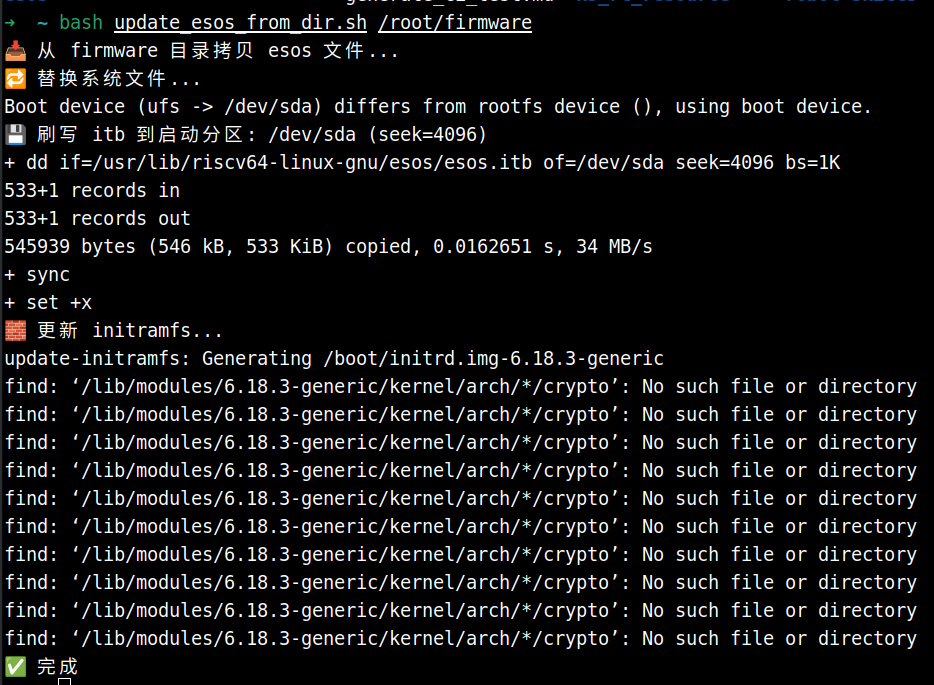
bash update_esos_from_dir.sh /root/firmware
When the process completes successfully, as shown below, reboot the development board.
After rebooting, the RCPU debug serial port will print new output:
This output comes from ~/esos/bsp/spacemit/applications/main.c. Changing the printed string is a simple way to confirm the firmware was replaced correctly.
Application Development Overview
- The K3 board has two RCPUs. RCPU0 is responsible for power and performance management in coordination with the main core — do not modify it. Custom real-time tasks should be implemented on RCPU1.
- It is recommended to place your project code under
~/esos/bsp/spacemit/applications. Build configuration is managed by editing the~/esos/bsp/spacemit/applications/SConscriptscript.
The example below uses a cross-core RPMsg communication sample to walk through configuring and building a custom project. Cross-compilation is used, but the same steps apply when building directly on the board.
Downloading the Example Code
Run on the PC:
cd ~/esos/bsp/spacemit/applications
git clone https://github.com/spacemit-dev/k3-rt-rpmsg-examples.git
Replacing the SConscript
cd ~/esos/bsp/spacemit/applications
cp ./k3-rt-rpmsg-examples/SConscript ./SConscript
SConscript walkthrough
Import('RTT_ROOT')
Import('rtconfig')
from building import *

cwd = GetCurrentDir()

# Select the application source files to compile based on the current board configuration.
# os0_rcpu uses the default main.c.
if rtconfig.BOARD == 'os0_rcpu':
 src = [
  'main.c',
 ]
 # Add the applications directory to the include path so example sources can find shared headers.
 CPPPATH = [
  cwd,
 ]
elif rtconfig.BOARD == 'os1_rcpu':
 # os1_rcpu compiles multiple rpmsg examples: sensor stream, motor control, and log upload.
 src = [
  'k3-rt-rpmsg-examples/01_sensor_stream/sensor_stream_rcpu.c',
  'k3-rt-rpmsg-examples/02_motor_control/motor_control_rcpu.c',
  'k3-rt-rpmsg-examples/03_log_upload/log_upload_rcpu.c',
  'k3-rt-rpmsg-examples/main.c',
 ]
 CPPPATH = [
  cwd,
 ]
else:
 # Default: collect all C source files in the current directory.
 src = Glob('*.c')
 CPPPATH = [
  cwd,
 ]

# -ffunction-sections places each function in its own section,
# allowing the linker to strip unused code.
CCFLAGS = ' -c -ffunction-sections'

# Define the Applications build group for collection and linking by the SCons build system.
group = DefineGroup('Applications', src, depend = [''], CPPPATH = CPPPATH, CCFLAGS = CCFLAGS)

Return('group')
RCPU0 uses the default main.c — it only needs to compile cleanly, with no additional functionality. RCPU1 is directed to build the custom program. When the build command runs, it compiles separate binaries for RCPU0 and RCPU1, along with device tree blobs (DTBs) for the respective boards, and then packages everything into esos.itb.
Running the Cross-Compilation
cd ~/esos
./build_top.sh
Normal build output looks like this:
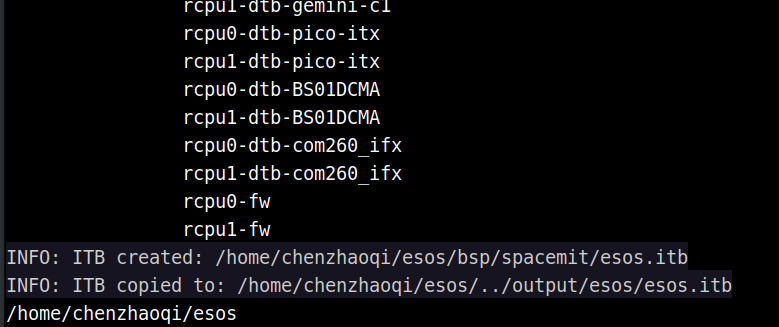
Once the build finishes, follow Replacing the Small-Core Firmware (on the K3 Board) to flash the new firmware.
After rebooting, the small-core serial port will print:
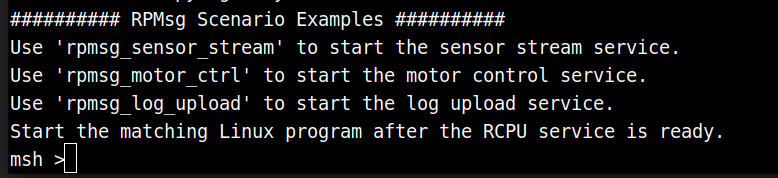
Building the Main-Core Communication Program
Run this step on the K3 board:
git clone https://github.com/spacemit-dev/k3-rt-rpmsg-examples.git
cd ~/k3-rt-rpmsg-examples/01_sensor_stream
gcc -Wall -Wextra -O2 -o k3_sensor_stream k3_sensor_stream.c
Running the Examples
The steps below use rpmsg_sensor_stream as an example. For other examples, see the README in the k3-rt-rpmsg-examples repository.
Step 1 — On the small-core terminal, start the service by running rpmsg_sensor_stream:

Step 2 — On the main core, run:
cd ~/k3-rt-rpmsg-examples/01_sensor_stream
sudo ./k3_sensor_stream -n 100 -p 20
-n <count>: number of samples or log entries to receive (sensor and log examples)
-p <ms>: small-core reporting interval in milliseconds (sensor and log examples)
Terminal output:
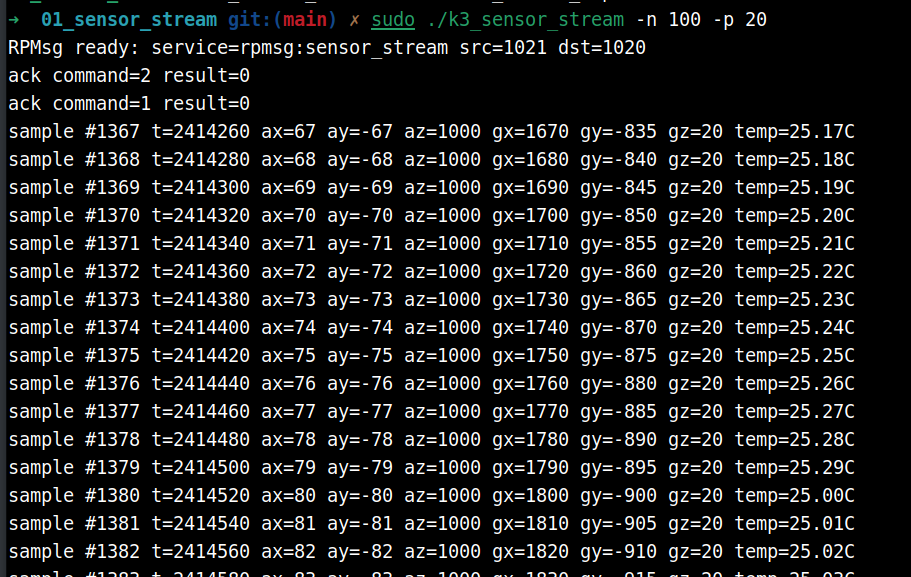
Example 1: Performance Test Suite — Build and Usage
This example uses the cross-compilation approach.
Downloading the Example Code
Run on the PC:
cd ~/esos/bsp/spacemit/applications
git clone https://github.com/spacemit-dev/rt-perf-test.git
Replacing the SConscript
cd ~/esos/bsp/spacemit/applications
cp ./rt-perf-test/SConscript ./SConscript
Modifying the Configuration File
Open ~/esos/bsp/spacemit/platform/rt24/os1_rcpu/rt24_os1_rcpu_defconfig and change:
CONFIG_RT_TICK_PER_SECOND=100 → change to 1000
Building and Flashing
Follow the build and firmware replacement steps in the Cross-Compilation section.
After a successful flash, the small-core serial port will print:
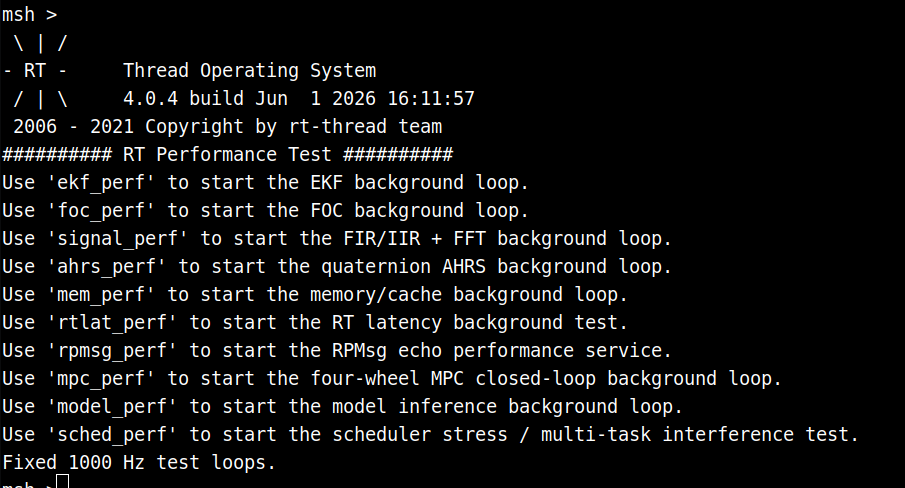
Running the Tests
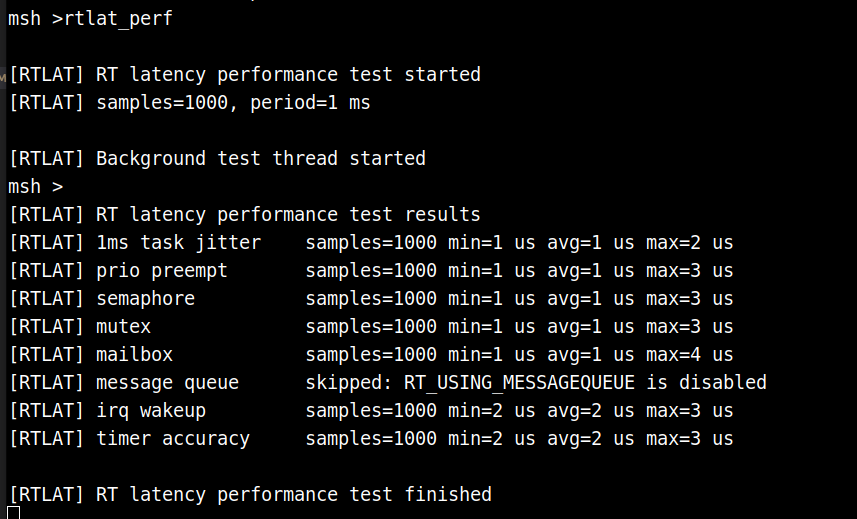
For example, running rtlat_perf produces: