GPIO
GPIO Functionality and Usage Guide.
Overview
GPIO is the controller for the GPIO module
Functional Description
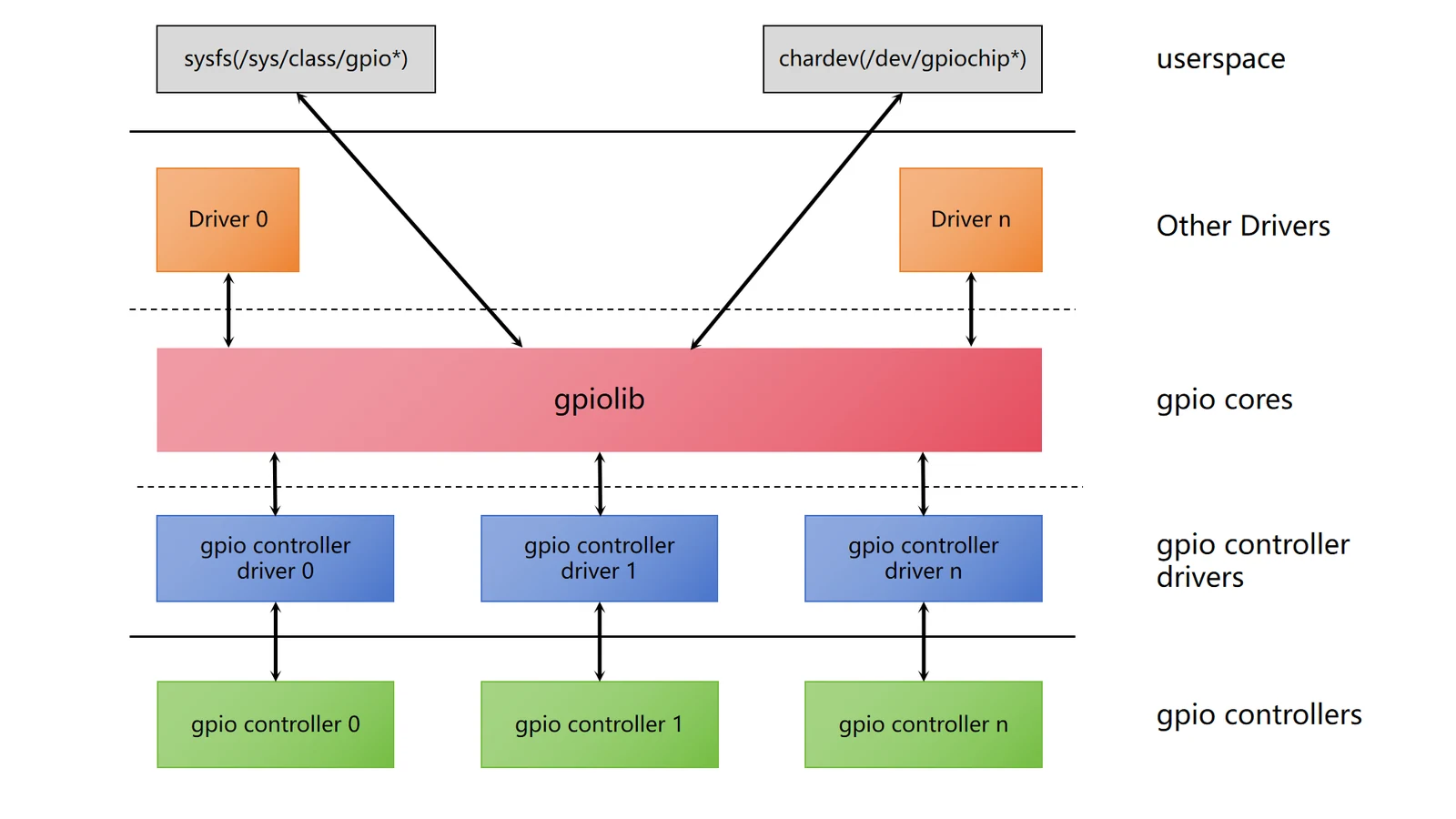
The Linux GPIO subsystem driver framework mainly consists of three parts:
- GPIO Controller Driver: Interacts with the GPIO controller, performing initialization and operations on the controller.
- GPIO lib Driver: Provides standard APIs for use by other modules, such as setting GPIO direction and reading/writing GPIO level states.
- GPIO Character Device Driver: Exposes GPIOs to user space as character devices, allowing user space to access GPIOs through standard file interfaces.
Source Code Structure
The controller driver code is located in the drivers/gpio directory:
|-- gpio-k1x.c
Key Features
| Feature | Description |
|---|---|
| Direction Configuration Support | Supports setting GPIO as input or output |
| High/Low Level Output Support | Supports setting the level of GPIO in output mode |
| GPIO Interrupt Support | Supports GPIO interrupts triggered by rising and falling edge |
Configuration Introduction
It mainly includes driver CONFIG enablement configuration and DTS configuration.
CONFIG Configuration
- CONFIG_GPIOLIB: Provides support for GPIO controllers, with a
Ydefault value of
Device Drivers
        GPIO Support (GPIOLIB [=y])
- CONFIG_GPIO_K1X: Provides support for the K1 GPIO controller, with a default value of
Y
Device Drivers
        GPIO Support (GPIOLIB [=y])
                Virtual GPIO drivers
                        SPACEMIT-K1X GPIO support (GPIO_K1X [=y])
Usage Guide
Using GPIO involves three steps:
- GPIO Description
- GPIO Pin Configuration
- GPIO Usage
Notes:
- Pin numbers are defined in the kernel directory
include/dt-bindings/pinctrl/k1-x-pinctrl.h. - Pin configuration is the same when a group of pins is set to the GPIO function, meaning that the mux mode, pull-up/pull-down, edge detection, and drive strength configurations are the same.
GPIO Description
Define all GPIOs used in the system.
The gpio-ranges property of the Linux GPIO framework is used for definition. If the pin numbers corresponding to a segment of GPIOs are also consecutive, they are defined as a group.
The GPIO controller definition in the solution DTS file for the example above
&gpio{
        gpio-ranges = <
                &pinctrl 49  GPIO_49  2
                &pinctrl 58  GPIO_58  1
                &pinctrl 63  GPIO_63  5
                &pinctrl 70  PRI_TDI  4
                &pinctrl 74  GPIO_74  1
                &pinctrl 80  GPIO_80  4
                &pinctrl 90  GPIO_90  3
                &pinctrl 96  DVL0     2
                &pinctrl 110 GPIO_110 1
                &pinctrl 114 GPIO_114 3
                &pinctrl 123 GPIO_123 5
        >;
};
GPIO Pin Configuration
Set the pins corresponding to the GPIOs used in the solution to the GPIO function and configure them (edge detection/pull-up/pull-down/drive strength).
Use the pinctrl-single,gpio-range property for setting. If there is a continuous range of pin numbers with the same configuration, they are configured as a group.
Refer to Section Pin Configuration Parameters for pin configuration parameters.
For example:
&pinctrl {
        pinctrl-single,gpio-range = <
                &range GPIO_49  2 (MUX_MODE0 | EDGE_NONE | PULL_UP   | PAD_3V_DS4)
                &range GPIO_58  1 (MUX_MODE0 | EDGE_NONE | PULL_DOWN | PAD_1V8_DS2)
                &range GPIO_63  2 (MUX_MODE0 | EDGE_NONE | PULL_DOWN | PAD_1V8_DS2)
                &range GPIO_65  1 (MUX_MODE0 | EDGE_NONE | PULL_UP   | PAD_1V8_DS2)
                &range GPIO_66  2 (MUX_MODE0 | EDGE_NONE | PULL_UP   | PAD_3V_DS4)
                &range PRI_TDI  2 (MUX_MODE1 | EDGE_NONE | PULL_UP   | PAD_1V8_DS2)
                &range PRI_TCK  1 (MUX_MODE1 | EDGE_NONE | PULL_DOWN | PAD_1V8_DS2)
                &range PRI_TDO  1 (MUX_MODE1 | EDGE_NONE | PULL_UP   | PAD_1V8_DS2)
                &range GPIO_74  1 (MUX_MODE0 | EDGE_NONE | PULL_UP   | PAD_1V8_DS2)
                &range GPIO_80  1 (MUX_MODE0 | EDGE_NONE | PULL_UP   | PAD_3V_DS4)
                &range GPIO_81  3 (MUX_MODE0 | EDGE_NONE | PULL_UP   | PAD_1V8_DS2)
                &range GPIO_90  1 (MUX_MODE0 | EDGE_NONE | PULL_DOWN | PAD_1V8_DS2)
                &range GPIO_91  2 (MUX_MODE0 | EDGE_NONE | PULL_UP   | PAD_1V8_DS2)
                &range DVL0     2 (MUX_MODE1 | EDGE_NONE | PULL_DOWN | PAD_1V8_DS2)
                &range GPIO_110 1 (MUX_MODE0 | EDGE_NONE | PULL_DOWN | PAD_1V8_DS2)
                &range GPIO_114 1 (MUX_MODE0 | EDGE_NONE | PULL_DOWN | PAD_1V8_DS2)
                &range GPIO_115 1 (MUX_MODE0 | EDGE_NONE | PULL_DOWN | PAD_1V8_DS2)
                &range GPIO_116 1 (MUX_MODE0 | EDGE_NONE | PULL_UP   | PAD_1V8_DS2)
                &range GPIO_123 1 (MUX_MODE0 | EDGE_NONE | PULL_DOWN | PAD_1V8_DS2)
                &range GPIO_124 1 (MUX_MODE0 | EDGE_NONE | PULL_UP   | PAD_1V8_DS2)
                &range GPIO_125 3 (MUX_MODE0 | EDGE_NONE | PULL_DOWN | PAD_1V8_DS2)
        >;
};
GPIO Usage
For example, in the solution, eth0 uses gpio 110 as the PHY Reset signal:
ð0 {
emac,reset-gpio = <&gpio 110 0>;
};
Interface Introduction
API
- Request a specified GPIO
int gpio_request(unsigned gpio, const char *label);
- Release a specified GPIO that has been requested
void gpio_free(unsigned gpio);
- Set a specified GPIO to input mode
int gpio_direction_input(unsigned gpio)
- Set a specified GPIO to output mode and assign an initial value
int gpio_direction_output(unsigned gpio, int value)
- Set the output value of a specified GPIO
void gpio_set_value(unsigned gpio, int value)
- Get the signal value of a specified GPIO
int gpio_get_value(unsigned gpio)
- Get the interrupt number corresponding to the specified GPIO.
int gpio_to_irq(unsigned gpio)
Debugging
sysfs
Accessing and Controlling GPIOs via sysfs.
/sys/class/gpio
|-- export
|-- gpiochip0 -> ../../devices/gpiochip0/gpio/gpiochip0
|-- gpiochip512 -> ../../devices/platform/soc/d401d800.i2c/i2c-8/8-0041/spacemit-pinctrl@spm8821/gpio/gpiochip512
`-- unexport
- export: Used to inform the system to export the specified GPIO pin number for control
- unexport: Used to inform the system to unexport (remove) the GPIO pin
- gpiochipX: Detailed information of GPIO chip X
- gpioX/direction: Direction setting of GPIO X
- gpioX/value: Port value of GPIO X
debugfs
Inspect the system’s GPIO controllers and the GPIO information they manage.
/sys/kernel/debug/gpio
# cat gpio
gpiochip0: GPIOs 0-127, k1x-gpio:
 gpio-63  (                    |reset               ) out lo
 gpio-67  (                    |pwr                 ) out hi
 gpio-80  (                    |cd                  ) in  hi ACTIVE LOW
 gpio-96  (                    |sys-led             ) out lo
 gpio-97  (                    |vbus                ) out hi
 gpio-110 (                    |mdio-reset          ) out hi
 gpio-111 (                    |reset               ) out lo
 gpio-113 (                    |pwdn                ) out lo
 gpio-115 (                    |mdio-reset          ) out hi
 gpio-116 (                    |regon               ) out hi
 gpio-123 (                    |hub                 ) out hi
 gpio-124 (                    |hub                 ) out hi
 gpio-127 (                    |?                   ) out lo

gpiochip1: GPIOs 512-517, parent: platform/spacemit-pinctrl@spm8821, spacemit-pinctrl@spm8821, can sleep:
Testing
You can use devmem to check register values and determine whether the GPIO configuration has taken effect.
devmem reg_addr