V2D
The SpacemiT's V2D Module Functionality and Usage Guide.
Overview
The V2D driver on the SpacemiT platform provides hardware acceleration for 2D graphics.
Functional Description
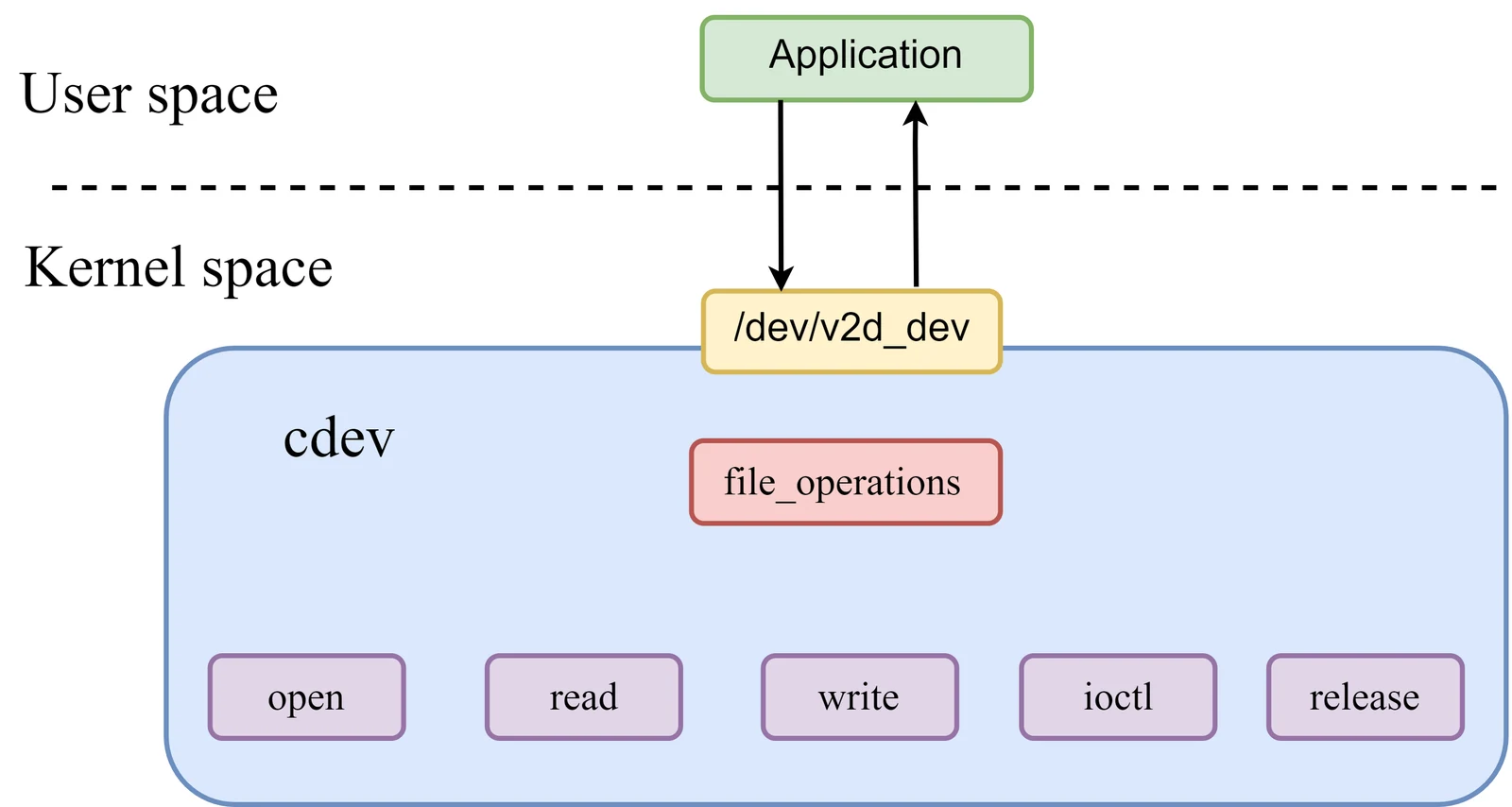
Driver Model
The V2D driver uses a character device driver model and communicates with user space via the /dev/v2d_dev device file.
open: The function called when the device is opened.
read: The function to read data from the device.
write(): The function to write data to the device.
ioctl(): The function to handle control commands.
release(): The function called when the device is closed.
Basic Functions The V2D driver supports 2D graphics filling, scaling, rotation, cropping, format conversion, and other functions.
Source Code Structure
The source code structure of the SpacemiT platform's V2D driver is located under the kernel directory:
drivers/soc/spacemit$ tree v2d
v2d
|-- csc_matrix.h
|-- Kconfig
|-- Makefile
|-- v2d_drv.c                   // v2d driver
|-- v2d_drv.h
|-- v2d_hw.c
|-- v2d_iommu.c                 // v2d iommu driver
|-- v2d_priv.h
|-- v2d_reg.h
Key Features
| Feature | Description |
|---|---|
| Color Fill | Supports image color fill functionality |
| Rotation | Supports 0°, 90°, 180°, and 270° image rotation, as well as mirroring functionality |
| Cropping | Supports image cropping functionality |
| Scaling | Supports 1/8 to 8x image scaling functionality |
| Format Conversion | Supports YUV and RGB color space conversion functionality |
Performance Parameters
| Function | Performance Specification |
|---|---|
| Color Fill | 1920x1080@200 FPS |
| Format Conversion | 1920x1080@200 FPS |
Configuration
It mainly includes the V2D driver enable configuration and the DTS configuration.
CONFIG Configuration
CONFIG_SPACEMIT_V2D: This is the configuration option for the V2D driver on the Spacemit platform. By default, this option is set to Y.
 Device Drivers  --->
 SOC (System On Chip) specific Drivers  --->
  <*> Spacemit V2D Engine Driver
DTS Configuration
Clock Configuration
The DTS configuration for V2D includes settings for the v2d-io and v2d-core clocks, as well as the reset configuration. The v2d-io clock can be configured to four different frequencies: 204,800,000 Hz, 307,200,000 Hz, 409,600,000 Hz, and 409,600,000 Hz. By default, the frequency is set to 409,600,000 Hz. This can be dynamically configured by writing to the node /sys/bus/platform/devices/c0100000.v2d/clkrate.
The DTS configuration is used to set up the related clocks and resets for the platform's V2D.
// linux-6.6\arch\riscv\boot\dts\spacemit\k1-x.dtsi
v2d@c0100000 {
        compatible = "spacemit,v2d";
        reg =  <0x0 0xc0100000 0x0 0x1000>;
        reg-names = "v2dreg";
        clocks = <&ccu CLK_DPU_MCLK>,                   // v2d clock configuration
                        <&ccu CLK_V2D>;
        clock-names = "v2d-io", "v2d-core";
        resets = <&reset RESET_V2D>;                    // v2d reset configuration
        reset-names= "v2d_reset";
        interrupt-parent = <&intc>;
        interrupts = <86>;
        interconnects = <&dram_range3>;
        interconnect-names = "dma-mem";
        status = "ok";
};
Interface
API
The application end realizes the V2D functions through API calls. The main functions implemented are Fill, Bitblit, and Blend for 2D graphics.
V2D_BeginJob
int32_t V2D_BeginJob(V2D_HANDLE *phHandle);
| Function Description | Create a V2D work queue |
|---|---|
| Parameter Definition | phHandle: Pointer to the handle |
| Return Value | 0: Success; -1: Failure |
V2D_EndJob
int32_t V2D_EndJob(V2D_HANDLE hHandle);
| Function Description | Submit the work queue to the V2D driver and start the job. |
|---|---|
| Parameter Definition | hHandle: Handle |
| Return Value | 0: Success; -1: Failure |
V2D_AddFillTask
int32_t V2D_AddFillTask(V2D_HANDLE hHandle,
                        V2D_SURFACE_S *pstDst,
                        V2D_AREA_S *pstDstRect,
                        V2D_FILLCOLOR_S *pstFillColor);
| Function Description | Submit a task to the V2D work queue to fill the target bitmap's operation area with a color |
|---|---|
| Parameter Definition | hHandle: Handle; pstDst: Target bitmap; pstDstRect: Target bitmap operation area; pstFillColor: Color fill structure |
| Return Value | 0: Success; -1: Failure |
V2D_AddBitblitTask
int32_t V2D_AddBitblitTask(V2D_HANDLE hHandle,
                                V2D_SURFACE_S *pstDst,
                                V2D_AREA_S *pstDstRect,
                                V2D_SURFACE_S *pstSrc,
                                V2D_AREA_S *pstSrcRect, V2D_CSC_MODE_E enCSCMode);
| Function Description | Submit a task to the V2D work queue to transfer the operation area of the source bitmap to the operation area of the target bitmap |
|---|---|
| Parameter Definition | hHandle: Handle; pstDst: Target bitmap; pstDstRect: Target bitmap operation area; pstSrc: Source bitmap; pstSrcRect: Source bitmap operation area; enCSCMode: Flag indicating whether color space conversion is required |
| Return Value | 0: Success; -1: Failure |
V2D_AddBlendTask
int32_t V2D_AddBlendTask(V2D_HANDLE hHandle,
                             V2D_SURFACE_S *pstBackGround,
                             V2D_AREA_S *pstBackGroundRect,
                             V2D_SURFACE_S *pstForeGround,
                             V2D_AREA_S *pstForeGroundRect,
                             V2D_SURFACE_S *pstMask,
                             V2D_AREA_S *pstMaskRect,
                             V2D_SURFACE_S *pstDst,
                             V2D_AREA_S *pstDstRect,
                             V2D_BLEND_CONF_S *pstBlendConf,
                             V2D_ROTATE_ANGLE_E enForeRotateAngle,
                             V2D_ROTATE_ANGLE_E enBackRotateAngle,
                             V2D_CSC_MODE_E enForeCSCMode,
                             V2D_CSC_MODE_E enBackCSCMode,
                             V2D_PALETTE_S *pstPalette,
                             V2D_DITHER_E dither);
| Function Description | Submit a task to the V2D work queue to perform operations such as cropping, rotating, format conversion, and scaling from the source bitmap to the target bitmap |
|---|---|
| Parameter Definition | hHandle: Handle; pstBackGround: Background bitmap; pstBackGroundRect: Background bitmap operation area; pstForeGround: Foreground bitmap; pstForeGroundRect: Foreground bitmap operation area; pstMask: Mask bitmap; pstMaskRect: Mask bitmap operation area; pstDst: Target bitmap; pstDstRect: Target bitmap operation area; pstBlendConf: Blend configuration structure; enForeRotateAngle: Foreground operation rotation angle; enBackRotateAngle: Background operation rotation angle; enForeCSCMode: Foreground CSC conversion mode; enBackCSCMode: Background CSC conversion mode; pstPalette: Pointer to the palette data structure for L8 format; dither: Select dither mode |
| Return Value | 0: Success;-1: Failure |
Debugging
Viewing the V2D IO Clock Frequency
# cat /sys/bus/platform/devices/c0100000.v2d/clkrate
409600000
Testing
Fill Test Case
# cd /usr/share/v2d
# v2d_test --fill
v2d fill test case successful!
Bitblit Test Case
# cd /usr/share/v2d
# v2d_test --blit
v2d blit test case successful!
Blend Test Case
# cd /usr/share/v2d
# v2d_test --blend
v2d blend test case successful!