Crypto-Engine
Crypto-Engine Functionality and Usage Guide.
Overview
The Crypto-Engine implements hardware encryption algorithms to encrypt plaintext.
Functional Description
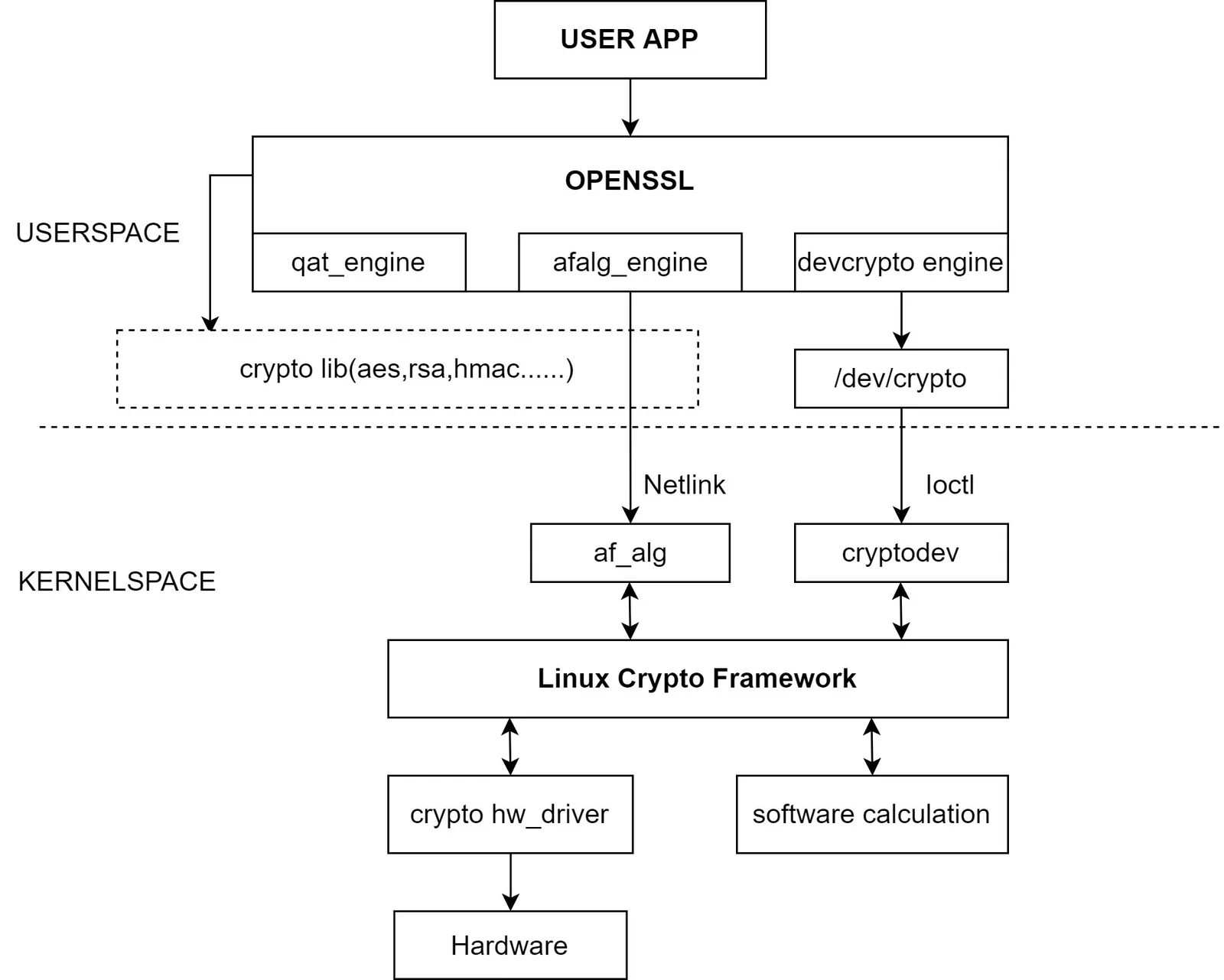 The K1 Crypto-Engine (also known as CE) implements hardware-based (ECB/CBC/XTS-) AES encryption algorithms.
Source Code Structure
The CE driver code is located in the drivers/crypto/spacemit directory:
drivers/crypto/spacemit
|-- spacemit_ce_engine.c            # CE driver code
|-- spacemit-ce-glue.c              # Encryption algorithms implemented based on the CE driver
|-- spacemit_engine.h
The kernel framework layer for crypto is implemented under the kernel's crypto path, which will not be elaborated here.
Key Features
Features
- Supports AES encryption algorithms in ECB/CBC/XTS modes.
Performance Parameters
- Standalone hardware performance reaches 500MB/s.
- Kernel-mediated encryption performance reaches 280MB/s for data sizes of 128KB and above.
Testing Method:
- Use the openssl speed tool. Note that the OpenSSL tool code supports a maximum data size of 16KB, but it can be modified for 128KB through secondary development.
openssl speed -elapsed -async_jobs 1 -engine afalg -evp aes-128-cbc -multi 1
Configuration
Configuration mainly involves driver enablement and DTS settings
CONFIG Configuration
CONFIG_CRYPTO This provides support for the kernel platform crypto framework. It should be set to Y when supporting the K1 CE driver.
CONFIG_CRYPTO=y
CONFIG_SPACEMIT_REE_AES=y
CONFIG_SPACEMIT_REE_ENGINE=y
DTS Configuration
The CE does not utilize any input or output signals. In the DTS, only the clock and reset resources are required to be configured.
DTSI Configuration Example
In the DTSI, configure the CE controller base address along with the clock and reset resources. Under normal circumstances, no modifications are required.
 spacemit_crypto_engine@d8600000 {
  compatible = "spacemit,crypto_engine";
  spacemit-crypto-engine-0 = <0xd8600000 0x00100000>;
  interrupt-parent = <&intc>;
  interrupts = <113>;
  num-engines = <1>;
  clocks = <&ccu CLK_AES>;
  resets = <&reset RESET_AES>;
  interconnects = <&dram_range5>;
  interconnect-names = "dma-mem";
  status = "okay";
 };
Interface
API
The AES driver primarily implements two APIs for encryption and decryption, which are registered into the crypto framework. The commonly used ones are:
Example for CBC mode
static int cbc_encrypt(struct skcipher_request *req)
This interface implements the hardware CBC mode encryption functionality of the CE.
static int cbc_decrypt(struct skcipher_request *req)
This interface implements the hardware CBC mode decryption functionality of the CE.
Testing
First, verify successful registration of the AES algorithms
cat /proc/crypto
The output should include entries similar to the following:
name         : xts(aes)
driver       : __driver-xts-aes-spacemit-ce1
module       : kernel
priority     : 500
refcnt       : 1
selftest     : passed
internal     : no
type         : skcipher
async        : yes
blocksize    : 16
min keysize  : 32
max keysize  : 64
ivsize       : 16
chunksize    : 16
walksize     : 16

name         : cbc(aes)
driver       : __driver-cbc-aes-spacemit-ce1
module       : kernel
priority     : 500
refcnt       : 1
selftest     : passed
internal     : no
type         : skcipher
async        : yes
blocksize    : 16
min keysize  : 16
max keysize  : 32
ivsize       : 16
chunksize    : 16
walksize     : 16

name         : ecb(aes)
driver       : __driver-ecb-aes-spacemit-ce1
module       : kernel
priority     : 500
refcnt       : 2
selftest     : passed
internal     : no
type         : skcipher
async        : yes
blocksize    : 16
min keysize  : 16
max keysize  : 32
ivsize       : 16
chunksize    : 16
walksize     : 16
Encryption algorithm functionality can be tested using the OpenSSL tool. The usage is as follows:
echo "hello,world" | openssl enc -aes128 -e -a -salt -engine afalg  // Encrypt a string
echo "The key automatically generated during encryption" | openssl enc -engine afalg -aes128 -a -d -salt   // Decrypt a string
openssl enc -aes128 -e -engine afalg -in data.txt -out encrypt.txt -pass pass:12345678   // Encrypt using a key
openssl enc -aes-cbc -d -engine afalg -in encrypt.txt -out data.txt -pass pass:12345678   // Decrypt using a key
Compare the decrypted string/file with the original; if they match, the encryption function is considered normal