DDR
| Version | Date | Notes |
|---|---|---|
| v1.0 | 2026-01-10 | Initial release |
1. Overview
This document is based on the SpacemiT K1 platform and describes how to adapt the K1 SDK to specific DDR devices by modifying DDR driver parameters.
Configuration Mechanism
The K1 SDK supports three DDR types:
- LPDDR3
- LPDDR4
- LPDDR4x
According to the specific DDR device to configure the following key parameters:
- DDR type
- Number of chip selects (single / dual CS)
- Maximum data rate
- Drive strength and related electrical parameters
As shown below, the DDR driver loads configuration parameters in the following priority order:
- Read parameters stored in EEPROM
- If no valid EEPROM data is found, read from DTS
- If neither is configured, fall back to default parameters in the code
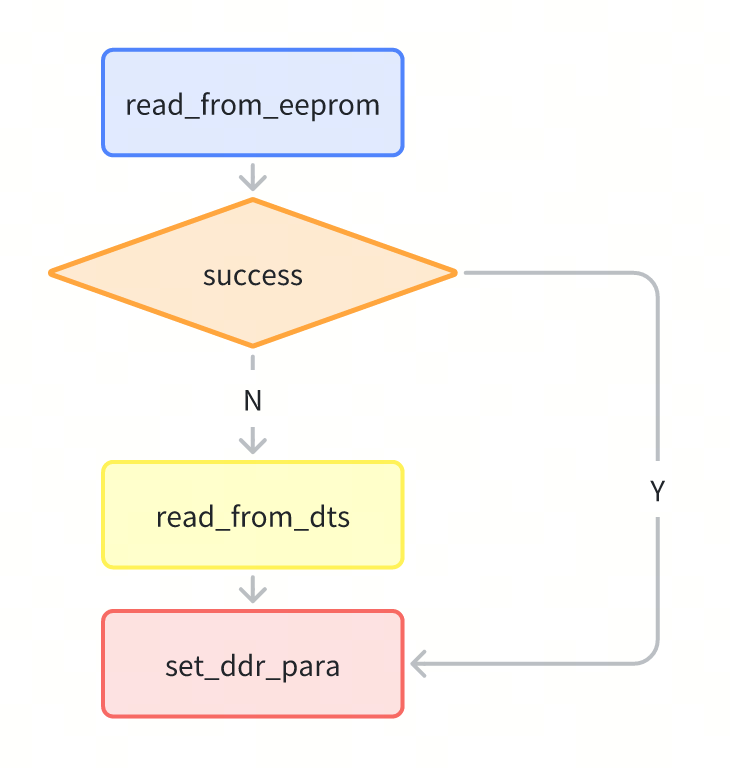
After modifying any parameters, the firmware image must be rebuilt and reflashed to the device for the changes to take effect.
2. Basic Configuration
2.1 DDR Type Configuration
Scenario 1: Single Image Supporting Multiple DDR Types (EEPROM Required)
The DDR type can be written to the on-board EEPROM using either of the following methods.
-
Programming via Flashing Tool
Procedure:
- Power on the device while holding the flashing button to enter flashing mode
- Connect the device to the PC via USB
- Use the TitanFlasher to write the DDR type, as shown below

-
Programming via U-Boot Command Line
Prerequisite: The default DDR configuration must allow successful initialization so the system can boot into U-Boot.
=> tlv_eeprom read # Read current EEPROM configuration=> tlv_eeprom set 0x42 LPDDR4x # Set DDR type (LPDDR4x / LPDDR4 / LPDDR3)=> tlv_eeprom write # Write configuration back to EEPROM
Scenario 2: Fixed DDR Type (No EEPROM on Board)
Modify the type field of the DDR node (ddr@c0000000) in the U-Boot DTS file uboot/arch/riscv/dts/k1-x_spl.dts
type = "LPDDR4X"; /* Options: LPDDR4X / LPDDR4 / LPDDR3 */
2.2 Chip Select (CS) Configuration
The K1 platform supports single-CS and dual-CS DDR configurations.
Scenario 1: No Image Reflash Required (EEPROM Required)
-
Programming via Flashing Tool
Use the TitanFlasher programming function to write the CS number into EEPROM.

-
Programming via U-Boot Command Line
Prerequisite: The system must boot successfully with the default DDR configuration.
=> tlv_eeprom read=> tlv_eeprom set 0x41 1 # 1 = single CS, 2 = dual CS=> tlv_eeprom write
Scenario 2: Fixed CS Configuration (No EEPROM on Board)
Modify the cs-num field in the DDR node (ddr@c0000000) of the U-Boot DTS file uboot/arch/riscv/dts/k1-x_spl.dts
cs-num = <2>;    /* Dual CS DDR */
# or
cs-num = <1>;    /* Single CS DDR */
Note: For LPDDR3, the driver supports automatic CS detection. The value configured in DTS or EEPROM will be overridden by the detected result during initialization.
2.3 Data Rate Configuration
Supported data rates vary by DDR type:
-
LPDDR4 / LPDDR4x: 1200 / 1600 / 2400 MT/s
- LPDDR4x supports up to 2666 MT/s (stability verification required)
-
LPDDR3: 1066 / 1333 / 1600 MT/s
Scenario 1: No Image Reflash Required (EEPROM Required)
-
Programming via Flashing Tool
Use the TitanFlasher programming tool to write the DDR data rate to EEPROM.

-
Programming via U-Boot Command Line
Prerequisite: The system must boot successfully using the default DDR configuration.
=> tlv_eeprom read=> tlv_eeprom set 0x43 2400 # Data rate in MT/s=> tlv_eeprom write
Scenario 2: Fixed Data Rate (No EEPROM on Board)
Modify the datarate field in the DDR node of the DTS file:
datarate = <2400>; /* Must be within the supported range of the DDR device */
3. Advanced Configuration
Warning: The parameters described in this section directly affect signal integrity. Incorrect settings may cause system instability or boot failure. It is strongly recommended to make changes under the guidance of a hardware engineer and to perform thorough memory stress testing afterward.
All DDR electrical parameters are centralized in the ddr_io_para_table structure.
Specific DDR devices can be supported by modifying the driver source code.
/* DDR electrical parameter structure (PHY / controller related settings) */
struct io_para_info {
    u32 manufacturer;  /* DDR vendor ID (currently unused) */
    u32 devicetype;    /* DDR type (e.g., LPDDR4X) */
    u32 ca_vref;       /* Command/address reference voltage */
    u32 tx_pdrv;       /* TX pull-up drive strength */
    u32 tx_ndrv;       /* TX pull-down drive strength */
    u32 tx_odt;        /* TX on-die termination */
    u32 tx_vref;       /* TX reference voltage */
    u32 rx_drv;        /* RX drive strength */
    u32 rx_pu_cal;     /* RX pull-up calibration value */
    u32 rx_odt;        /* RX ODT (controller PHY side) */
    u32 rx_soc_odt;    /* RX ODT (DDR device side) */
    u32 rx_vref;       /* RX reference voltage */
};

const struct io_para_info ddr_io_para_table[] = {
    {DDR_MID_SK_HYNIX, LPDDR4X, 0x9D, R_40, R_40, R_80, 0x19, R_60, VOH_0P6, R_80, R_80, 0x55},
    {DDR_MID_SK_HYNIX, LPDDR4,  0xB2, R_40, R_40, R_120, 0xA7, R_60, VOH_0P6, R_80, R_80, 0x33},
};
3.1 TX ODT Configuration
Electrical characteristics vary between DDR vendors.
TX ODT (tx_odt) can be adjusted to better match different DDR devices.
- Supported values: 40Ω, 48Ω, 60Ω, 80Ω, 120Ω, 240Ω
- Recommendation: Use the default value 80Ω unless there is a clear reason to change it.
Scenario 1: No Image Reflash Required (EEPROM Required)
-
Programming via Flashing Tool
Write the TX ODT value to EEPROM using TitanFlasher.

-
Programming via U-Boot Command Line Prerequisite: The system must boot successfully using the default DDR configuration.
=> tlv_eeprom read# Set TX ODT to 80Ω=> tlv_eeprom set 0x44 80# Write back EEPROM=> tlv_eeprom write
Scenario 2: Fixed TX ODT (No EEPROM on Board)
-
Modify the DDR node
ddr@c0000000in the DTS fileuboot/arch/riscv/dts/k1-x_spl.dtsand rebuild the image:tx-odt = ; -
Alternatively, modify the DDR driver source code. Example: change LPDDR4x TX ODT from 80Ω to 60Ω:
diff --git a/drivers/ddr/spacemit/k1x/lpddr4_silicon_init.c b/drivers/ddr/spacemit/k1x/lpddr4_silicon_init.cindex 751623a0e1..421b61fab5 100644--- a/drivers/ddr/spacemit/k1x/lpddr4_silicon_init.c+++ b/drivers/ddr/spacemit/k1x/lpddr4_silicon_init.c@@ -74,7 +74,7 @@ struct io_para_info {};const struct io_para_info ddr_io_para_table[] = {- {DDR_MID_SK_HYNIX, LPDDR4X, 0x9D, R_40, R_40, R_80, 0x19, R_60, VOH_0P6, R_60, R_60, 0x55},+ {DDR_MID_SK_HYNIX, LPDDR4X, 0x9D, R_40, R_40, R_60, 0x19, R_60, VOH_0P6, R_60, R_60, 0x55},{DDR_MID_SK_HYNIX, LPDDR4, 0xB2, R_40, R_40, R_120, 0xA7, R_60, VOH_0P6, R_80, R_80, 0x33},// {DDR_MID_SK_HYNIX, LPDDR4, 0xB2, R_40, R_40, R_60, 0xA7, R_48, VOH_0P6, R_48, R_48, 0x00},};
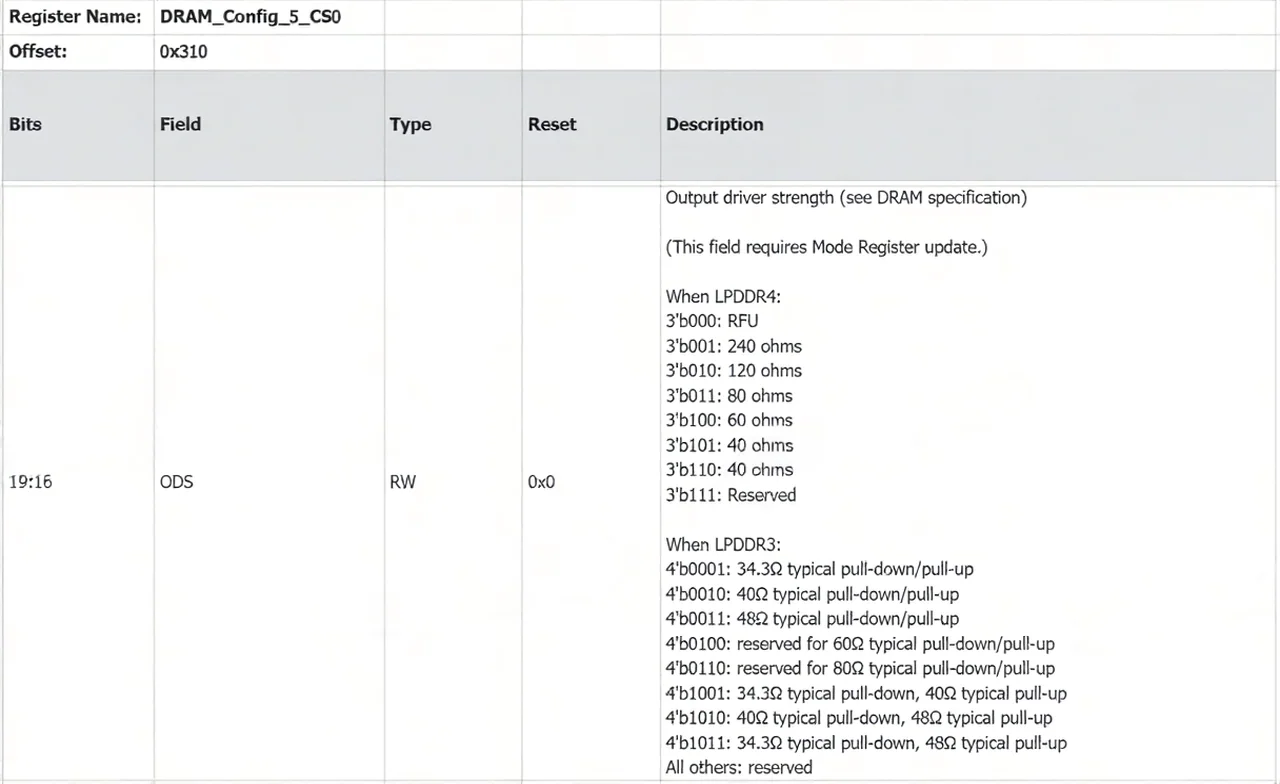
The corresponding registers are configured per CS:
DRAM_Config_5_CS0(offset0x310)DRAM_Config_5_CS1(offset0x314)
Each frequency point must be configured.
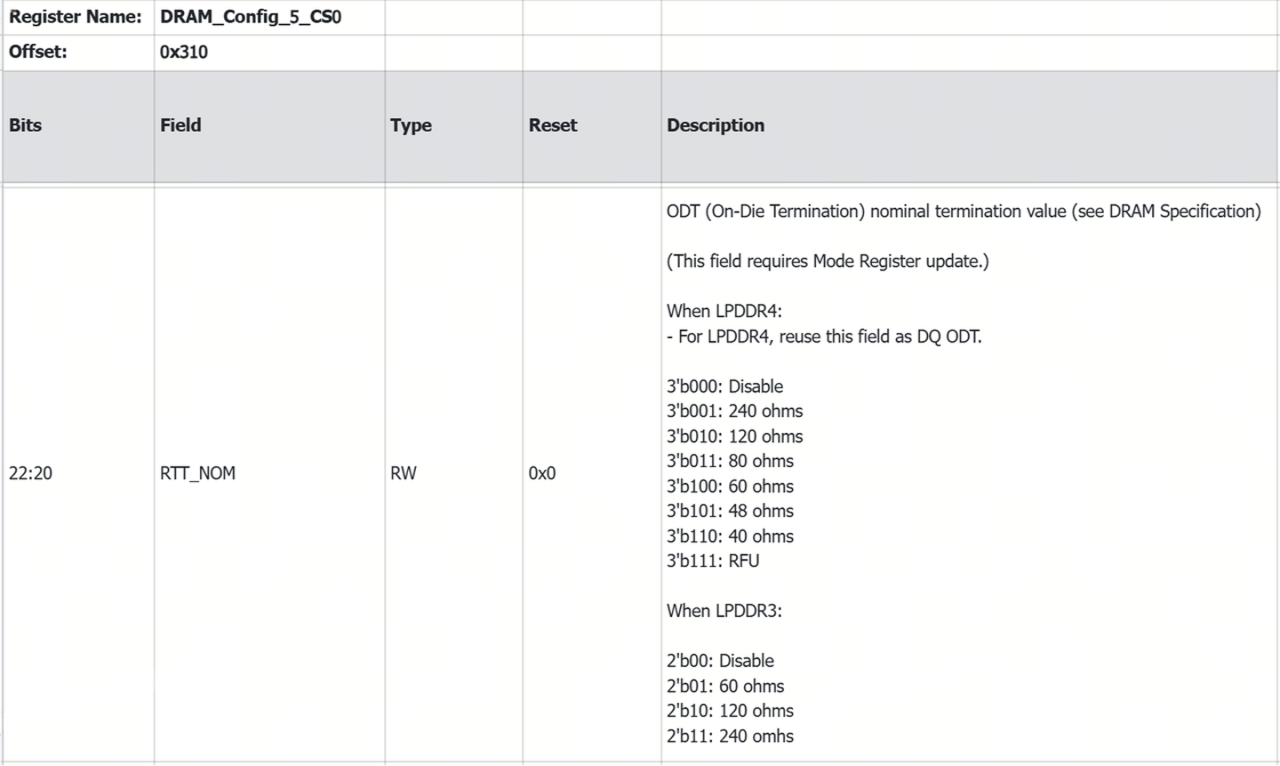
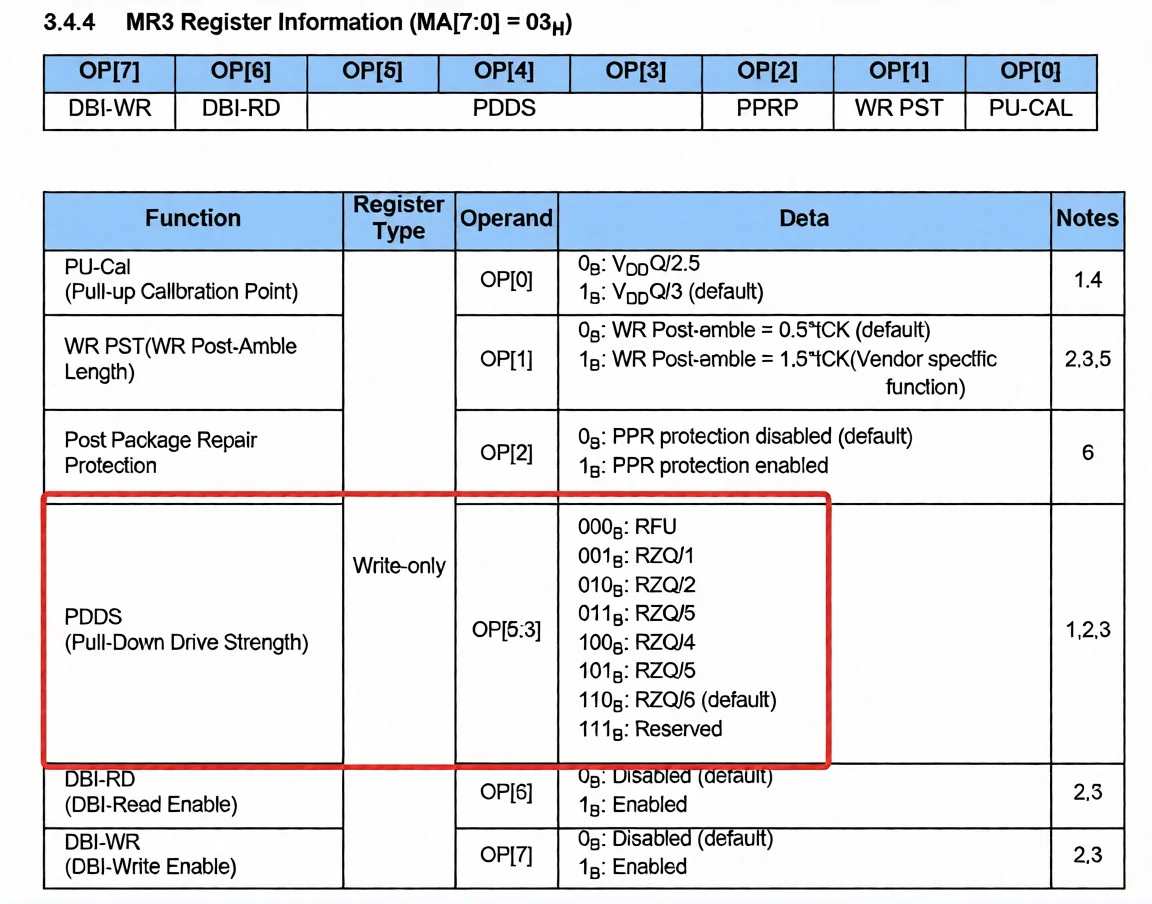
It will be programmed by the controller into the DDR mode register.
For LPDDR4, the value is programmed into DDR MR3 OP[5:3], as shown below.
3.2 RX ODT
RX ODT controls DDR read-path impedance matching and includes:
-
rx_odt: controller PHY side -
rx_soc_odt: DDR device side -
Supported values: 40Ω, 48Ω, 60Ω, 80Ω, 120Ω, 240Ω
-
Recommendation: Set both values to the same resistance
Example: change LPDDR4x RX ODT from 60Ω to 80Ω
diff --git a/drivers/ddr/spacemit/k1x/lpddr4_silicon_init.c b/drivers/ddr/spacemit/k1x/lpddr4_silicon_init.c
index 751623a0e1..d5c5a2cfc0 100644
--- a/drivers/ddr/spacemit/k1x/lpddr4_silicon_init.c
+++ b/drivers/ddr/spacemit/k1x/lpddr4_silicon_init.c
@@ -74,7 +74,7 @@ struct io_para_info {
 };

 const struct io_para_info ddr_io_para_table[] = {
- {DDR_MID_SK_HYNIX, LPDDR4X, 0x9D, R_40, R_40, R_80, 0x19, R_60, VOH_0P6, R_60, R_60, 0x55},
+ {DDR_MID_SK_HYNIX, LPDDR4X, 0x9D, R_40, R_40, R_80, 0x19, R_60, VOH_0P6, R_80, R_80, 0x55},
  {DDR_MID_SK_HYNIX, LPDDR4, 0xB2, R_40, R_40, R_120, 0xA7, R_60, VOH_0P6, R_80, R_80, 0x33},
  // {DDR_MID_SK_HYNIX, LPDDR4, 0xB2, R_40, R_40, R_60, 0xA7, R_48, VOH_0P6, R_48, R_48, 0x00},
 };
PHY-side rx_odt configuration with the register mapping:
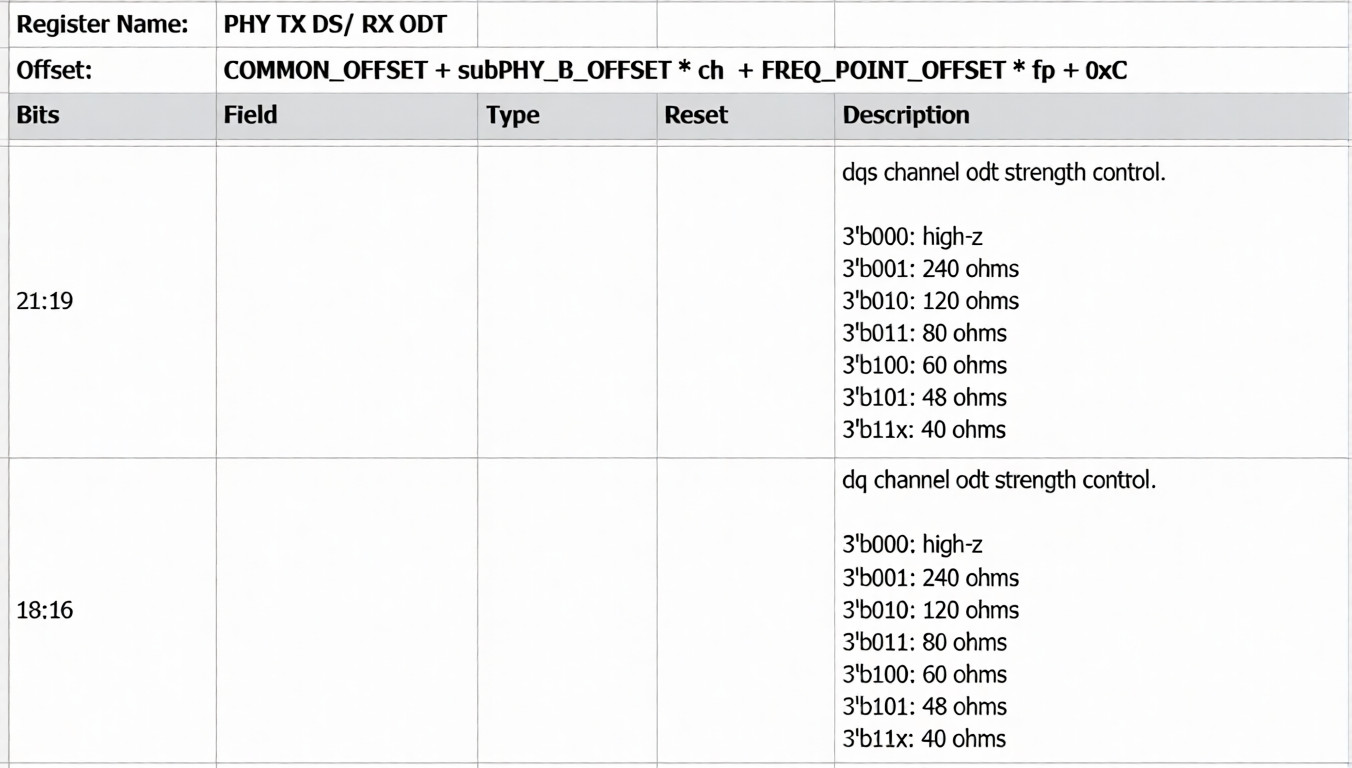
DDR device-side rx_soc_odt configuration with the register mapping:

3.3 TX VREF
TX VREF (tx_vref) controls the reference voltage used by the DDR device to sample incoming signals.
During initialization, the driver sets a reasonable (but not optimal) initial value. During boot, TX training adjusts TX VREF to the center of the valid sampling window.
Recommendation: Do not modify this parameter unless necessary. Use the default value.

3.4 RX VREF
RX VREF (rx_vref) controls the reference voltage used by the K1 controller to sample incoming signals.
During initialization, the driver sets a reasonable (but not optimal) initial value. During boot, TX training adjusts TX VREF to the center of the valid sampling window.
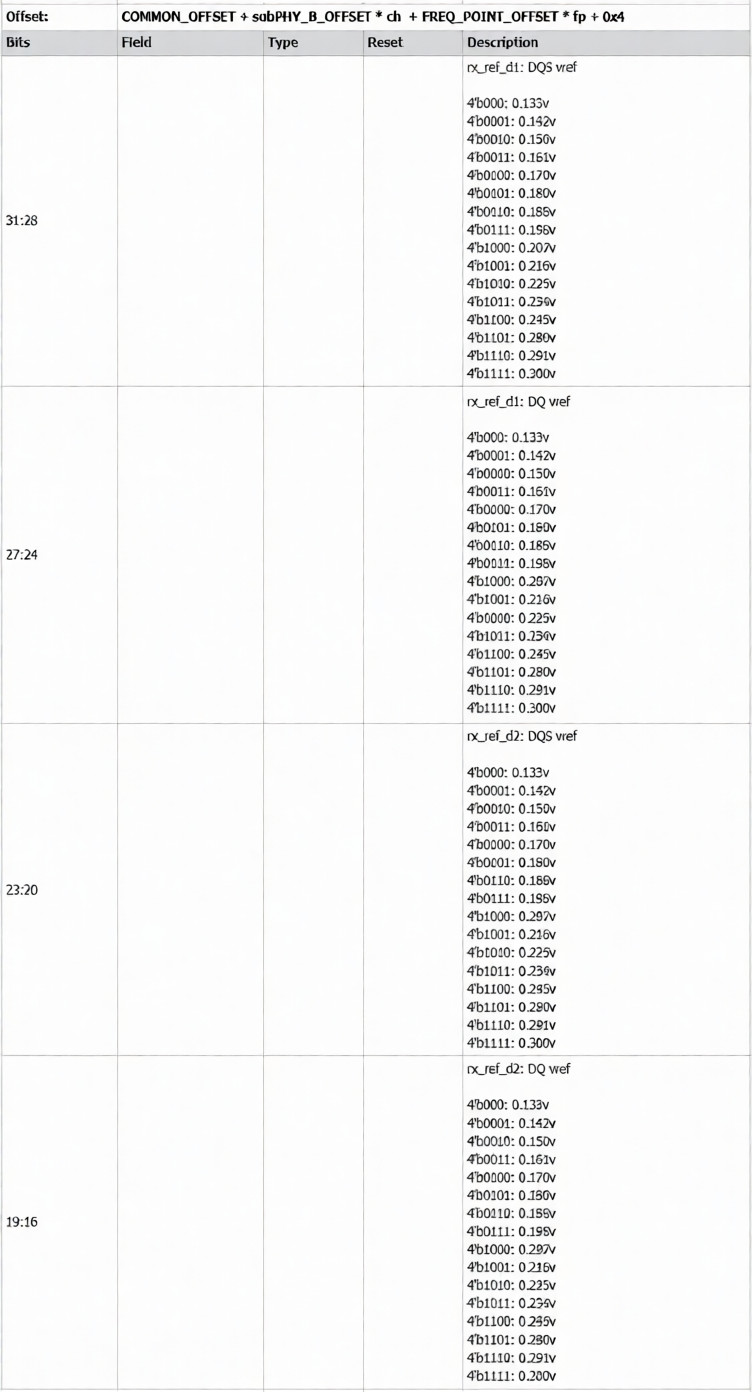
Initial RX VREF follows the formula:
vref = 0.3 * vddq
Recommendation: Use the default value unless specific tuning is required.
3.5 TX DRIVE
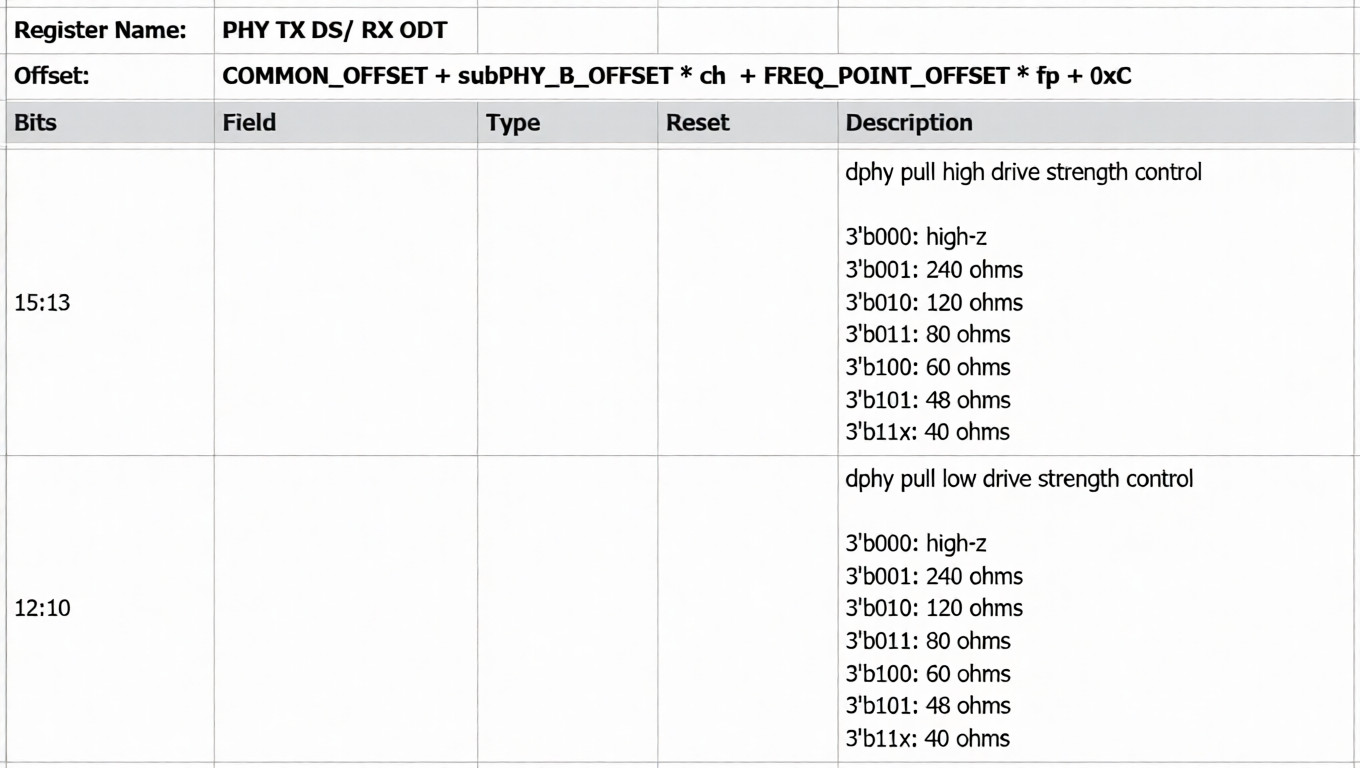
TX DRIVE is used to adjust the output drive strength of CK/DQS/DQ signals on the controller side.
It is configured by setting the PHY register parameters for pull-high drive (tx_pdrv) and pull-low drive (tx_ndrv).
Refer to the figure below for the corresponding register descriptions.
3.6 RX DRIVE
RX DRIVE controls the output drive strength of DQS/DQ signals on the DDR device side. Refer to the figure below for the corresponding register descriptions.
3.7 WDQS
WDQS compensates for write data strobe timing skew, improving write timing margin and data capture reliability.
- Default: WDQS is disabled for LPDDR4x (few devices support it)
- Recommendation: If DDR stress tests fail, consider enabling WDQS using the patch below
diff --git a/drivers/ddr/spacemit/k1x/lpddr4_silicon_init.c b/drivers/ddr/spacemit/k1x/lpddr4_silicon_init.c
index 751623a0e1..90c2d2082e 100644
--- a/drivers/ddr/spacemit/k1x/lpddr4_silicon_init.c
+++ b/drivers/ddr/spacemit/k1x/lpddr4_silicon_init.c
@@ -280,8 +280,7 @@ void fp_timing_init(unsigned DDRC_BASE)
  REG32(DDRC_BASE+MC_CH0_BASE+0x01c4) = 0x00000006;
  REG32(DDRC_BASE+MC_CH0_BASE+0x01d8) = 0x00010190;
  REG32(DDRC_BASE+MC_CH0_BASE+0x014c) = 0x000c4090;
- if (LPDDR4 == io_para_update->devicetype)
-  REG32(DDRC_BASE+MC_CH0_BASE+0x0200) = ((0x1 << 31) | (0x1E << 8) | (0x6 << 0)); // DRAM wdqs timing
+ REG32(DDRC_BASE+MC_CH0_BASE+0x0200) = ((0x1 << 31) | (0x90 << 16) | (0x1E << 8) | (0x6 << 0)); // DRAM wdqs timing

  REG32(DDRC_BASE+MC_CH0_PHY_BASE+0x03e4) = 0x15000A02;
  REG32(DDRC_BASE+MC_CH0_PHY_BASE+0x03ec) = 0x0000046c;
@@ -325,8 +324,7 @@ void fp_timing_init(unsigned DDRC_BASE)
  REG32(DDRC_BASE+MC_CH0_BASE+0x01c4) = 0x00000004;
  REG32(DDRC_BASE+MC_CH0_BASE+0x01d8) = 0x0000D94E;
  REG32(DDRC_BASE+MC_CH0_BASE+0x014c) = 0x0007204a;
- if (LPDDR4 == io_para_update->devicetype)
-  REG32(DDRC_BASE+MC_CH0_BASE+0x0200) = ((0x1 << 31) | (0x1B << 8) | (0x4 << 0)); // DRAM wdqs timing
+ REG32(DDRC_BASE+MC_CH0_BASE+0x0200) = ((0x1 << 31) | (0x78 << 16) | (0x1B << 8) | (0x4 << 0)); // DRAM wdqs timing

  REG32(DDRC_BASE+MC_CH0_PHY_BASE+0x03e4) = 0x13000802;
  REG32(DDRC_BASE+MC_CH0_PHY_BASE+0x03ec) = 0x00000450;
@@ -370,8 +368,7 @@ void fp_timing_init(unsigned DDRC_BASE)
  REG32(DDRC_BASE+MC_CH0_BASE+0x01c4) = 0x00000003;
  REG32(DDRC_BASE+MC_CH0_BASE+0x01d8) = 0x00008190;
  REG32(DDRC_BASE+MC_CH0_BASE+0x014c) = 0x00030848;
- if (LPDDR4 == io_para_update->devicetype)
-  REG32(DDRC_BASE+MC_CH0_BASE+0x0200) = ((0x1 << 31) | (0x15 << 8) | (0x0 << 0)); // DRAM wdqs timing
+ REG32(DDRC_BASE+MC_CH0_BASE+0x0200) = ((0x1 << 31) | (0x48 << 16) | (0x15 << 8) | (0x0 << 0)); // DRAM wdqs timing

  REG32(DDRC_BASE+MC_CH0_PHY_BASE+0x03e4) = 0x0a000402;
  REG32(DDRC_BASE+MC_CH0_PHY_BASE+0x03ec) = 0x00000480;
@@ -415,8 +412,7 @@ void fp_timing_init(unsigned DDRC_BASE)
  REG32(DDRC_BASE+MC_CH0_BASE+0x01c4) = 0x00000003;
  REG32(DDRC_BASE+MC_CH0_BASE+0x01d8) = 0x00008190;
  REG32(DDRC_BASE+MC_CH0_BASE+0x014c) = 0x00030848;
- if (LPDDR4 == io_para_update->devicetype)
-  REG32(DDRC_BASE+MC_CH0_BASE+0x0200) = ((0x1 << 31) | (0x15 << 8) | (0x0 << 0)); // DRAM wdqs timing
+ REG32(DDRC_BASE+MC_CH0_BASE+0x0200) = ((0x1 << 31) | (0x48 << 16) | (0x15 << 8) | (0x0 << 0)); // DRAM wdqs timing

  REG32(DDRC_BASE+MC_CH0_PHY_BASE+0x03e4) = 0x0a000402;
  REG32(DDRC_BASE+MC_CH0_PHY_BASE+0x03ec) = 0x00000480;
4. Debugging
-
DDR Training Logs
To enable more detailed DDR initialization logs, modify the log level with
drivers/ddr/spacemit/k1x/k1_ddr.h#define LOGLEVEL 1 /* 0 = disable logs, 1 = verbose logs */ -
SPL Debug Logs
-
Default SPL log level is 1 (only emergency messages are printed):
CONFIG_SPL_LOGLEVEL=1 -
To enable more logs:
- Increase
CONFIG_SPL_LOGLEVELin U-BootmenuconfigNote: ensure
FSBL.bin≤ 216 KB)* - Or replace the logging interface with
printf
- Increase
-
5. Build and Deployment
After making changes, apply them using the following steps:
- Rebuild U-Boot to generate
FSBL.binanduboot.itb - Replace the corresponding files in the image package
- Flash the updated image to the device to complete the DDR driver update