CPP & ISP & MIPI-CSI
CPP, ISP and MIPI-CSI of K1 are implemented based on the standard V4L2 interface, with reference for complete test programs.
1. Specification
MIPI CSI (CSI-2 V1.1) 4 lane (x2)
- Supports multiple Lane combination modes:
- 4 Lane + 4 Lane
- 4 Lane + 2 Lane
- 4 Lane + 4 Lane + 2 Lane (supports three sensors)
- DPHY V1.1, the maximum data rate reaches 1.5 Gbps/lane.
- Supports RAW8/ RAW10/ RAW12/ RAW14 formats, as well as YUV420 8-bit input format.
ISP (Image Signal Processor)
ISP is used to process the image signals output by the sensor. It realizes image optimization such as dead pixel correction, lens shading correction, denoising, phase compensation and correction, backlight compensation, and color enhancement through a series of digital image processing algorithms.
- Supports dual pipeline (time-division multiplexing), which can process two image streams simultaneously, with sources from the sensor or DDR.
- The maximum output image resolution of each pipeline is 1920x1080.
- When two pipeline work simultaneously:
- Without PDAF (Phase Detection Auto Focus) enabled,the maximum input image size is 4748x8188.
- With PDAF enabled, the maximum input image size is 3264x8188.
- When a single pipeline works:
- Without PDAF enabled, the maximum input size is 9496x8188.
- With PDAF enabled, the maximum input size is 6528x8188.
- Both the input width and height must be multiples of 4.
CPP (Image Post-processing Module)
CPP processes ISP-output NV12 data offline via pyramid-based time-sharing multi-layer processing, providing lens distortion correction, spatial and temporal denoising, frequency domain denoising and edge enhancement.
- Supports input format: NV12_DWT
- Supports output format: NV12/DWT、FBC_DWT (NV12_DWT format consist of standard NV12 Buffer and ASR-proprietary DWT Buffer)
- Supports maximum image size:
- Width: 4224
- Height: 3136
- Supports minimal image size:
- Width: 480
- Height: 288
- Output and input size should remain consistent.
2 Flow
2.1 ISP online Flow
Module connection in ISP online mode:
sensor -> VI_DEV -> ISP_FW –> VI_CHN -> DDR -> CPP
During code development, please first configure the Sensor, VI, ISP, and CPP modules, register the buffer callback functions for each module, and then enable streamon for ISP and Sensor in sequence. After the Sensor streamon on data, interrupts will be triggered during ISP image processing. Each module processes the interrupt and then invokes the module callback to handle the buffer. When the program exits, please stop VI first, then stop the Sensor, followed by deinitializing the CPP, ISP, and VI modules in sequence, and finally releasing the used buffers. The software flow is as follows:
Development Process Overview
- Initialization configuration: Configure Sensor, VI, ISP and CPP modules in sequence.
- Register the callback: Register buffer functions for each module.
- Startup process: Streamon ISP and Sensor in sequence.
- Data flow:
- After the Sensor streamon, the ISP image processing will trigger an interrupt.
- Each module invokes the corresponding buffer callback after interrupt processing.
- The user retrieves the buffer data in the callback, and re-queues the processed buffer back to the module.
- Exit Process: It is recommended to stop VI first, then stop the Sensor, and finally deinitialize CPP, ISP, and VI in sequence, followed by releasing all buffers.
ISP online flow
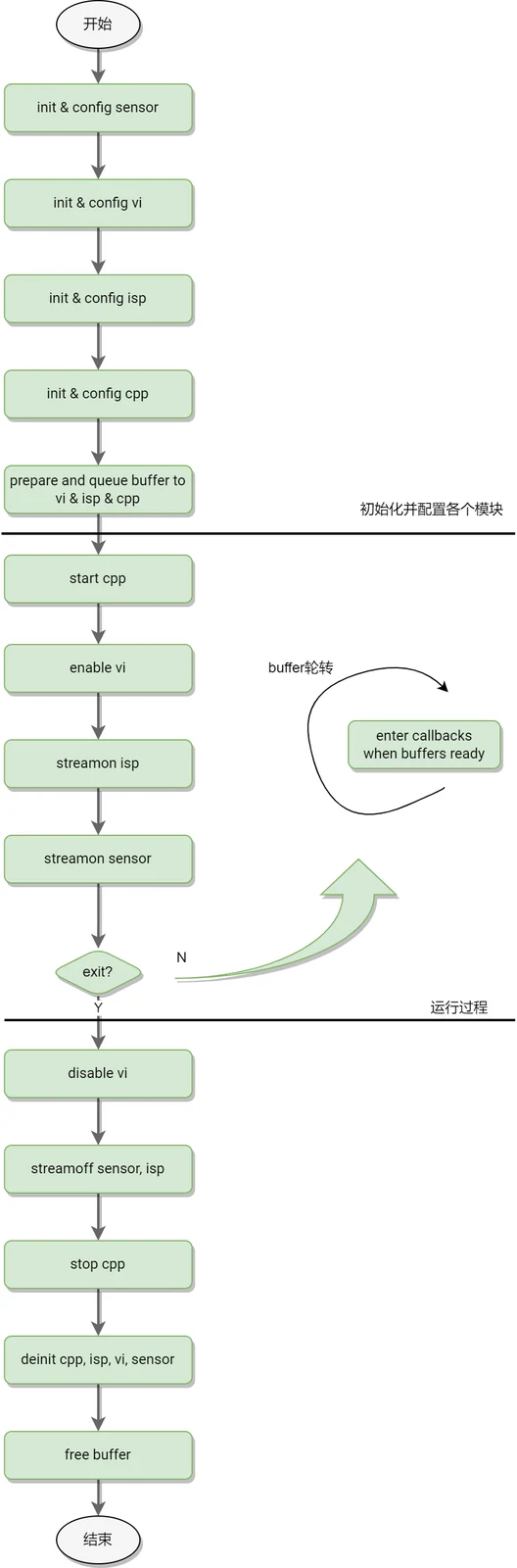
Buffer Rotation:
- Before streamon: Prepare the input and output buffers, and queue the output buffers into the module buffer list.
- After streamon: Trigger the module's buffer callback when the output buffer list is ready.
- Callback functions: Implemented by users, it process data and re-queue completed buffer.
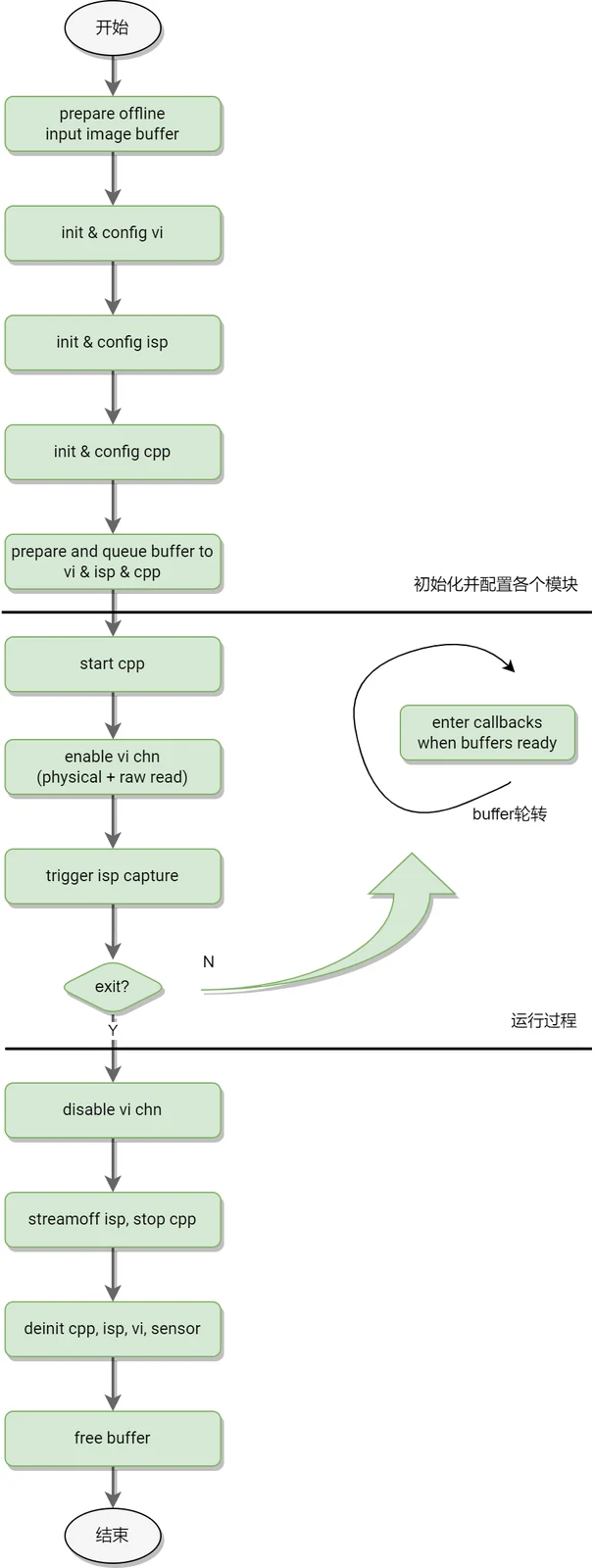
2.2 ISP offline flow
Module connection in ISP offline mode:
DDR -> VI_DEV -> ISP_FW –> VI_CHN -> DDR -> CPP
Differences from ISP online mode:
- Data source comes from DDR (not collected from Sensor in real-time).
- The configurations of data input and buffer callback are different.
Other processes are basically consistent with the Online mode.
Offline Capture Mode Flow:
3 Test Program Usage Instruction
k1x-cam is a set of tools for testing and verifying K1 MIPI CSI + ASR ISP/CPP functions.
Besides function verification, it is also a reference implementation for customizing applications development (need to directly interface with ISP/CPP APIs)
3.1 Installation Instruction
3.1.1 Bianbu Desktop System
k1x-cam is pre-integrated in software repository, and can be installed via apt command.
sudo apt update
sudo apt install k1x-cam
3.1.2 Buildroot System
TODO
3.2 Usage Instruction
The test program set of k1x-cam includes the following test programs:
cam-test: Used for test and verification of single pipeline, dual pipeline, single raw pipeline, single CPP processing and other scenarios.cam_sensors_test: Simply verify Sensor test, initialization and stream on flow.
3.2.1 cam-test
Basic usage examples:
Usage instance:cam-test <file.json>

//Single pipeline online test:imx135(4208x3120@30fps raw10 4lane) –> ISP -> DDR(1080p@30fps) -> CPP
Command:cam-test demo/cfgs/0/camtest_sensor0_mode0.json

//Single pipeline online test:imx135(4208x2416@30fps raw10 4lane) –> ISP -> DDR(1080p@30fps) -> CPP
Command:cam-test demo/cfgs/0/camtest_sensor0_mode1.json

//Single pipeline online test:imx135(2104x1560@30fps raw10 4lane) –> ISP -> DDR(1080p@30fps) -> CPP
Command:cam-test demo/cfgs/0/camtest_sensor0_mode2.json

//Single pipeline online test:imx135(2104x1560@30fps raw10 4lane) –> ISP -> DDR(1080p@30fps) -> CPP
Command:cam-test demo/cfgs/0/camtest_sensor0_mode2.json

//Dual pipeline capture test:imx135(2104x1560@30fps raw10 4lane) –> ISP -> DDR(1080p@30fps) -> CPP
Command:cam-test demo/cfgs/2/camtest_sensor0_mode0.json

//only raw dump pipeline test:imx135(4208x3120@30fps raw10 4lane) –> ISP(VI) -> DDR
Command:cam-test demo/cfgs/3/camtest_sensor0_mode0.json

//only isp online pipeline test:imx135 –> ISP -> DDR(NV12)
Command:cam-test demo/cfgs/4/camtest_sensor0_mode0_nv12.json

//only isp online pipeline test:imx135 –> ISP -> DDR(p010)
Command:cam-test demo/cfgs/4/camtest_sensor0_mode0_p010.json

//only isp online pipeline test:imx135 –> ISP -> DDR(p210)
Command:cam-test demo/cfgs/4/camtest_sensor0_mode0_p210.json

//only isp online pipeline test:imx135 –> ISP -> DDR(rgb565)
Command:cam-test demo/cfgs/4/camtest_sensor0_mode0_rgb565.json

//only isp online pipeline test:imx135 –> ISP -> DDR(rgb888)
Command:cam-test demo/cfgs/4/camtest_sensor0_mode0_rgb888.json

//only isp online pipeline test:imx135 –> ISP -> DDR(y210)
Command:cam-test demo/cfgs/4/camtest_sensor0_mode0_y210.json

//dual pipeline online test:imx135+gc2375h –> ISP -> DDR -> CPP
Command:cam-test demo/cfgs/1/camtest_main_aux.json
3.2.2 JSON Parameter Description
Take sdktest_main_aux.json as an example:
{
    "tuning_server_enable":1, //For isp tuning service enablement, valid testing in only isp online, single pipeline online and dual pipeline.
    "show_fps":1,    //calculate the average frame rate from frame 0 to frame 120
    "auto_run": 1,    //automatic test without user interaction

    "cpp_node": [    //CPP module
            {
                    "name": "cpp0",    //cpp group0
                    "enable": 1,
                    "format":"NV12",
                    "src_from_file": 0,    //cpp input is sourced from ISP output when both ISP and cpp are enabled.

                    "src_path":"/tmp/cpp_case_in_data/1920x1080/",
                    "size_width":1920,
                    "size_height":1080,
            },
            {
                    "name": "cpp1",    //cpp group1
                    "enable": 1,
                    "format":"NV12",
                    "src_from_file": 0,    //

                    "src_path":"/vendor/etc/camera/",
                    "size_width":1920,
                    "size_height":1080,
            },
        ],

    "isp_node":[    //ISP module, 1 ISP can access 2 channels of video stream input
            {
                    "name": "isp0",    //isp0 works in online mode, outputs 1080p@30fps NV12
                    "enable": 1,
                    "work_mode":"online",
                    "format":"NV12",
                    "out_width":1920,
                    "out_height":1080,

                    "sensor_name":"imx135_asr",    //imx135 corresponds to /dev/cam_sensor0, works in mode 0
                    "sensor_id" : 0,
                    "sensor_work_mode":0,
                    "fps":30,

                    "src_file":"/tmp/1920x1080_raw12_long_packed.vrf",    //invalid (used in other modes)
                    "bit_depth": 12,    //invalid
                    "in_width":1920,    //invalid
                    "in_height":1080,    //invalid

            },
            {
                    "name": "isp1",    //isp1 works in online mode, outputs 1600x1200@30fps NV12
                    "enable": 1,
                    "work_mode":"online",
                    "format":"NV12",
                    "out_width":1600,
                    "out_height":1200,

                    "src_file":"/tmp/1920x1080_raw12_long_packed.vrf",    //invalid
                    "bit_depth": 12,    //invalid
                    "in_width":1920,    //invalid
                    "in_height":1080,    //invalid

                    "sensor_name":"gc2375h_asr",    //gc2375h corresponds to /dev/cam_sensor1, works in mode 0
                    "sensor_id" : 1,
                    "sensor_work_mode":0,
                    "fps":30,
            },
    ]
}
For more detailed information on the role of JSON parameters, you can analyze the specific application scenarios in config.c and online_pipeline_test.c/main.c.
3.2.3 cam_sensors_test
Basic usage example:
Usage instance:cam_sensors_test [devId] [sensors_name]
After executing the command, input s in interactive terminal to stream on.
If the program reports no errors, the following process is normal: sensor detect -> init -> stream on.
4 SENSOR Debugging
Refer to Camera development Guide
5 ISP Debugging
ISP performance debugging may use: Tuning Tool, Calibration Plugins, VRF viewer, and platform debugging assistants.
Refer to ISP PQ tools user guide
6 API Usage Instruction
The detailed parameters, data structures, error codes and return values of API are documented in ISP API Development Guide. They are primarily intended for the following two types of developers:
- Tuning and algorithm engineers working on ISP image quality
- Application engineers developing image functions