I2C
This document describes I2C functionality and usage.
Overview
The I2C bus is a two-wire serial communication bus used to connect microcontrollers and peripheral devices. It is commonly used for master-slave communication between a main controller and its peripherals in scenarios with small data volumes and short transmission distances. Each device has its own unique address, and I2C operates in half-duplex mode, allowing only one master to communicate on the bus at any given time.
Functionality
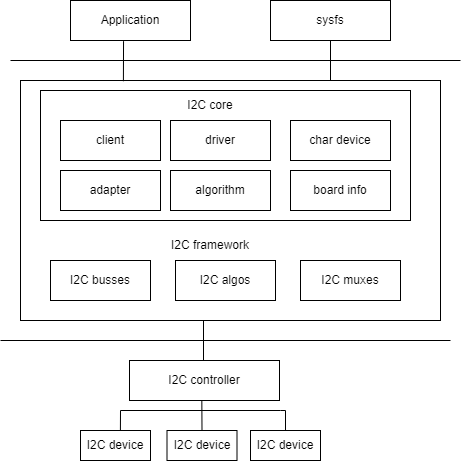
As shown in the figure, the I2C architecture in Linux is divided into three layers:
- User space: all applications that use I2C devices
- Kernel: the driver layer
- Hardware: the actual physical devices, including the I2C controller and I2C peripherals
In the Linux kernel, the I2C driver logically implements the following:
- The I2C framework provides a way to access I2C slave devices. Since these slave devices are controlled by the I2C controller, this is mainly implemented by the I2C controller driver.
- Internally, the I2C framework consists of four modules: I2C core, I2C busses, I2C algos, and I2C muxes.
- The I2C core uses the I2C adapter and I2C algorithm submodules to abstract I2C controller functionality.
- I2C busses is a collection of I2C controller drivers located in the
drivers/i2c/busses/directory, such asi2c-k1.c. - I2C algos contains some common I2C algorithms. Here, an algorithm refers to the I2C protocol communication method used to implement I2C read/write operations.
Source Code Structure
The controller driver code is located in the drivers/i2c/ directory:
drivers/i2c/
|-- i2c-core-of.c       #I2C subsystem core file, providing relevant interface
|-- i2c-boardinfo.c
|-- i2c-core-base.c
|-- i2c-core-slave.c
|-- i2c-core-smbus.c
|-- i2c-dev.c           #I2C subsystem device-related file, used for registering
|-- busses/i2c-k1.c     #I2C controller driver code for the K3 platform
Key Features
Features
| Feature | Description |
|---|---|
| Support for 8 I2C groups | Supports 8 I2C interfaces (i2c0-6, i2c8) |
| Support for 100K/400K speed modes | Supports standard mode (100KHz) and fast mode (400KHz), configurable through the clock-frequency property in DTS |
| Support for bus arbitration | Supports bus arbitration in multi-master mode |
| Support for SDA glitch suppression | The controller includes built-in SDA glitch repair logic, which is enabled by default and can be disabled by adding the spacemit,sda-glitch-nofix property in DTS |
In addition, the K3 R-domain (RCPU side) provides two independent I2C controllers, r_i2c0 and r_i2c1 (defined in k3-rdomain.dtsi). They use the same spacemit,k1-i2c driver, their clocks are provided by syscon_rcpu_i2cctrl, and their status is disabled by default. The available pinctrl groups are ri2c0_0_cfg ~ ri2c0_3_cfg and ri2c1_0_cfg ~ ri2c1_3_cfg.
Configuration
Configuration mainly includes driver enablement and DTS settings.
Kconfig Configuration
CONFIG_I2CandCONFIG_I2C_K1are enabled in the K3 SDK defconfig
Device Drivers
        I2C support
                I2C support (I2C [=y])
                        I2C Hardware Bus support
                               SpacemiT K1 I2C adapter (I2C_K1 [=y])
CONFIG_I2C_CHARDEVis the I2C character device option
Device Drivers
        I2C support
                I2C support (I2C [=y])
                        I2C device interface (I2C_CHARDEV [=y])
DTS Configuration
The I2C controller on K3 reuses the spacemit,k1-i2c IP and its DT binding (see Documentation/devicetree/bindings/i2c/spacemit,k1-i2c.yaml). The main supported properties are:
| Configuration | Description |
|---|---|
| clock-frequency | I2C bus clock frequency. Supports 100000 (standard mode) and 400000 (fast mode), defaulting to 400000. |
| spacemit,sda-glitch-nofix | Bypasses the SDA glitch repair logic. Eliminates the delay caused by repeated Start signals when connecting with some devices. |
The default bus speed is 400KHz. To switch to standard mode (100KHz), modify the clock-frequency property in the board-level DTS:
&i2c2 {
        clock-frequency = <100000>;
};
pinctrl
Check the development board schematic to determine which pin group is used by the I2C controller.
The K3 platform provides multiple pinctrl configurations for each I2C controller, defined in k3-pinctrl.dtsi. Taking i2c2 as an example, assuming that i2c2_1_cfg (PAD 106/107) is used, the board-level DTS configuration is as follows:
&i2c2 {
        pinctrl-names = "default";
        pinctrl-0 = <&i2c2_1_cfg>;
};
The available pinctrl configuration groups for each I2C controller are as follows:
| Controller | Available Configuration Group |
|---|---|
| i2c0 | i2c0_0_cfg ~ i2c0_4_cfg (5 groups) |
| i2c1 | i2c1_0_cfg ~ i2c1_3_cfg (4 groups) |
| i2c2 | i2c2_0_cfg ~ i2c2_3_cfg (4 groups) |
| i2c3 | i2c3_0_cfg ~ i2c3_3_cfg (4 groups) |
| i2c4 | i2c4_0_cfg ~ i2c4_3_cfg (4 groups) |
| i2c5 | i2c5_0_cfg ~ i2c5_3_cfg (4 groups) |
| i2c6 | i2c6_0_cfg ~ i2c6_3_cfg (4 groups) |
| i2c8 | i2c8_cfg (mux 0, PAD128/129 connected to AP-side i2c8); i2c8_cfg_rcpu (mux 1, the same pins switched to the RCPU-side function, commonly used in rpmi_regulator/PMIC scenarios, in which case AP-side i2c8 cannot use this pin group) |
I2C Device Configuration
Taking EEPROM as an example to illustrate how to configure an I2C device in the DTS.
Device Type
Confirm the device type and the driver it uses.
For the EEPROM device, set the compatible property to atmel,24c02.
Device Address
Confirm the I2C communication address of the device and specify it in the reg property of the DTS node.
The schematic shows that the EEPROM address is 0x50. The configuration is as follows:
eeprom@50 {
        compatible = "atmel,24c02";
        reg = <0x50>;
}
Communication Frequency
Confirm the communication frequency supported by the device.
The EEPROM supports a 400KHz communication frequency and is attached to i2c2, using the default clock-frequency = <400000>.
Device Control Signals
Check the board schematic to determine the control signals used by the device.
EEPROM devices generally do not require additional control signals (such as reset or irq) and only need an I2C bus connection.
If the device requires write-protect control, you can configure the corresponding GPIO.
Device DTS
The EEPROM device address is 0x50, and the communication frequency is 400KHz. It is configured as read-only and uses the ONIE TLV layout to store board-level information.
The device DTS configuration is as follows:
eeprom@50 {
        compatible = "atmel,24c02";
        reg = <0x50>;
        read-only;
        status = "okay";

        nvmem-layout {
                compatible = "onie,tlv-layout";
        };
};
DTS Example
Based on the above information, when the EEPROM device is connected to i2c2, the board-level DTS configuration is as follows:
&i2c2 {
        pinctrl-names = "default";
        pinctrl-0 = <&i2c2_1_cfg>;
        status = "okay";

        eeprom@50 {
                compatible = "atmel,24c02";
                reg = <0x50>;
                read-only;
                status = "okay";

                nvmem-layout {
                        compatible = "onie,tlv-layout";
                };
        };
};
Interface
API
Kernel space: I2C read/write communication uses standard Linux interfaces. For detailed instructions on sending and receiving, refer to Documentation/i2c/writing-clients.rst in the kernel source tree.
User space: From user space, you can access all devices on the bus through /dev/i2c-%d nodes. The demo example shows a simple way to read from and write to I2C devices. For more information, refer to Documentation/i2c/dev-interface.rst.
The I2C bus numbers on K3 are determined by device-tree aliases (see k3.dtsi). The corresponding user-space device nodes are /dev/i2c-0 ~ /dev/i2c-6 and /dev/i2c-8 (/dev/i2c-7 is not available).
Demo Example
#include <stdio.h>
#include <stdlib.h>
#include <stdint.h>
#include <unistd.h>
#include <sys/ioctl.h>
#include <fcntl.h>
#include <linux/i2c-dev.h>
#define I2C_DEV_FILE "/dev/i2c-1" // I2C device file path, typically /dev/i2c-1
#define DEVICE_ADDR 0x68 // Example I2C device address; modify as needed for the actual device
// Data to the I2C device
int write_to_i2c(int file, uint8_t reg, uint8_t value) {
uint8_t buffer[2];
buffer[0] = reg; // Register address
buffer[1] = value; // Value to write
if (write(file, buffer, 2) != 2) {
perror("I2C write failed");
return -1;
}
return 0;
}
// Read data from the I2C device
int read_from_i2c(int file, uint8_t reg, uint8_t *data, size_t len) {
if (write(file, ®, 1) != 1) {
perror("I2C write register failed");
return -1;
}
if (read(file, data, len) != len) {
perror("I2C read failed");
return -1;
}
return 0;
}
int main() {
int file;
uint8_t data[2]; // Used to store the data read
// Open the I2C device file
if ((file = open(I2C_DEV_FILE, O_RDWR)) < 0) {
perror("Failed to open I2C bus");
exit(1);
}
// Set the address of the I2C slave device
if (ioctl(file, I2C_SLAVE, DEVICE_ADDR) < 0) {
perror("Failed to acquire bus access and/or talk to slave");
close(file);
exit(1);
}
if (write_to_i2c(file, 0x6B, 0x00) < 0) {
close(file);
exit(1);
}
printf("Write 0x00 to register 0x6B\n");
if (read_from_i2c(file, 0x75, data, 1) < 0) {
close(file);
exit(1);
}
printf("Read data 0x%02x from register 0x75\n", data[0]);
// Close the I2C device file
close(file);
return 0;
}
Debugging
sysfs
After enabling CONFIG_I2C_CHARDEV, adapters and their attached devices appear in the /sys/bus/i2c/devices/ directory. You can quickly inspect them with the following commands:
ls /sys/bus/i2c/devices/i2c-*/name
cat /sys/bus/i2c/devices/2-0050/name   # Check the EEPROM client node
debugfs
debugfs is enabled on K3 by default. After mounting it, you can view each adapter directory under /sys/kernel/debug/i2c/, then enter the corresponding directory to view attached clients (such as 2-0050):
ls /sys/kernel/debug/i2c                  # List all I2C controllers
ls /sys/kernel/debug/i2c/i2c-2            # View clients under i2c-2; output will look like 2-0050
Testing
I2C tool is an open-source utility suite that you can download and cross-compile for use. Download link After compilation, tools such as i2cdetect, i2cdump, i2cset, and i2cget are generated. They can be used directly from the command line for debugging:
- i2cdetect: Lists all devices on an I2C bus
- i2cdump: Displays the values of all registers on an I2C device
- i2cset: Writes the value of a specific register on an I2C device
- i2cget: Reads the value of a specific register on an I2C device
FAQ
1. I2C Transmission Timeout Issue
The abnormal log is as follows:
[ 126.800897] i2c-k1 d401d800.i2c: msg completion timeout
Troubleshooting steps:
- Check the I2C hardware resistors. If a slave device on the SDA line requires a bypass capacitor, it is recommended to change the SDA pull-up resistor to 1k resistor.
- Check the I2C pinctrl drive capability, and increase the drive strength of the corresponding I2C pinctrl configuration if necessary.
- If the repeated-start signal is delayed due to the SDA glitch repair logic, try adding the
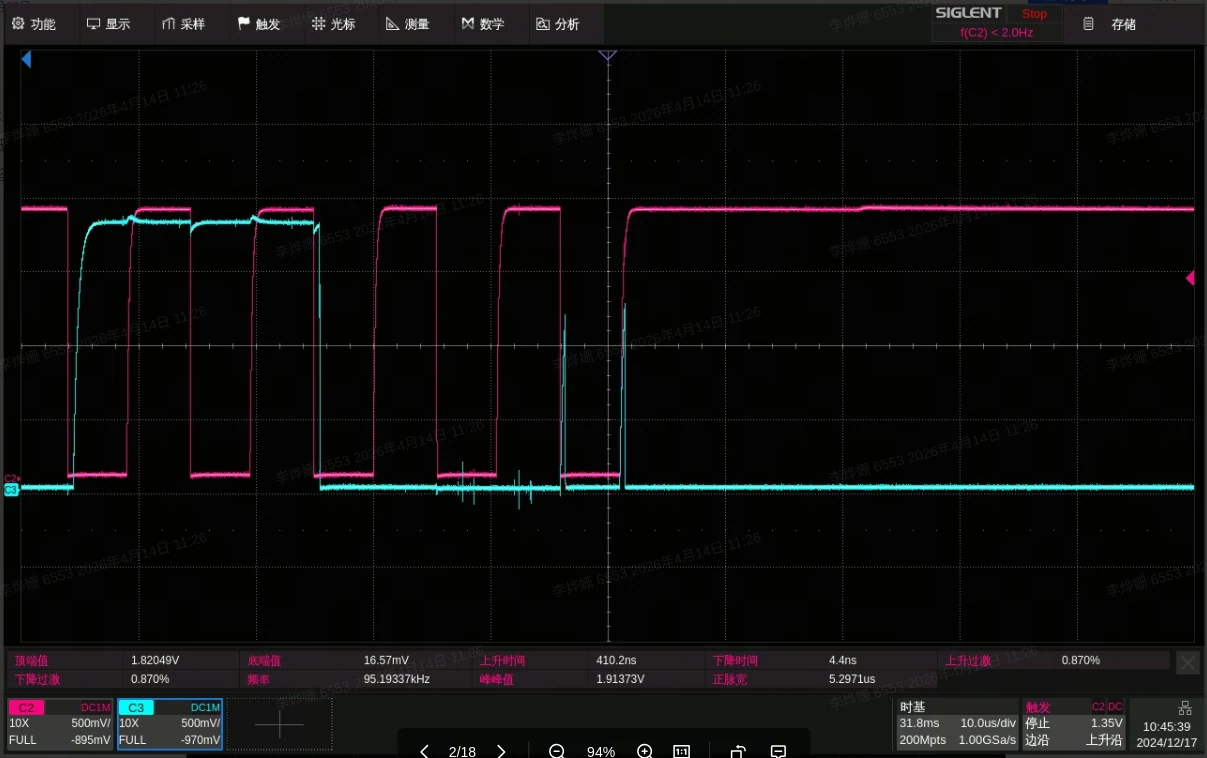
spacemit,sda-glitch-nofixproperty in DTS to disable this logic. The following figure shows an abnormal waveform captured on an oscilloscope:
By default, the repair logic actively pulls SDA low and holds it after ACK. When SDA is released, the rising edge is delayed, producing a sharp glitch between ACK and Repeated Start (marked by the red arrow). As a result, the subsequent Repeated Start condition cannot be correctly recognized by the slave device, causing the controller to report msg completion timeout.