SDHC
This section describes the K3 platform SDHC controller, including its features, device tree configuration, and debugging methods.
Module Introduction
SDHC is the host controller for MMC/SD/SDIO devices. On the K3 platform, SDHC mainly supports the following devices or interfaces:
- SD Card
- SDIO
- eMMC
Functionality
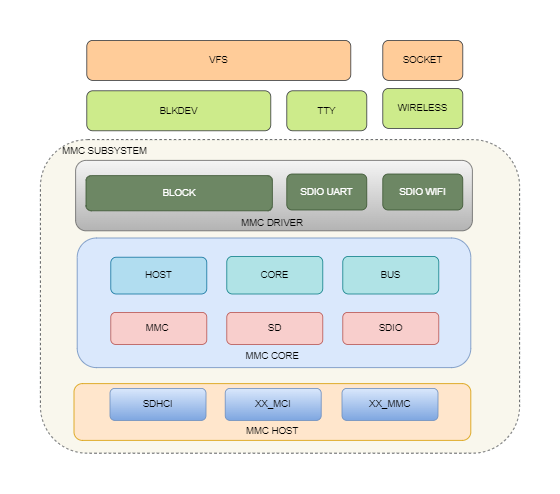
The Linux MMC framework can be broadly divided into three layers:
- MMC Host: The host controller driver layer, responsible for controller initialization, command transmission, data transfer, voltage switching, and related control logic;
- MMC Core: The core layer, which manages card enumeration, protocol handling, and state machines;
- MMC Block / SDIO Functionality Layer: The upper layer that provides interfaces for block devices or SDIO peripheral drivers.
On K3, the block devices corresponding to eMMC and SD cards are as follows:
- The eMMC block device node is
/dev/mmcblk2; - The SD card block device node is
/dev/mmcblk0.
Source Code Structure
The controller-related source code is primarily located in:
linux-6.18/
|-- drivers/mmc/host/
|   |-- sdhci.c                # SDHCI generic framework
|   |-- sdhci-pltfm.c          # SDHCI platform layer
|   `-- sdhci-of-k1.c          # SpacemiT K1/K3 SDHCI driver
|-- Documentation/devicetree/bindings/mmc/
|   `-- spacemit,sdhci.yaml    # SpacemiT SDHCI binding
`-- arch/riscv/boot/dts/spacemit/
        |-- k3.dtsi                # K3 SoC-level DTS configuration
        `-- k3*.dts                # Board-level DTS configuration
Key Features
Features
| Feature | Description |
|---|---|
| Controller Count | K3 provides three host controllers: sdcard, sdio, and emmc |
| Supported Device Types | Supports SD, SDIO, and eMMC |
| eMMC5.1 | Supports HS400 and HS400ES |
| SD 3.0 | Supports UHS and up to SDR104 |
| SDIO | Supports SDIO Specification Version 3.00 |
| Software Tuning | Supports automatic RX tuning and independent configuration of tx_delaycode |
Usage of the Three Slots on K3
Slot 1 supports SD/SDIO (1-bit or 4-bit), Slot 2 supports SDIO/eMMC (1-bit or 4-bit), and Slot 3 supports only eMMC (1-bit, 4-bit, or 8-bit). In the DTS, these three slots are described as sdcard, sdio, and emmc, respectively:
sdcard: SD card configuration, supporting up to SDR104;sdio: SDIO interface configuration, generally used to connect Wi-Fi modules;emmc: eMMC configuration, supporting up to HS400ES.
Configuration
This mainly includes Kconfig configuration and DTS configuration.
Kconfig Configuration
Common K3 SDHC configuration options are as follows:
CONFIG_MMC provides support for the MMC bus protocol, and is usually set to Y:
Device Drivers
    MMC/SD/SDIO card support (MMC [=y])
CONFIG_MMC_BLOCK provides support for MMC block devices and is usually set to Y:
Device Drivers
    MMC/SD/SDIO card support (MMC [=y])
        MMC block device driver (MMC_BLOCK [=y])
CONFIG_MMC_SDHCI / CONFIG_MMC_SDHCI_PLTFM / CONFIG_MMC_SDHCI_OF_K1 provide support for the SpacemiT SDHCI controller:
Device Drivers
    MMC/SD/SDIO card support (MMC [=y])
        Secure Digital Host Controller Interface support (MMC_SDHCI [=y])
            SDHCI platform and OF driver helper (MMC_SDHCI_PLTFM [=y])
            SDHCI OF support for the SpacemiT SDHCI controller (MMC_SDHCI_OF_K1 [=y])
DTS Configuration
Controller Nodes
The three controller nodes for K3 are located in k3.dtsi:
sdcard: mmc@d4280000 {
        compatible = "spacemit,k3-sdhci";
        reg = <0x0 0xd4280000 0x0 0x200>;
        clocks = <&syscon_apmu CLK_APMU_SDH_AXI>,
                 <&syscon_apmu CLK_APMU_SDH0>;
        clock-names = "core", "io";
        interrupt-parent = <&saplic>;
        interrupts = <99 IRQ_TYPE_LEVEL_HIGH>;
        resets = <&syscon_apmu RESET_APMU_SDH_AXI>,
                 <&syscon_apmu RESET_APMU_SDH0>;
        reset-names = "sdh_axi", "sdh0";
        status = "disabled";
};
sdio: mmc@d4280800 {
        compatible = "spacemit,k3-sdhci";
        reg = <0x0 0xd4280800 0x0 0x200>;
        clocks = <&syscon_apmu CLK_APMU_SDH_AXI>,
                 <&syscon_apmu CLK_APMU_SDH1>;
        clock-names = "core", "io";
        interrupt-parent = <&saplic>;
        interrupts = <100 IRQ_TYPE_LEVEL_HIGH>;
        resets = <&syscon_apmu RESET_APMU_SDH_AXI>,
                 <&syscon_apmu RESET_APMU_SDH1>;
        reset-names = "sdh_axi", "sdh1";
        status = "disabled";
};
emmc: mmc@d4281000 {
        compatible = "spacemit,k3-sdhci";
        reg = <0x0 0xd4281000 0x0 0x200>;
        clocks = <&syscon_apmu CLK_APMU_SDH_AXI>,
                 <&syscon_apmu CLK_APMU_SDH2>;
        clock-names = "core", "io";
        interrupt-parent = <&saplic>;
        interrupts = <101 IRQ_TYPE_LEVEL_HIGH>;
        resets = <&syscon_apmu RESET_APMU_SDH_AXI>,
                 <&syscon_apmu RESET_APMU_SDH2>;
        reset-names = "sdh_axi", "sdh2";
        status = "disabled";
};
pinctrl Configuration
At the board level, the SD card controller supports three pinctrl states:
defaultuhsdebug
For example:
&sdcard {
        pinctrl-names = "default","uhs","debug";
        pinctrl-0 = <&mmc1_cfg>;
        pinctrl-1 = <&mmc1_uhs_cfg>;
        pinctrl-2 = <&mmc1_debug_cfg>;
        status = "okay";
};
Where:
-
default: Default operating mode, using 3.3 V I/O; -
uhs: UHS mode, using 1.8 V I/O. The driver dynamically switches to this pinctrl state when required; -
debug: Debug scenarios. Choose one of the following two pinctrl configurations forpinctrl-2based on solution requirements:mmc1_debug_cfg: Multiplexes PAD 132/133 (SD DAT3/DAT2) as UART0 TX/RX while keeping other pins as SD functions, used for external debug daughterboard serial output scenarios (see EVB);mmc1_jtag_cfg: Multiplexes PAD 132/133/134/137 (SD DAT3/DAT2/DAT1/CLK) as JTAG TDI/TMS/TDO/TCK, used for JTAG debugging scenarios (see CoM260).
The driver defaults to the
debugstate during probe. After detecting SD card insertion, it automatically switches todefaultoruhsmode, and returns todebugafter card removal. Therefore, debug functionality is only available when the SD card is not working.
mmc1_debug_cfg configuration reference (k3-pinctrl.dtsi, used by EVB):
mmc1_debug_cfg: mmc1-debug-cfg {
        mmc1-0-pins {
                pinmux = <K3_PADCONF(132, 2)>,  /* uart0 tx */
                         <K3_PADCONF(133, 2)>,  /* uart0 rx */
                         <K3_PADCONF(134, 0)>,  /* mmc1 dat1 */
                         <K3_PADCONF(135, 0)>,  /* mmc1 dat0 */
                         <K3_PADCONF(136, 0)>;  /* mmc1 cmd */

                bias-pull-up;
                drive-strength = <8>;
                power-source = <3300>;
        };

        mmc1-1-pins {
                pinmux = <K3_PADCONF(137, 0)>;  /* mmc1 clk */

                bias-pull-down;
                drive-strength = <8>;
                power-source = <3300>;
        };
};
mmc1_jtag_cfg configuration reference (k3-pinctrl.dtsi, used by COM260):
mmc1_jtag_cfg: mmc1-jtag-cfg {
        mmc1-0-pins {
                pinmux = <K3_PADCONF(132, 5)>,  /* pri tdi */
                         <K3_PADCONF(133, 5)>,  /* pri tms */
                         <K3_PADCONF(134, 5)>,  /* pri tdo */
                         <K3_PADCONF(137, 5)>;  /* pri tck */

                bias-pull-up;
                drive-strength = <8>;
                power-source = <3300>;
        };
};
The SDIO controller and eMMC controller do not support 1.8 V/3.3 V I/O switching, so only one pinctrl state needs to be configured.
Power Configuration
For SD cards and SDIO devices, the following supplies usually need to be configured:
vmmc-supply: Card power supply;vqmmc-supply: I/O power supply. For SD cards, this must support switching between 3.3 V and 1.8 V.
For example:
&sdcard {
        vmmc-supply = <&p3v3>;
        vqmmc-supply = <&aldo1>;
};
For eMMC, the board-level design typically guarantees the required power supply, so explicit power configuration is not required.
Card Detect Configuration
SD cards support hot-plug detection, so a card-detect GPIO must be configured, for example:
&sdcard {
        cd-gpios = <&gpio 0 4 GPIO_ACTIVE_HIGH>;
};
The active level for card detection must be adjusted according to the actual hardware design.
The card-detect GPIO also requires a corresponding pull-up configuration in pinctrl.
&pinctrl {
        mmc1_cd_cfg: mmc1-cd-cfg {
                mmc1-cd-pins {
                        pinmux = <K3_PADCONF(4, 0)>;  /* cd gpio */

                        bias-pull-up = <1>;
                        drive-strength = <8>;
                        power-source = <3300>;
                };
        };
};
For card detection, the pinctrl configuration must enable pull-up by default, and power-source must be set to 3.3 V.
SD Card Configuration Example
sdcard configuration for K3 COM260:
&sdcard {
        pinctrl-names = "default","uhs","debug";
        pinctrl-0 = <&mmc1_cfg &mmc1_cd_cfg>;
        pinctrl-1 = <&mmc1_uhs_cfg &mmc1_cd_cfg>;
        pinctrl-2 = <&mmc1_jtag_cfg &mmc1_cd_cfg>;
        bus-width = <4>;
        wp-inverted;
        cd-gpios = <&gpio 0 4 GPIO_ACTIVE_HIGH>;
        vmmc-supply = <&p3v3>;
        vqmmc-supply = <&aldo1>;
        no-mmc;
        no-sdio;
        clock-frequency = <204800000>;
        spacemit,tx_delaycode = <0x1f>;
        status = "okay";
};
Key configuration parameters:
bus-width = <4>: The maximum bus width for an SD card is 4 bits. For hardware debugging, it can be reduced to 1 bit for troubleshooting;wp-inverted: Inverts the logic level of the write-protect signal. Configure this when the active level of the hardware write-protect pin is opposite to the controller's default logic;cd-gpios: The SD card detect pin, which should be configured according to the actual hardware design;vmmc-supply/vqmmc-supply: The power supply and I/O power supply for the SD card, configured according to the actual hardware;no-mmc: Disables the controller from enumerating eMMC devices. Required for SD card controllers;no-sdio: Disables the controller from enumerating SDIO devices. Required for SD card controllers;clock-frequency: Specifies the clock source. The SD card uses a 204 MHz clock source, and the maximum controller output frequency is 204 MHz;spacemit,tx_delaycode: Specifies the TX tuning parameter. This should be adjusted according to the actual hardware. If it is not configured, the default value is0x7f;spacemit,rx_tuning_limit: Minimum pass window width (delay code count) required for software RX tuning to succeed. If this value is not met, tuning fails. The default is 50 if not configured, and can be adjusted based on actual hardware tuning results;spacemit,rx_tuning_type: RX tuning sampling position within the pass window.0= 1/3 point,1= center point,2= 2/3 point. The default is1(center) if not configured;spacemit,phy_driver_sel: PHY driver capability selection. The default is0x4if not configured.
SDIO Configuration Example
sdio configuration for K3 EVB:
vmmc_sdio: regulator-vmmc-sdio {
        compatible = "regulator-fixed";
        regulator-name = "vmmc-sdio";
        regulator-min-microvolt = <3300000>;
        regulator-max-microvolt = <3300000>;
        enable-active-high;
        gpio = <&gpio 3 6 GPIO_ACTIVE_HIGH>;
};

sdio_pwrseq: sdio-pwrseq {
        compatible = "mmc-pwrseq-simple";

        reset-gpios = <&gpio 3 4 GPIO_ACTIVE_LOW>;
};

&sdio {
        pinctrl-names = "default";
        pinctrl-0 = <&mmc2_cfg>;
        bus-width = <4>;
        non-removable;
        vmmc-supply = <&vmmc_sdio>;
        vqmmc-supply = <&p1v8>;
        mmc-pwrseq = <&sdio_pwrseq>;
        no-mmc;
        no-sd;
        keep-power-in-suspend;
        clock-frequency = <375000000>;
        spacemit,tx_delaycode = <0x7f>;
        #address-cells = <1>;
        #size-cells = <0>;
        status = "okay";

        wifi@1 {
                reg = <1>;
                compatible = "realtek,rtl8852bs";
                pinctrl-names = "default";
                pinctrl-0 = <&wifi_hostwake_cfg>;
                interrupts-extended = <&pinctrl 101 IRQ_TYPE_EDGE_FALLING>;
        };
};
Key configuration parameters:
bus-width = <4>: The maximum bus width for SDIO is 4 bits. For hardware debugging, it can be reduced to 1 bit for troubleshooting;non-removable: Indicates that the device is non-removable. This property must be configured for SDIO devices such as soldered Wi-Fi modules; otherwise, the kernel will not actively enumerate the device;vmmc-supply/vqmmc-supply: SDIO power supply and I/O power supply, configured according to the actual hardware design;mmc-pwrseq: SDIO power-sequence configuration, used to control the Wi-FiREG_ONpin for device reset;no-mmc: Disables the controller from enumerating eMMC devices. Required for SDIO controllers;no-sd: Disables the controller from enumerating SD card devices. Required for SDIO controllers;keep-power-in-suspend: Keeps the device powered during system suspend. This is required for scenarios in which connectivity must be maintained or wake-up must be supported, such as Wi-Fi;clock-frequency: Specifies the clock source. SDIO uses a 375 MHz clock source, which is divided by 2 inside the controller, so the maximum output frequency is 187 MHz;spacemit,tx_delaycode: Specifies the TX delay parameter used for tuning. This must be adjusted according to the actual hardware layout. If not configured, the default value is0x7f;reset-gpios: Specifies the reset pin for the SDIO device. For Wi-Fi devices, this typically corresponds toREG_ON, and the active level should be configured according to actual requirements;wifi@1: SDIO child device node.regcorresponds to the SDIO function number (1 for Wi-Fi).compatibleshould be filled according to the actual Wi-Fi chip.interrupts-extendedconfigures the host wake interrupt pin and requires the corresponding pinctrl (wifi_hostwake_cfg) to be configured.
eMMC Configuration Example
emmc configuration for K3 EVB:
&emmc {
        bus-width = <8>;
        non-removable;
        mmc-hs400-1_8v;
        mmc-hs400-enhanced-strobe;
        no-sd;
        no-sdio;
        clock-frequency = <375000000>;
        status = "okay";
};
Key configuration parameters:
bus-width = <8>: eMMC typically uses an 8-bit bus. For hardware debugging, it can be reduced to 1 bit or 4 bits for troubleshooting;non-removable: Indicates that the device is not removable. This property must be configured for eMMC devices soldered on the board;mmc-hs400-1_8v: Enables HS400 1.8 V mode. If signal quality is poor and a downgrade is needed, remove this property to run only in HS200 mode;mmc-hs400-enhanced-strobe: Enables Enhanced Strobe. If this property is removed, the highest supported mode becomes HS400;no-sd: Disables the controller from enumerating SD card devices. Required for eMMC controllers;no-sdio: Disables the controller from enumerating SDIO devices. Required for eMMC controllers;clock-frequency: Specifies the clock source. eMMC uses a 375 MHz clock source, which is divided by 2 inside the controller, so the maximum output frequency is 187 MHz.
Tuning
The K3 driver supports automatic RX tuning, but tx_delaycode must be configured according to board-level layout differences.
The following modes require tuning:
- SDR50/SDR104
- HS200/HS400 (HS400 completes tuning during the HS200 phase before switching)
Tuning is only performed when the operating frequency is above 100 MHz; the driver skips tuning below this threshold.
For eMMC tuning, the default TX timing is used, so spacemit,tx_delaycode does not need to be set in the board DTS. For SD cards and SDIO devices, if tx_delaycode is not specified, the default value 0x7f is used.
If TX CRC errors occur when using an SD card or SDIO module, spacemit,tx_delaycode usually needs to be adjusted for further verification.
RX tuning behavior can be fine-tuned using spacemit,rx_tuning_limit and spacemit,rx_tuning_type: the former controls the minimum pass window width required to determine tuning success—if logs show fail to find valid tuning window and the measured window is narrow, this value can be appropriately reduced; the latter controls the delay code sampling position within the pass window, defaulting to the center point and generally not requiring modification.
Interface
API
In Linux, MMC/SD/SDIO devices are integrated through the MMC subsystem. The K3 sdhci-of-k1.c driver implements the following interfaces based on the standard SDHCI framework:
static const struct sdhci_ops spacemit_sdhci_ops = {
        .get_max_clock           = spacemit_sdhci_clk_get_max_clock,
        .reset                   = spacemit_sdhci_reset,
        .set_bus_width           = sdhci_set_bus_width,
        .set_clock               = spacemit_sdhci_set_clock,
        .set_uhs_signaling       = spacemit_sdhci_set_uhs_signaling,
        .set_power               = sdhci_set_power_and_bus_voltage,
        .platform_execute_tuning = spacemit_sdhci_execute_sw_tuning,
};
In addition, during the probe phase the driver also overrides some callbacks in mmc_host_ops:
mops = &host->mmc_host_ops;
if (!(host->mmc->caps2 & MMC_CAP2_NO_MMC)) {
        mops->hs400_prepare_ddr     = spacemit_sdhci_pre_select_hs400;
        mops->hs400_complete        = spacemit_sdhci_post_select_hs400;
        mops->hs400_downgrade       = spacemit_sdhci_pre_hs400_to_hs200;
        mops->hs400_enhanced_strobe = spacemit_sdhci_hs400_enhanced_strobe;
}
mops->card_busy = spacemit_sdhci_card_busy;
The first four callbacks only take effect for eMMC controllers and are used for HS400/HS400ES timing switching; card_busy is replaced with the platform implementation for all controllers.
The sdhci.c driver implements the following interfaces:
static const struct mmc_host_ops sdhci_ops = {
        .request                        = sdhci_request,
        .post_req                       = sdhci_post_req,
        .pre_req                        = sdhci_pre_req,
        .set_ios                        = sdhci_set_ios,
        .get_cd                         = sdhci_get_cd,
        .get_ro                         = sdhci_get_ro,
        .card_hw_reset                  = sdhci_hw_reset,
        .enable_sdio_irq                = sdhci_enable_sdio_irq,
        .ack_sdio_irq                   = sdhci_ack_sdio_irq,
        .start_signal_voltage_switch    = sdhci_start_signal_voltage_switch,
        .prepare_hs400_tuning           = sdhci_prepare_hs400_tuning,
        .execute_tuning                 = sdhci_execute_tuning,
        .card_event                     = sdhci_card_event,
        .card_busy                      = sdhci_card_busy,
};
The driver calls sdhci_pltfm_init() and sdhci_add_host() in sequence to create and register sdhci_host with the MMC subsystem. The MMC subsystem then uses sdhci_ops and spacemit_sdhci_ops to interact with the controller.
By default, the K3 platform does not actively scan for SDIO devices. Active scanning is performed only when an SDIO function driver, such as a Wi-Fi driver, is loaded. Therefore, an interface is exported for active SDIO device scanning:
void spacemit_sdio_detect_change(int enable_scan);
Calling this interface resets the SDIO host rescan state and triggers a device scan. The Wi-Fi driver should call this during loading. The current implementation does not use the enable_scan parameter; passing any value triggers a scan.
Debugging
sysfs
For SD/SDIO controllers, the K3 driver creates:
/sys/devices/platform/soc/d4280000.mmc/tx_delaycode
/sys/devices/platform/soc/d4280800.mmc/tx_delaycode
This node can be used to view and modify the current tx_delaycode, making it convenient to debug issues introduced by this parameter.
For example:
cat /sys/devices/platform/soc/d4280000.mmc/tx_delaycode
echo 0x1f > /sys/devices/platform/soc/d4280000.mmc/tx_delaycode
debugfs
The MMC subsystem also supports viewing the current host operating state through debugfs, for example:
cat /sys/kernel/debug/mmc0/ios
This interface is commonly used to view:
- Current source clock;
- Actual operating frequency;
- Bus width;
- Timing mode;
- Signal voltage.
Testing
MMC/SD storage devices can be validated for functionality and performance using standard Linux tools such as:
fioddhdparm(for block device scenarios only, please use with caution)
Initialization and Identification Check
dmesg | grep -Ei "mmc|sdhci|sdio"
lsblk
cat /proc/partitions
Viewing Current Host Status
cat /sys/kernel/debug/mmc0/ios
The example output typically includes:
clockactual clockbus widthtiming specsignal voltage
cat /sys/kernel/debug/mmc0/ios
clock:          204800000 Hz
actual clock:   204800000 Hz
vdd:            21 (3.3 ~ 3.4 V)
bus mode:       2 (push-pull)
chip select:    0 (don't care)
power mode:     2 (on)
bus width:      2 (4 bits)
timing spec:    6 (sd uhs SDR104)
signal voltage: 1 (1.80 V)
driver type:    0 (driver type B)
eMMC / SD Card Performance Testing
The following fio examples can be used as a reference:
#Test sequential read throughput
fio -name=read -direct=1 -iodepth=128 -rw=read -ioengine=libaio -bs=128k -size=1G -numjobs=1 -time_based=1 -runtime=60 -group_reporting -directory=/mount_point/

#Test sequential write throughput
fio -name=write -direct=1 -iodepth=128 -rw=write -ioengine=libaio -bs=128k -size=1G -numjobs=1 -time_based=1 -runtime=60 -group_reporting -directory=/mount_point/

#Test sequential read latency
fio -name=read -direct=1 -iodepth=1 -rw=read -ioengine=libaio -bs=4k -size=1G -numjobs=1 -time_based=1 -runtime=60 -group_reporting -directory=/mount_point/

#Test sequential write latency
fio -name=write -direct=1 -iodepth=1 -rw=write -ioengine=libaio -bs=4k -size=1G -numjobs=1 -time_based=1 -runtime=60 -group_reporting -directory=/mount_point/

#Test 4K random read IOPS
fio -name=randread -direct=1 -iodepth=128 -rw=randread -ioengine=libaio -bs=4k -size=1G -numjobs=1 -time_based=1 -runtime=60 -group_reporting -directory=/mount_point/

#Test 4K random write IOPS
fio -name=randwrite -direct=1 -iodepth=128 -rw=randwrite -ioengine=libaio -bs=4k -size=1G -numjobs=1 -time_based=1 -runtime=60 -group_reporting -directory=/mount_point/

#Test 4K random read latency
fio -name=randread -direct=1 -iodepth=1 -rw=randread -ioengine=libaio -bs=4k -size=1G -numjobs=1 -time_based=1 -runtime=60 -group_reporting -directory=/mount_point/

#Test 4K random write latency
fio -name=randwrite -direct=1 -iodepth=1 -rw=randwrite -ioengine=libaio -bs=4k -size=1G -numjobs=1 -time_based=1 -runtime=60 -group_reporting -directory=/mount_point/
SDIO Functionality Verification
SDIO is typically used to connect external Wi-Fi modules. Functional verification is performed by checking whether the upper-layer driver enumerates the device correctly:
# Confirm SDIO device enumeration succeeded
dmesg | grep -i sdio

# Confirm the network interface appears after the Wi-Fi driver loads
ip link show
After SDIO enumeration succeeds, dmesg usually contains a log similar to mmc1: new SDIO card. After the Wi-Fi driver is loaded, a corresponding network interface, such as wlan0, is created.
FAQ
1. Why does the sdcard controller initialize, but no block device appears after inserting a card?
Only the following log appears:
[ 5.840252] mmc0: SDHCI controller on d4280000.mmc [d4280000.mmc] using ADMA 64-bit
The following logs are missing:
[    5.804583] sdhci-spacemit d4280000.mmc: Got CD GPIO
[    5.940901] sdhci-spacemit d4280000.mmc: mmc0: set tx_delaycode: 31
[    5.953824] sdhci-spacemit d4280000.mmc: mmc0: pass window [38 167)
[    5.961322] sdhci-spacemit d4280000.mmc: mmc0: pass window [196 218)
[    5.972641] sdhci-spacemit d4280000.mmc: mmc0: tuning done, use delay_code:102
[    5.984557] mmc0: new UHS-I speed SDR104 SDXC card at address 5048
[    5.997836] mmcblk0: mmc0:5048 SD128 116 GiB
[    6.009456]  mmcblk0: p1 p2 p3 p4 p5 p6
Common causes include:
- Incorrect active level for
cd-gpios; - Missing or incorrect pinctrl configuration;
- Incorrect configuration or abnormal voltage of
vmmc-supply/vqmmc-supply; - Hardware failure of the card or slot.
2. Why is eMMC recognized, but the speed is incorrect or high-speed mode is unstable?
Key points to check:
- Whether
mmc-hs400-1_8v/mmc-hs400-enhanced-strobeconfigurations are correct; - Whether board-level clock and power supply meet the requirements;
- Whether kernel HS400/HS400ES configurations are enabled;
- Whether there are tuning failures or CRC errors in the driver logs.
3. Why does the SDIO device fail to come up?
Common checks:
- Whether
non-removableis configured; - Incorrect configuration or abnormal voltage of
vmmc-supply/vqmmc-supply; - Whether
mmc-pwrseqis correctly configured for the Wi-Fi module'sREG_ON/RESETpins; - Whether the corresponding Wi‑Fi/SDIO function driver and firmware exist.