GMAC
This document describes the K3 GMAC features and usage.
Overview
The K3 GMAC module is based on the Synopsys DesignWare Ethernet QoS controller (version 5.40a). It complies with IEEE 802.3-2015, supports 10/100/1000 Mbps communication, and provides a broad set of advanced networking features.
Typical application scenarios include:
- AV bridging
- switches
- network interface cards
- data center networking equipment
Functionality
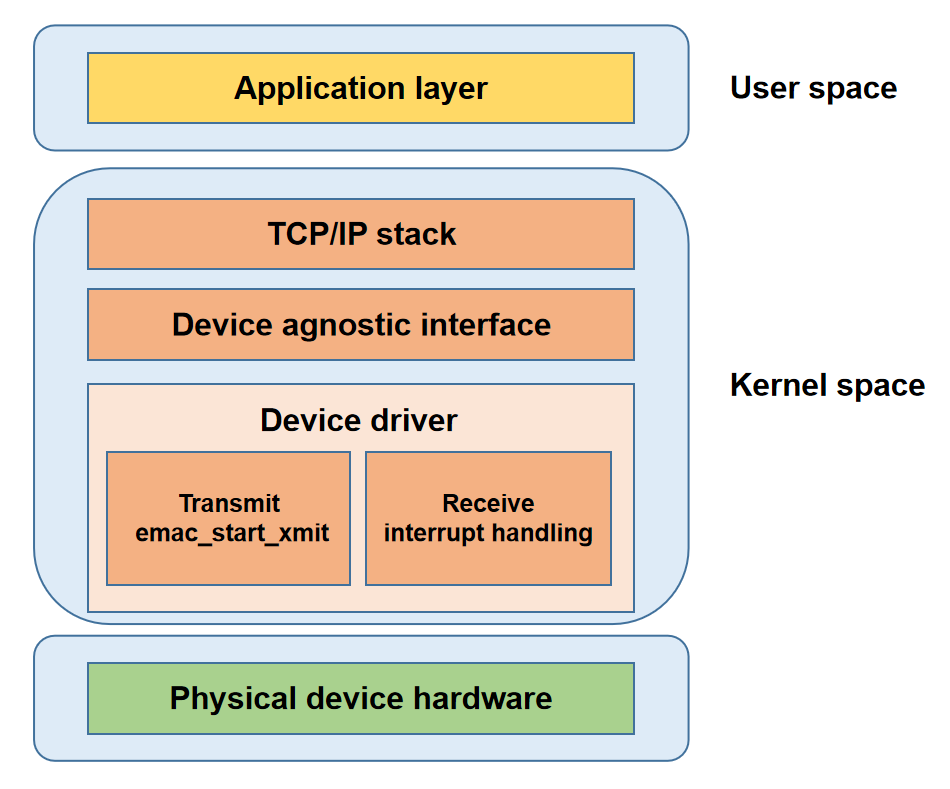
- Application layer: Provides application-facing network services.
- Protocol (TCP/IP) stack: Implements network protocols and provides system call interfaces to the application layer.
- Network Device agnostic Interface: Hides driver implementation details and provides a unified interface to the protocol stack.
- Network Device driver: Handles data transmission and device management.
- Physical device hardware: Consists of the networking hardware devices.
Source Tree
The driver source code is located in drivers/net/ethernet/stmicro/stmmac. The main file is listed below:
drivers/net/ethernet/stmicro/stmmac
|-- ...
|-- dwmac-spacemit-ethqos.c         # SpacemiT platform EQoS glue-layer driver
|-- ...
Key Features
| Feature | Description |
|---|---|
| Supports MII/RMII/RGMII interfaces | Supports multiple PHY interface types |
| Supports 10/100/1000 Mbps | Supports multiple link speeds |
| Supports Jumbo frames | Supports Ethernet frames up to 8 KB |
| Supports source address insertion and replacement | Automatically inserts or modifies source MAC addresses |
| Supports VLAN tag insertion/replacement/removal | Processes VLAN tags in hardware |
| Supports VLAN filtering | Filters packets by VLAN ID |
| Supports destination address filtering | Filters packets by destination MAC address |
| Supports source address filtering | Filters packets by source MAC address |
| Supports Hash filtering | Filters packets based on MAC address hash values |
| Supports L3 filtering | Filters packets by IP address |
| Supports L4 filtering | Filters packets by TCP/UDP port number |
| Supports IEEE 802.3x Pause | Supports Pause-frame flow control |
| Supports PFC | Supports priority flow control |
| Supports one-step timestamping | Inserts timestamps into synchronization packets |
| Supports one PPS output | Outputs a pulse-per-second signal based on the hardware clock |
| Supports WoL | Supports Wake-on-LAN |
| Supports MAC loopback mode | Useful for interface self-test and debug isolation |
| Supports programmable burst length | Configurable AXI burst transfer length |
| Supports up to 4 TX/RX queues | Supports multi-queue scheduling and traffic distribution |
| Supports Store-and-Forward | Buffers the entire frame in FIFO before transmission |
| Supports Threshold mode | Starts transmission once FIFO data reaches the threshold |
| Supports SP scheduling | Strict-priority scheduling |
| Supports WRR scheduling | Weighted round-robin scheduling |
| Supports DWRR scheduling | Deficit weighted round-robin scheduling |
| Supports WFQ scheduling | Weighted fair queuing |
| Supports CBS | Credit-based shaping |
| Supports EST | Time-aware gate scheduling |
| Supports frame preemption | High-priority frames can preempt low-priority frames |
| Supports TBS | Precise scheduling based on the hardware clock |
| Supports up to 4 DMA channels | Multi-channel parallel transfer |
| Supports TSO | Hardware TCP segmentation offload |
| Supports IPv4 checksum offload | Hardware IPv4 checksum calculation |
| Supports TCP checksum offload | Hardware TCP checksum calculation |
| Supports UDP checksum offload | Hardware UDP checksum calculation |
| Supports ICMP checksum offload | Hardware ICMP checksum calculation |
| Supports header/payload split storage | Stores Ethernet headers and payload separately |
| Supports ARP offload | Hardware response to ARP requests |
| Supports CRC offload | Hardware CRC generation and verification |
| Supports priority-based traffic distribution | Assigns channels based on priority |
Note: The K3 platform provides four GMAC instances (GMAC0 - GMAC3). Only GMAC0 and GMAC1 fully support MII, RMII, and RGMII interfaces. The remaining GMAC instances support only RGMII and RMII.
Performance Data
Throughput
| Protocol | Test Mode | TX Throughput (Mbps) | RX Throughput (Mbps) |
|---|---|---|---|
| TCP | Unidirectional | 942 | 941 |
| TCP | Bidirectional | 935 | 934 |
| UDP | Unidirectional | 956 | 956 |
| UDP | Bidirectional | 956 | 955 |
PTP Synchronization Accuracy
| Protocol | Timestamp | Steady-State Synchronization Accuracy |
|---|---|---|
| IEEE 802.3/L2 | Hardware Timestamp | < 250 ns |
| UDP/IPv4 | Hardware Timestamp | < 250 ns |
Note: Throughput fluctuates under bidirectional traffic.
Performance Testing
Throughput Testing
Test devices: Two K3 deb1 boards, referred to as deb1 A and deb1 B
Network topology: The Gigabit Ethernet ports of deb1 A and deb1 B are connected directly with an Ethernet cable.
Environment: iperf3 needs to be installed on deb1 A and deb1 B
Step 1: Configure the Gigabit Ethernet ports of both boards in the same subnet, then start the iperf3 server on deb1 A.
# deb1 A shell: set interface IP to 192.168.0.1
ifconfig end0 192.168.0.1 netmask 255.255.255.0

# deb1 A shell: start iperf3 server
iperf3 -s -B 192.168.0.1
# deb1 B shell: set interface IP to 192.168.0.2
ifconfig end0 192.168.0.2 netmask 255.255.255.0
Step 2: Start the iperf3 client on deb1 B.
Test Item 1: Unidirectional traffic test based on TCP
# deb1 B shell: test TCP TX throughput
iperf3 -c 192.168.0.1 -B 192.168.0.2 -t 60
# deb1 B shell: test TCP RX throughput
iperf3 -c 192.168.0.1 -B 192.168.0.2 -t 60 -R
Test Item 2: Bidirectional traffic test based on TCP
# deb1 B shell: test TCP full-duplex throughput
iperf3 -c 192.168.0.1 -B 192.168.0.2 -t 100 --bidir
Test Item 3: Unidirectional traffic test based on UDP
# deb1 B shell: test UDP TX throughput
iperf3 -c 192.168.0.1 -B 192.168.0.2 -u -b 1000M -t 60
# deb1 B shell: test UDP RX throughput
iperf3 -c 192.168.0.1 -B 192.168.0.2 -u -b 1000M -t 60 -R
Test Item 4: Bidirectional traffic test based on UDP
# deb1 B shell: test UDP full-duplex throughput
iperf3 -c 192.168.0.1 -B 192.168.0.2 -u -b 1000M -t 60 --bidir
PTP Testing
Test devices: Two K3 deb1 boards, referred to as deb1 A and deb1 B
Network topology: The Gigabit Ethernet ports of deb1 A and deb1 B are connected directly with an Ethernet cable.
Environment: linuxptp needs to be installed on deb1 A and deb1 B
Test Item 1: Synchronize time based on L2 Ethernet frames
# deb1 A shell: start PTP master over L2 Ethernet frames
ptp4l -i end0 -2 -H -m
# deb1 B shell: start PTP slave over L2 Ethernet frames
ptp4l -i end0 -2 -H -m -s
Test Item 2: Synchronize time based on UDP/IPv4
# deb1 A shell: set interface IP to 192.168.0.1
ifconfig end0 192.168.0.1 netmask 255.255.255.0

# deb1 A shell: start PTP master over UDP/IPv4
ptp4l -i end0 -4 -H -m

# deb1 B shell: set interface IP to 192.168.0.2
ifconfig end0 192.168.0.2 netmask 255.255.255.0

# deb1 B shell: start PTP slave over UDP/IPv4
ptp4l -i end0 -4 -H -m -s
Functionality Testing
This section focuses on TSN functions.
Test devices: Two K3 deb1 boards, referred to as deb1 A and deb1 B
Network topology: The Gigabit Ethernet ports of deb1 A and deb1 B are connected directly with an Ethernet cable.
Environment: iperf3 and tcpdump should be installed on deb1 A; iperf3, netsniff-ng, linuxptp and ethtool should be installed on deb1 B.
Step 1: Configure the Gigabit Ethernet ports of both boards in the same subnet
# deb1 A shell: set interface IP to 192.168.0.1
ifconfig end0 192.168.0.1 netmask 255.255.255.0

# deb1 B shell: set interface IP to 192.168.0.2
ifconfig end0 192.168.0.2 netmask 255.255.255.0
Step 2: Synchronize the system time and GMAC hardware timestamp on the deb1 B
# deb1 B shell: /dev/ptp1 is the PTP clock node for end0
phc2sys -s /dev/ptp1 -c CLOCK_REALTIME -O 0 -m > ptp.txt 2>&1 &

# deb1 B shell: check sync accuracy is below 1 us
tail -n 10 ptp.txt
Expected result: CLOCK_REALTIME phc offset < 1000, as shown below:
phc2sys[137.942]: CLOCK_REALTIME phc offset       -51 s2 freq     +28 delay    250
phc2sys[138.942]: CLOCK_REALTIME phc offset       -12 s2 freq     +52 delay    291
phc2sys[139.942]: CLOCK_REALTIME phc offset        29 s2 freq     +90 delay    291
phc2sys[140.943]: CLOCK_REALTIME phc offset      -101 s2 freq     -32 delay    291
phc2sys[141.943]: CLOCK_REALTIME phc offset       101 s2 freq    +140 delay    291
phc2sys[142.943]: CLOCK_REALTIME phc offset       -21 s2 freq     +48 delay    292
phc2sys[143.943]: CLOCK_REALTIME phc offset        32 s2 freq     +95 delay    291
phc2sys[144.944]: CLOCK_REALTIME phc offset       -85 s2 freq     -12 delay    291
phc2sys[145.944]: CLOCK_REALTIME phc offset        36 s2 freq     +83 delay    291
phc2sys[146.944]: CLOCK_REALTIME phc offset        10 s2 freq     +68 delay    292
Step 3: Configure the gate control scheduling algorithm with tc tool. The K3 SoC is configured with 2 TX queues by default. The following script configures 2 Traffic Classes (TCs) and maps them to the 2 TX queues respectively.
#!/bin/sh

NOW=$(date +%s)
BASE_TIME=$((NOW + 2))
NOW_NS=$((BASE_TIME * 1000000000))
echo "Base Time (ns): $NOW_NS"

tc qdisc replace dev end0 parent root stab overhead 24 linklayer ethernet taprio \
 num_tc 2 \
 map 0 0 0 0 0 0 0 1 \
 queues 1@0 1@1 \
 base-time $NOW_NS \
 sched-entry S 0x2 50000 \
 sched-entry S 0x1 450000 \
 fp P E \
 flags 0x2
Step 4: Enable FPE and wait for verification completion
# deb1 A shell: enable FPE
ethtool --set-mm end0 pmac-enabled on tx-enabled on verify-enabled on verify-time 128

# deb1 B shell: enable FPE
ethtool --set-mm end0 pmac-enabled on tx-enabled on verify-enabled on verify-time 128
After enabling FPE, wait for 1~2 minutes to allow the hardware to complete the verification process.
ethtool --show-mm end0
Expected result:
MAC Merge layer state for end0:
pMAC enabled: on
TX enabled: on
TX active: on
TX minimum fragment size: 60
RX minimum fragment size: 60
Verify enabled: on
Verify time: 128
Max verify time: 128
Verification status: SUCCEEDED
Step 5: Generate background traffic with iperf3
# deb1 A shell: start iperf3 server on deb1 A
iperf3 -s -B 192.168.0.1

# deb1 B shell: start iperf3 client on deb1 B
iperf3 -c 192.168.0.1 -B 192.168.0.2 -t 10000
Step 6: Generate critical traffic with mausezahn
# deb1 B shell: start critical traffic with priority=7, UDP=5000, payload=18B, period=1 ms
sudo mausezahn end0 -q -c 0 -d 1000 \
  -R 7 \
  -a own \
  -b 50:0a:52:0b:ca:26 \
  -A 192.168.0.2 \
  -B 192.168.0.1 \
  -t udp "sp=4000,dp=5000" \
  -P "CCCCCCCCCCCCCCCCCC"
Step 7: Capture critical traffic packets on deb1 A. The packet interval shall be approximately 1 ms.
sudo tcpdump -i end0 -e -n \
  'udp and src host 192.168.0.2 and dst host 192.168.0.1 and src port 4000 and dst port 5000 and less 100'
Output:
tcpdump: verbose output suppressed, use -v[v]... for full protocol decode
listening on end0, link-type EN10MB (Ethernet), snapshot length 262144 bytes
17:30:55.691980 fe:fe:fe:ec:26:7c > 50:0a:52:0b:ca:26, ethertype IPv4 (0x0800), length 60: 192.168.0.2.4000 > 192.168.0.1.5000: UDP, length 18
17:30:55.692981 fe:fe:fe:ec:26:7c > 50:0a:52:0b:ca:26, ethertype IPv4 (0x0800), length 60: 192.168.0.2.4000 > 192.168.0.1.5000: UDP, length 18
17:30:55.693982 fe:fe:fe:ec:26:7c > 50:0a:52:0b:ca:26, ethertype IPv4 (0x0800), length 60: 192.168.0.2.4000 > 192.168.0.1.5000: UDP, length 18
17:30:55.694980 fe:fe:fe:ec:26:7c > 50:0a:52:0b:ca:26, ethertype IPv4 (0x0800), length 60: 192.168.0.2.4000 > 192.168.0.1.5000: UDP, length 18
17:30:55.695978 fe:fe:fe:ec:26:7c > 50:0a:52:0b:ca:26, ethertype IPv4 (0x0800), length 60: 192.168.0.2.4000 > 192.168.0.1.5000: UDP, length 18
17:30:55.697398 fe:fe:fe:ec:26:7c > 50:0a:52:0b:ca:26, ethertype IPv4 (0x0800), length 60: 192.168.0.2.4000 > 192.168.0.1.5000: UDP, length 18
17:30:55.698398 fe:fe:fe:ec:26:7c > 50:0a:52:0b:ca:26, ethertype IPv4 (0x0800), length 60: 192.168.0.2.4000 > 192.168.0.1.5000: UDP, length 18
17:30:55.699398 fe:fe:fe:ec:26:7c > 50:0a:52:0b:ca:26, ethertype IPv4 (0x0800), length 60: 192.168.0.2.4000 > 192.168.0.1.5000: UDP, length 18
17:30:55.700396 fe:fe:fe:ec:26:7c > 50:0a:52:0b:ca:26, ethertype IPv4 (0x0800), length 60: 192.168.0.2.4000 > 192.168.0.1.5000: UDP, length 18
17:30:55.701398 fe:fe:fe:ec:26:7c > 50:0a:52:0b:ca:26, ethertype IPv4 (0x0800), length 60: 192.168.0.2.4000 > 192.168.0.1.5000: UDP, length 18
17:30:55.702397 fe:fe:fe:ec:26:7c > 50:0a:52:0b:ca:26, ethertype IPv4 (0x0800), length 60: 192.168.0.2.4000 > 192.168.0.1.5000: UDP, length 18
17:30:55.703397 fe:fe:fe:ec:26:7c > 50:0a:52:0b:ca:26, ethertype IPv4 (0x0800), length 60: 192.168.0.2.4000 > 192.168.0.1.5000: UDP, length 18
Note: This is a rough measurement. tcpdump captures packets at the protocol stack level, which comes with inherent measurement errors. For accurate measurements, a dedicated TSN protocol analyzer is required to capture the on-wire data.
Configuration
Configuration mainly includes:
- Kconfig settings
- DTS settings
Kconfig Settings
DWMAC_SPACEMIT_ETHQOS: enables the SpacemiT EQoS controller driver.
config DWMAC_SPACEMIT_ETHQOS
  tristate "Spacemit ETHQOS support"
  depends on OF && (SOC_SPACEMIT || COMPILE_TEST)
  help
    Support for the Spacemit ETHQOS core.

    This selects the Spacemit ETHQOS glue layer support for the
    stmmac device driver.
DTS Settings
pinctrl
GMAC pin configuration depends on the board-level hardware design. In k3-pinctrl.dtsi, GMAC-related pins are grouped by function. GMAC0 is used as an example below:
gmac0_base_pins: base pin group used directly in RMII modegmac0_rgmii_add_pins: additional pins required in RGMII mode on top of the base pin groupgmac0_mii_add_pins: additional pins required in MII mode on top of the RGMII configurationgmac0_int_pins: PHY interrupt pin. Some PHY devices can output an interrupt when link status changes or a wake event occurs. This is optional.gmac0_pps_pins: PPS (pulse per second) output pin. This is optional.gmac0_refclk_pins: 25 MHz reference clock output pin used to provide a working clock to the PHY. This is optional.
All the pin groups above use function = 1, which selects the GMAC function.
gmac0_cfg: gmac0-cfg {
 /* Base pins: - Used by RMII directly */
 gmac0_base_pins: gmac0-0-pins {
  pinmux = <K3_PADCONF(0, 1)>, /* gmac0: MII=rxdv | RMII=crs_dv | RGMII=rx_ctl */
    <K3_PADCONF(1, 1)>,     /* gmac0 rx d0 */
    <K3_PADCONF(2, 1)>,     /* gmac0 rx d1 */
    <K3_PADCONF(3, 1)>,     /* gmac0: MII=rxc | RMII=ref_clk | RGMII=rxc */
    <K3_PADCONF(6, 1)>,     /* gmac0 tx d0 */
    <K3_PADCONF(7, 1)>,     /* gmac0 tx d1 */
    <K3_PADCONF(11, 1)>,    /* gmac0: MII=tx_en | RMII=tx_en | RGMII=tx_ctl */
    <K3_PADCONF(12, 1)>,    /* gmac0 mdc */
    <K3_PADCONF(13, 1)>;    /* gmac0 mdio */

  bias-disable;                /* normal bias disable */
  drive-strength = <9>;      /* DS4 */
 };

 /* RGMII extra pins: add on top of base pins */
 gmac0_rgmii_add_pins: gmac0-1-pins {
  pinmux = <K3_PADCONF(4, 1)>, /* gmac0 rx d2 */
    <K3_PADCONF(5, 1)>,     /* gmac0 rx d3 */
    <K3_PADCONF(8, 1)>,     /* gmac0 tx clk */
    <K3_PADCONF(9, 1)>,     /* gmac0 tx d2 */
    <K3_PADCONF(10, 1)>;    /* gmac0 tx d3 */

  bias-disable;                /* normal bias disable */
  drive-strength = <9>;      /* DS4 */
 };

 /* MII extra pins: add on top of (base + rgmii extra pins) */
 gmac0_mii_add_pins: gmac0-2-pins {
  pinmux = <K3_PADCONF(15, 1)>, /* gmac0 rxer */
    <K3_PADCONF(16, 1)>,     /* gmac0 txer */
    <K3_PADCONF(17, 1)>,     /* gmac0 crs */
    <K3_PADCONF(18, 1)>;     /* gmac0 col */

  bias-disable;                 /* normal bias disable */
  drive-strength = <9>;      /* DS4 */
 };

 /* Optional int pins */
 gmac0_int_pins: gmac0-3-pins {
  pinmux = <K3_PADCONF(14, 1)>; /* gmac0 int (from phy) */

  bias-disable;                 /* normal bias disable */
  drive-strength = <9>;      /* DS4 */
 };

 /* Optional pps pins */
 gmac0_pps_pins: gmac0-4-pins {
  pinmux = <K3_PADCONF(19, 1)>; /* gmac0 pps (tsn/1588) */

  bias-disable;                 /* normal bias disable */
  drive-strength = <9>;      /* DS4 */
 };

 /* Optional reference clock output */
 gmac0_refclk_pins: gmac0-5-pins {
  pinmux = <K3_PADCONF(20, 1)>; /* gmac0 clk ref */

  bias-disable;                 /* normal bias disable */
  drive-strength = <9>;      /* DS4 */
 };
};
During actual configuration, select the appropriate pinmux groups based on the board-level hardware design. For example, on K3 deb1:
- GMAC0 is connected to an external RGMII PHY
- the PHY working clock is provided by an external crystal
- GMAC0 PPS output is not enabled
- PHY interrupt is not used
- the IO voltage domain is 1.8 V
Based on this hardware design:
gmac0-2-pins,gmac0-4-pins, andgmac0-5-pinscan be removed from the solution DTS- the
power-sourceproperty should be set to 1.8 V
&pinctrl {
 gmac0-cfg {
  /delete-node/ gmac0-2-pins;     // release unused pins, which may be required by other modules
  /delete-node/ gmac0-4-pins;
  /delete-node/ gmac0-5-pins;

  gmac0-0-pins {
   power-source = <1800>;      // must match the actual IO supply voltage, or back-powering and malfunction may occur
  };

  gmac0-1-pins {
   power-source = <1800>;
  };

  gmac0-3-pins {
   power-source = <1800>;
  };

  /**
   * Add a PHY reset pin configuration.
   * This pin uses function 0 so that it is multiplexed as GPIO.
   * It is used to control PHY hardware reset. See the next section for details.
   */
  gmac0-6-pins {
   pinmux = <K3_PADCONF(15, 0)>;

   bias-disable;
   drive-strength = <25>;
   power-source = <1800>;
  };
 };
}
Then reference the pin configuration from the Ethernet node in the board DTS:
ð0 {
pinctrl-names = "default";
pinctrl-0 = <&gmac0_cfg>;
...
}
GPIO
Check the board schematic to identify the GPIO used for the Ethernet PHY reset signal. On K3 deb1, the PHY reset control pin is GPIO15.
In addition to configuring the pin function as described in the previous section, add the reset-related properties to the eth0 node in the board DTS:
ð0 {
...
snps,reset-gpios = <&gpio 0 15 GPIO_ACTIVE_LOW>;
snps,reset-delays-us = <0 20000 100000>;
...
}
In this example, reset is held for 20 us, and the post-reset wait time is 100 us. The actual timing must satisfy the requirements defined in the PHY datasheet.
PHY Configuration
The main PHY-related settings include:
phy-modephy-handle- the
phychild node
Within the phy child node:
- device matching is performed through the PHY ID in
compatible - the PHY address is configured through
reg - optional
LEDsettings can be added when needed
The following example shows the configuration used on K3 deb1:
ð0 {
...
phy-mode = "rgmii";
phy-handle = <&gmac0_phy>;
...
mdio {
#address-cells = <1>;
#size-cells = <0>;
compatible = "snps,dwmac-mdio";
gmac0_phy: ethernet-phy@1 {
compatible = "ethernet-phy-id001c.c916",
"ethernet-phy-ieee802.3-c22";
reg = <1>;
leds {
#address-cells = <1>;
#size-cells = <0>;
led@1 {
reg = <1>;
function = LED_FUNCTION_LAN;
color = <LED_COLOR_ID_GREEN>;
default-state = "keep";
};
led@2 {
reg = <2>;
function = LED_FUNCTION_LAN;
color = <LED_COLOR_ID_YELLOW>;
default-state = "keep";
};
};
};
}
...
};
TX phase and RX phase
With an RGMII interface, phase skew between clock and data signals is affected by board-level PCB routing. In severe cases, this can cause PHY sampling errors.
The K3 platform supports clock phase offset configuration to:
- optimize the sampling window
- help meet strict setup and hold timing margins
The following example shows the configuration used on K3 deb1:
ð0 {
...
spacemit,clk-tuning-enable;
spacemit,clk-tuning-by-delayline;
spacemit,tx-phase = <73>;
spacemit,rx-phase = <61>;
...
};
spacemit,clk-tuning-enable enables clock phase adjustment on the K3 platform.
In the following cases, this feature is usually not required:
- the PHY uses an RMII or MII interface
- delay is already provided on the PHY side
When phase adjustment is handled by the K3 side, one of the following methods can be used:
spacemit,clk-tuning-by-reg
spacemit,clk-tuning-by-delayline
spacemit,clk-tuning-by-clk-revert
The values of spacemit,tx-phase and spacemit,rx-phase correspond to actual adjustment amounts. However, the actual effect depends heavily on factors such as board-level power conditions, so there is no exact absolute mapping between the configured value and the physical phase shift.
Different tuning methods provide different adjustment ranges:
spacemit,clk-tuning-by-reg:tx-phaseandrx-phaserange from 0 to 7, providing 8 tuning stepsspacemit,clk-tuning-by-delayline:tx-phaseandrx-phaserange from 0 to 254, providing 255 tuning stepsspacemit,clk-tuning-by-clk-revert: the clock phase is inverted by 180°; this method is used only in RMII mode
Other Settings
-
max-speed: Sets the maximum speed supported by the platform.ð0 {...max-speed = <1000>;...}; -
Enable WoL interrupt support.
ð0 {...spacemit,wake-irq-enable;...};
Note: When this property is present, the controller can respond to wake events and generate an interrupt to notify the CPU. Without this property, the controller can still respond to wake events, but the wake interrupt remains masked.
Complete DTS Configuration
Based on the settings described above, a complete configuration example is shown below.
ð0 {
pinctrl-names = "default";
pinctrl-0 = <&gmac0_cfg>;
max-speed = <1000>;
phy-mode = "rgmii";
phy-handle = <&gmac0_phy>;
snps,reset-gpios = <&gpio 0 15 GPIO_ACTIVE_LOW>;
snps,reset-delays-us = <0 20000 100000>;
spacemit,wake-irq-enable;
spacemit,clk-tuning-enable;
spacemit,clk-tuning-by-delayline;
spacemit,tx-phase = <73>;
spacemit,rx-phase = <61>;
status = "okay";
mdio {
#address-cells = <1>;
#size-cells = <0>;
compatible = "snps,dwmac-mdio";
gmac0_phy: ethernet-phy@1 {
compatible = "ethernet-phy-id001c.c916",
"ethernet-phy-ieee802.3-c22";
reg = <1>;
leds {
#address-cells = <1>;
#size-cells = <0>;
led@1 {
reg = <1>;
function = LED_FUNCTION_LAN;
color = <LED_COLOR_ID_GREEN>;
default-state = "keep";
};
led@2 {
reg = <2>;
function = LED_FUNCTION_LAN;
color = <LED_COLOR_ID_YELLOW>;
default-state = "keep";
};
};
};
};
};
Common Commands
View information for a specific network interface
ip addr show dev <INTERFACE>
Bring a network interface up
ip link set dev <INTERFACE> up
Bring a network interface down
ip link set dev <INTERFACE> down
View link status for a network interface
ip link show dev <INTERFACE>
Assign a static IP address to a network interface
ip addr add <IP>/<PREFIX> dev <INTERFACE>
Remove an IP address from a network interface
ip addr del <IP>/<PREFIX> dev <INTERFACE>
View basic NIC information
ethtool <INTERFACE>
View NIC driver information
ethtool -i <INTERFACE>
View NIC statistics
ethtool -S <INTERFACE>
View NIC offload features
ethtool -k <INTERFACE>
View NIC negotiation parameters
ethtool -a <INTERFACE>
Set NIC negotiation parameters
ethtool -A <INTERFACE> autoneg on rx on tx on
Disable NIC RX Pause
ethtool -A <INTERFACE> rx off
Disable NIC TX Pause
ethtool -A <INTERFACE> tx off
View NIC ring buffer parameters
ethtool -g <INTERFACE>
Set NIC ring buffer parameters
ethtool -G <INTERFACE> rx 1024 tx 1024
View NIC channel information
ethtool -l <INTERFACE>
Set NIC queue counts
ethtool -L <INTERFACE> tx 2 rx 2
View NIC interrupt coalescing parameters
ethtool -c <INTERFACE>
Set NIC interrupt coalescing parameters
ethtool -C <INTERFACE> rx-usecs 100 tx-usecs 100
View NIC timestamping capabilities
ethtool -T <INTERFACE>
View NIC EEE status
ethtool --show-eee <INTERFACE>
Disable NIC EEE
ethtool --set-eee <INTERFACE> eee off
Enable NIC EEE
ethtool --set-eee <INTERFACE> eee on
View NIC Wake-on-LAN status
ethtool <INTERFACE>
Disable NIC Wake-on-LAN
ethtool -s <INTERFACE> wol d
Enable NIC Wake-on-LAN
ethtool -s <INTERFACE> wol g
View current NIC speed and duplex settings
ethtool <INTERFACE>
Set NIC speed, duplex mode, and auto-negotiation parameters
ethtool -s <INTERFACE> speed 1000 duplex full autoneg on
View NIC self-test capability
ethtool -t <INTERFACE>
Run NIC self-test
ethtool -t <INTERFACE>
Debugging
debugfs
The driver provides a debugfs node that can be used to query and adjust the tx phase and rx phase parameters:
# View current phase settings
/sys/kernel/debug/cac80000.ethernet # cat clk_tuning
Emac MII Interface : RGMII
Current rx phase : 73
Current tx phase : 60

# Modify phase settings
echo tx 50 > /sys/kernel/debug/cac80000.ethernet/clk_tuning
echo rx 50 > /sys/kernel/debug/cac80000.ethernet/clk_tuning
Testing
The following commands are commonly used during interface bring-up and connectivity testing.
View network interface information
ifconfig -a
Bring the network interface up
ip link set dev <INTERFACE> up
Bring the network interface down
ip link set dev <INTERFACE> down
Test connectivity to another host, assuming the peer IP address is 192.168.0.1
ping 192.168.0.1
Obtain an IP address through DHCP
udhcpc
Run traffic testing with iperf3
iperf3 -c <server_ip> -t 84200 --bidir
FAQ
Common Issues
DMA engine initialization failed
If DMA engine initialization failed appears when the network interface is brought up, it usually indicates that the clock input from the PHY side to the GMAC side is not ready.
Check the following based on interface mode:
- For RGMII or MII mode, verify that the hardware path from PHY RXC to GMAC RXC is connected correctly.
- For RMII mode, verify that the 50 MHz reference clock is provided by the PHY and connected to GMAC REF_CLK.
~ # ifconfig eth0 up
[   43.944269] dwmac-spacemit-ethqos cac80000.ethernet eth0: Register MEM_TYPE_PAGE_POOL RxQ-0
[   43.950621] dwmac-spacemit-ethqos cac80000.ethernet eth0: Register MEM_TYPE_PAGE_POOL RxQ-1
[   43.983474] dwmac-spacemit-ethqos cac80000.ethernet eth0: PHY [stmmac-0:01] driver [RTL8211F Gigabit Ethernet] (irq=POLL)
[   44.993454] dwmac-spacemit-ethqos cac80000.ethernet eth0: Failed to reset the dma
[   44.998275] dwmac-spacemit-ethqos cac80000.ethernet eth0: stmmac_hw_setup: DMA engine initialization failed
[   45.008004] dwmac-spacemit-ethqos cac80000.ethernet eth0: __stmmac_open: Hw setup failed
Link Never Comes Up
If the network cable is connected, but the link never comes up after the interface is enabled, the following checks are recommended:
-
The PHY device itself may not be operating correctly.
- The RJ45 LEDs can be used as a quick indicator. If the LEDs remain off, the PHY is likely not working properly.
-
The pin voltage configuration may not match the actual IO voltage.
-
The GMAC MDC/MDIO signals may be abnormal.
- Check the board-level connections carefully.
~ # ifconfig eth0 up
[   10.713066] dwmac-spacemit-ethqos cac80000.ethernet eth0: Register MEM_TYPE_PAGE_POOL RxQ-0
[   10.719441] dwmac-spacemit-ethqos cac80000.ethernet eth0: Register MEM_TYPE_PAGE_POOL RxQ-1
[   10.753582] dwmac-spacemit-ethqos cac80000.ethernet eth0: PHY [stmmac-0:01] driver [RTL8211F Gigabit Ethernet] (irq=POLL)
[   10.763126] dwmac4: Master AXI performs any burst length
[   10.767196] dwmac-spacemit-ethqos cac80000.ethernet eth0: No Safety Features support found
[   10.775655] dwmac-spacemit-ethqos cac80000.ethernet eth0: IEEE 1588-2008 Advanced Timestamp supported
[   10.784722] dwmac-spacemit-ethqos cac80000.ethernet eth0: registered PTP clock
[   10.791825] dwmac-spacemit-ethqos cac80000.ethernet eth0: configuring for phy/rgmii link mode
~ #
~ #
~ # ethtool eth0
Settings for eth0:
  Supported ports: [ TP MII ]
  Supported link modes:   10baseT/Full
        100baseT/Full
        1000baseT/Full
  Supported pause frame use: Symmetric Receive-only
  Supports auto-negotiation: Yes
  Advertised link modes:  10baseT/Full
        100baseT/Full
        1000baseT/Full
  Advertised pause frame use: Symmetric Receive-only
  Advertised auto-negotiation: Yes
  Speed: Unknown!
  Duplex: Unknown! (255)
  Port: Twisted Pair
  PHYAD: 1
  Transceiver: internal
  Auto-negotiation: on
  MDI-X: Unknown
  Supports Wake-on: ug
  Wake-on: d
  Current message level: 0x0000003f (63)
          drv probe link timer ifdown ifup
  Link detected: no
Packet Errors During Transmission or Reception
Adjust phase settings through the debugfs node first. In most cases, a suitable tx phase and rx phase combination can be identified in one of the following ways:
-
Capture the eye diagram with an oscilloscope and determine the optimal phase configuration.
-
Start with a baseline
tx phaseandrx phasethat allows successful ping to the peer, then sweep eithertx phaseorrx phaseand select the midpoint of the valid range.
No Received Packets or Abnormal RX Counters
-
One possible cause is incorrect phase configuration, which introduces packet errors and causes the hardware to discard frames.
-
Another possible cause is missing or abnormal GMAC RXD signaling, usually due to a disconnected or faulty link to the PHY side.
- This can be confirmed further with MAC loopback and PHY loopback testing.
- In such cases, MAC loopback often passes while PHY loopback fails.