V2D
This document describes the features and usage of the V2D module on the SpacemiT platform.
Overview
The V2D driver on the SpacemiT platform provides hardware acceleration for 2D graphics processing.
Functionality
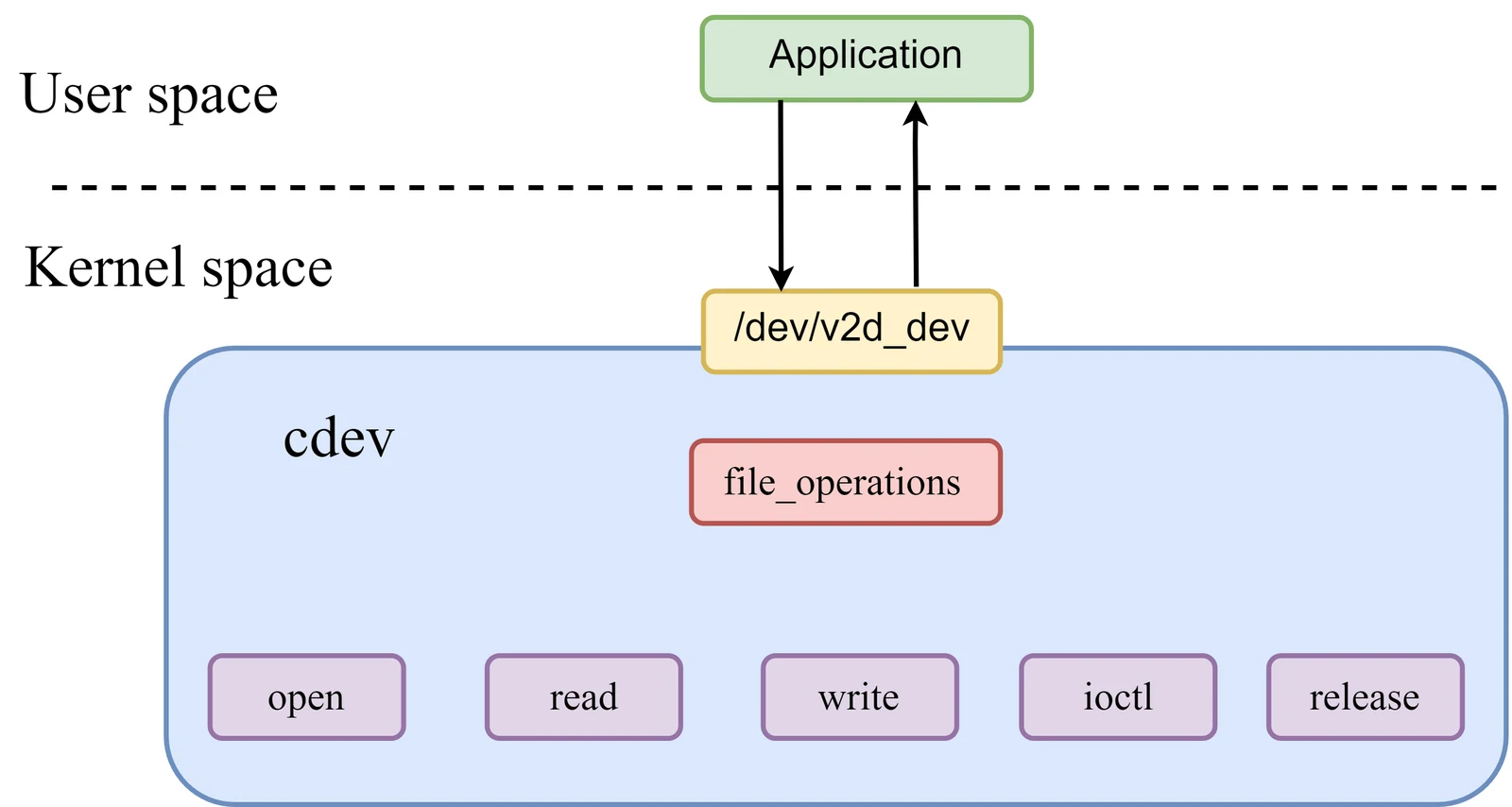
Driver model
The V2D driver uses a character device model. User-space applications interact with the driver through the /dev/v2d_dev device node. Supported standard interfaces include:
open(): called when the device is opened.read(): reads data from the device.write(): writes data to the device.ioctl(): handles control commands.release(): called when the device is closed.
Core capabilities
The V2D driver supports the following 2D image-processing operations:
- Region fill
- Scaling
- Rotation
- Cropping
- Image format conversion
Source Tree Overview
The kernel source tree for the SpacemiT V2D driver is organized as follows:
drivers/soc/spacemit$ tree v2d
v2d
|-- csc_matrix.h
|-- Kconfig
|-- Makefile
|-- v2d_drv.c                   // V2D driver
|-- v2d_drv.h
|-- v2d_hw.c
|-- v2d_iommu.c                 // V2D IOMMU driver
|-- v2d_priv.h
|-- v2d_reg.h
Key Features
Feature Summary
| Feature | Description |
|---|---|
| Color fill | Supports image color fill operations. |
| Rotation | Supports image rotation at 0°, 90°, 180°, and 270°, as well as mirroring. |
| Cropping | Supports image cropping. |
| Scaling | Supports scaling from $1/8\times$ to $8\times$. |
| Format conversion | Supports color-space conversion between YUV and RGB formats. |
Performance
| Function | Performance specification |
|---|---|
| Color fill | 4096x2304@60 FPS |
| Format conversion | 4096x2304@60 FPS |
Configuration
This mainly includes Kconfig configuration and DTS configuration.
CONFIG Options
CONFIG_SPACEMIT_V2D: V2D driver option for the SpacemiT platform. By default, this option is set to Y.
 Device Drivers  --->
 SOC (System On Chip) specific Drivers  --->
 	<*> Spacemit V2D Engine Driver
DTS Configuration
Clock Configuration
V2D uses two primary clock sources: v2d-io and v2d-core.
For v2d-io, four clock rates are supported: 312 MHz, 499 MHz, 624 MHz, and 750 MHz. The default setting is 750 MHz. Dynamic adjustment is supported through /sys/bus/platform/devices/c0100000.v2d/clkrate.
The following example shows the platform clock and reset configuration for V2D.
// linux-6.18/arch/riscv/boot/dts/spacemit/k3.dtsi
v2d: v2d@c0100000 {
	compatible = "spacemit,v2d";
	reg =  <0x0 0xc0100000 0x0 0x1000>;
	reg-names = "v2dreg";
	clocks = <&syscon_apmu CLK_APMU_LCD_MCLK>,
			<&syscon_apmu CLK_APMU_V2D>;
	clock-names = "v2d-io", "v2d-core";
	resets = <&syscon_apmu RESET_APMU_V2D>;
	reset-names = "v2d_reset";
	interrupt-parent = <&saplic>;
	interrupts = <86 IRQ_TYPE_LEVEL_HIGH>;
	status = "okay";
};
Interface
API Overview
Applications access V2D functions through the API layer. The main capabilities are grouped into the following 2D graphics operations:
FillBitblitBlend
V2D_BeginJob
int32_t V2D_BeginJob(V2D_HANDLE *phHandle);
| Description | Creates a V2D job queue |
|---|---|
| Parameters | phHandle: handle pointer |
| Return value | 0: success; -1: failure |
V2D_EndJob
int32_t V2D_EndJob(V2D_HANDLE hHandle);
| Description | Submits the job queue to the V2D driver and starts execution. |
|---|---|
| Parameters | hHandle: handle |
| Return value | 0: success; -1: failure |
V2D_AddFillTask
int32_t V2D_AddFillTask(V2D_HANDLE hHandle,
			V2D_SURFACE_S *pstDst,
			V2D_AREA_S *pstDstRect,
			V2D_FILLCOLOR_S *pstFillColor);
| Description | Adds a task to the V2D job queue to fill the target bitmap region with a specified color. |
|---|---|
| Parameters | hHandle: handle; pstDst: destination bitmap; pstDstRect: destination operation region; pstFillColor: fill color structure |
| Return value | 0: success; -1: failure |
V2D_AddBitblitTask
int32_t V2D_AddBitblitTask(V2D_HANDLE hHandle,
				V2D_SURFACE_S *pstDst,
				V2D_AREA_S *pstDstRect,
				V2D_SURFACE_S *pstSrc,
				V2D_AREA_S *pstSrcRect, V2D_CSC_MODE_E enCSCMode);
| Description | Adds a task to the V2D job queue to copy the source bitmap operation region into the destination bitmap operation region. |
|---|---|
| Parameters | hHandle: handle; pstDst: destination bitmap; pstDstRect: destination operation region; pstSrc: source bitmap; pstSrcRect: source operation region; enCSCMode: flag indicating whether color-space conversion is required |
| Return value | 0: success; -1: failure |
V2D_AddBlendTask
int32_t V2D_AddBlendTask(V2D_HANDLE hHandle,
			     V2D_SURFACE_S *pstBackGround,
			     V2D_AREA_S *pstBackGroundRect,
			     V2D_SURFACE_S *pstForeGround,
			     V2D_AREA_S *pstForeGroundRect,
			     V2D_SURFACE_S *pstMask,
			     V2D_AREA_S *pstMaskRect,
			     V2D_SURFACE_S *pstDst,
			     V2D_AREA_S *pstDstRect,
			     V2D_BLEND_CONF_S *pstBlendConf,
			     V2D_ROTATE_ANGLE_E enForeRotateAngle,
			     V2D_ROTATE_ANGLE_E enBackRotateAngle,
			     V2D_CSC_MODE_E enForeCSCMode,
			     V2D_CSC_MODE_E enBackCSCMode,
			     V2D_PALETTE_S *pstPalette,
			     V2D_DITHER_E dither);
| Description | Adds a task to the V2D job queue to perform cropping, rotation, format conversion, scaling, and related operations on source bitmaps and write the result to the destination bitmap. |
|---|---|
| Parameters | hHandle: handle; pstBackGround: background bitmap; pstBackGroundRect: background operation region; pstForeGround: foreground bitmap; pstForeGroundRect: foreground operation region;pstMask: mask bitmap; pstMaskRect: mask operation region; pstDst: destination bitmap; pstDstRect: destination operation region; pstBlendConf: blend configuration structure; enForeRotateAngle: foreground rotation angle; enBackRotateAngle: background rotation angle; enForeCSCMode: foreground CSC conversion mode; enBackCSCMode: background CSC conversion mode; pstPalette: pointer to the L8-format palette structure; dither: selected dither mode |
| Return value | 0: success; -1: failure |
Debugging
View the V2D I/O clock frequency
# cat /sys/bus/platform/devices/c0100000.v2d/clkrate
409600000
Testing
- Fill test case
Runs the color fill test:
# cd /usr/share/v2d
# v2d_test --fill
v2d fill test case successful!
- Bitblit test case
Runs the bit-block transfer test:
# cd /usr/share/v2d
# v2d_test --blit
v2d blit test case successful!
- Blend test case
Runs the image blending test:
# cd /usr/share/v2d
# v2d_test --blend
v2d blend test case successful!