BT
This document describes common methods and considerations for porting Bluetooth modules to the K3 platform.
Overview
The K3 platform requires an external BT module to provide Bluetooth functionality and supports UART / USB / SDIO interfaces.
Features
The BT software stack used on the K3 platform is BlueZ. The software framework based on BlueZ can be divided into the following layers from top to bottom:
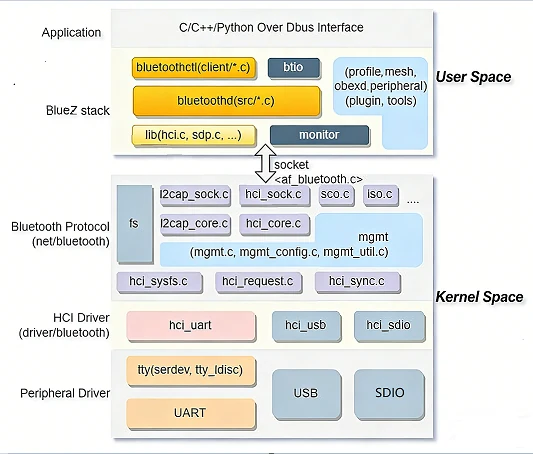
- Bluetooth Application Layer
Implements application logic and interacts with the protocol stack through the
DBusinterface. - BlueZ Protocol Stack User Space Manages protocols, provides application interfaces, and schedules services.
- BlueZ Protocol Stack Kernel Space Handles L2CAP fragmentation and reassembly, ACL/SCO link management, and HCI core scheduling.
- HCI Transport Driver Transfers HCI packets between the host and controller through UART / USB / SDIO and other physical interfaces.
- Interface Controller Provides the BT data transport interface.
Source Code Structure
BT-related kernel code is located in:
linux-6.18/
|-- net/bluetooth/          # Bluetooth core protocol stack
|-- drivers/bluetooth/      # HCI transport and vendor drivers
|-- drivers/rfkill/         # rfkill generic framework
`-- arch/riscv/boot/dts/spacemit/       # Board-level BT power / GPIO configuration
The BT driver-related code is located in drivers/bluetooth/:
hci_h4.chci_h5.chci_ldisc.chci_serdev.cbtusb.cbtsdio.cbtbcm.cbtrtl.c
USB Bluetooth also uses drivers/usb/misc/onboard_usb_dev.c in the USB framework, which powers on the module and deasserts reset before device enumeration.
The K3 BT driver uses the serdev framework. Before serdev, the kernel provided only tty_ldisc devices for UART Bluetooth, so commands such as hciattach were required to attach the device and download firmware. With serdev, the HCI driver performs these operations.
When porting BT to K3, adapt at the hci layer. The required adaptation depends on the vendor transport protocol. For example, rtl8852bs uses H5, so add the following entry to hci_h5.c:
static const struct of_device_id rtl_bluetooth_of_match[] = {
#ifdef CONFIG_BT_HCIUART_RTL
        { .compatible = "realtek,rtl8852bs-bt",
                .data = (const void *)&h5_data_rtl8822cs },
#endif
        { },
};
Key Features
Platform UART Interface Features
| Feature | Description |
|---|---|
| 4-wire flow control | CTS/RTS hardware flow control |
| Maximum baud rate | Up to 3.6 Mbps |
| DMA support | DMA transfer mode |
Platform USB Interface Features
The K3 USB controller supports up to SuperSpeed (5 Gbps). Bluetooth modules require only High-Speed (480 Mbps), so configure maximum-speed = "high-speed" and enable only the USB 2 PHY. For complete controller capabilities, including modes, speeds, PHYs, and low-power features, see the USB Development Guide.
Module Performance Specifications
| Module Model | Bluetooth Version | HCI Interface |
|---|---|---|
| rtl8852bs | Bluetooth 5.2 | UART, H4/H5 transport layer |
| rtl8852be | Bluetooth 5.2 | USB |
Both drivers are included in the kernel tree: rtl8852bs uses hci_h5.c, whereas rtl8852be uses btusb.c (VID 0x0bda / PID 0xb85b). No additional out-of-tree drivers are required.
Configuration
Configure the driver and DTS as follows.
Kconfig Configuration
Protocol Stack Configuration
Networking support (NET [=y])
        Bluetooth subsystem support (BT [=m])
                Bluetooth Classic (BR/EDR) features (BT_BREDR [=y])
                        RFCOMM protocol support (BT_RFCOMM [=m])
                                RFCOMM TTY support (BT_RFCOMM_TTY [=y])
                        BNEP protocol support (BT_BNEP [=y])
                        HIDP protocol support (BT_HIDP [=y])
                Bluetooth Low Energy (LE) features (BT_LE [=y])
        Export Bluetooth internals in debugfs (BT_DEBUGFS [=y])
UART HCI Configuration
Networking support (NET [=y])
        Bluetooth subsystem support (BT [=m])
                Bluetooth device drivers
                        HCI UART driver (BT_HCIUART [=m])
                                UART (H4) protocol support (BT_HCIUART_H4 [=y])
                                Three-wire UART (H5) protocol support (BT_HCIUART_3WIRE [=y])
                                Realtek protocol support (BT_HCIUART_RTL [=y])
H4 and H5 are enabled by default. Realtek Bluetooth UART uses the H5 protocol. BT_HCIUART_3WIRE is automatically enabled by BT_HCIUART_RTL through select; it cannot be changed independently in menuconfig and therefore does not appear in k3_defconfig.
USB HCI Configuration
Networking support (NET [=y])
        Bluetooth subsystem support (BT [=m])
                Bluetooth device drivers
                        HCI USB driver (BT_HCIBTUSB [=m])
                                Broadcom protocol support (BT_HCIBTUSB_BCM [=y])
                                Realtek protocol support (BT_HCIBTUSB_RTL [=y])
BT_HCIBTUSB_BCM and BT_HCIBTUSB_RTL provide USB support for Broadcom and Realtek devices, respectively. Both default to y.
If USB Bluetooth relies on onboard_usb_dev to power on and deassert reset before enumeration, enable CONFIG_USB_ONBOARD_DEV:
Device Drivers
        USB support (USB_SUPPORT [=y])
                USB Miscellaneous drivers
                        Onboard USB device support (USB_ONBOARD_DEV [=y])
SDIO HCI Configuration
Networking support (NET [=y])
        Bluetooth subsystem support (BT [=m])
                Bluetooth device drivers
                        HCI SDIO driver (BT_HCIBTSDIO [=m])
The corresponding driver is drivers/bluetooth/btsdio.c. Current K3 board DTS files do not use BT over SDIO because SDIO is used for Wi-Fi. Enable this configuration only when using an SDIO Bluetooth module.
AVRCP Configuration
Device Drivers
        Input device support
                Generic input layer (needed for keyboard, mouse, ...) (INPUT [=y])
                        Miscellaneous devices (INPUT_MISC [=y])
                                User level driver support (INPUT_UINPUT [=y])
Enable INPUT_UINPUT to deliver AVRCP key values and related information to user-space applications through an input device.
HOGP Configuration
Device Drivers
        HID bus support (HID_SUPPORT [=y])
                HID bus core support (HID[=y])
                        User-space I/O driver support for HID subsystem (UHID [=y])
Enable UHID to deliver HoG key values, such as KEY_1, KEY_2, and KEY_ESC, to user-space applications through an input device.
DTS Configuration
USB Interface Configuration
Configure the BT node according to the hardware design. The following &usb3_portc example is from k3-pico.dtsi; k3_deb1.dts and other Pico-series board DTS files include this configuration. BT is connected to portc:
&usb3_portc_u2phy {
        status = "okay";
};

&usb3_portc_u3phy {
        status = "disabled";
};

&usb3_portc {
        /* Bluetooth, only enable USB2 phy */
        #address-cells = <1>;
        #size-cells = <0>;
        /delete-property/ phys;
        /delete-property/ phy-names;
        maximum-speed = "high-speed";
        reset-on-resume;
        phys = <&usb3_portc_u2phy>;
        phy-names = "usb2-phy";
        pinctrl-names = "default";
        pinctrl-0 = <&bt_reset_cfg>;
        status = "okay";

        bluetooth@1 {
                /* RTL8852BE, reset must be deasserted before enumeration */
                compatible = "usbbda,b85b";
                reg = <1>;
                vdd-supply = <&p3v3>;
                reset-gpios = <&gpio 0 30 GPIO_ACTIVE_LOW>;
        };
};
maximum-speedspecifies the maximum speed. The Bluetooth module requires only High-Speed mode.physspecifies the controller PHY. Only the USB 2.0 PHY is enabled.reset-on-resumeresets the device after resume.bluetooth@1is the USB BT child-device node.compatibleuses theusbVID,PIDformat;usbbda,b85bcorresponds to RTL8852BE VID 0x0bda / PID 0xb85b and must matchbtusb_match_tableinbtusb.c.regis the USB port number.reset-gpiosis the module reset pin. The USB framework'sonboard_usb_devdriver manages it; its device table inonboard_usb_dev.calready includes RTL8852BE. The driver powers on the module and deasserts reset before device enumeration.vdd-supplyis the module power supply.
Configure the reset pin pinctrl according to the hardware design:
bt_reset_cfg: bt-reset-cfg {
        bt-reset-pins {
                pinmux = <K3_PADCONF(30, 0)>;

                bias-pull-up;
                drive-strength = <38>;
                power-source = <3300>;
        };
};
The onboard_usb_dev driver controls the USB BT reset pin before enumeration. Therefore, when btusb requests the pin, it receives -EBUSY, skips the driver-level hardware reset, and uses the USB-layer reset for recovery. This is expected behavior. This approach does not require an additional rfkill-gpio node, but it does require CONFIG_USB_ONBOARD_DEV.
UART Interface Configuration
Configure the BT node according to the hardware design. The following example uses &uart2 in k3_evb.dts:
&uart2 {
        pinctrl-names = "default";
        pinctrl-0 = <&uart2_0_cfg>;
        status = "okay";

        bluetooth {
                compatible = "realtek,rtl8852bs-bt";
                pinctrl-names = "default";
                pinctrl-0 = <&bt_hostwake_cfg &bt_enable_cfg>;
                device-wake-gpios = <&gpio 1 31 GPIO_ACTIVE_HIGH>;
                enable-gpios = <&gpio 2 29 GPIO_ACTIVE_HIGH>;
                interrupts-extended = <&pinctrl 62 IRQ_TYPE_EDGE_FALLING>;
        };
};
device-wake-gpiosis the GPIO used to wake the BT module. Configure its active level according to the hardware design.enable-gpiosis the GPIO used to enable the BT module. Configure its active level according to the hardware design.interrupts-extendedspecifies the interrupt pin used by the BT module to wake the host. The driver obtains this interrupt throughof_irq_get(); it does not use thehost-wake-gpiosproperty, so configuring that property incorrectly has no effect.pinctrl-0must configure both the host-wake and enable pin pads; otherwise, pin multiplexing is incorrect.
Corresponding pinctrl configuration (k3_evb.dts):
bt_hostwake_cfg: bt-hostwake-cfg {
        bt-hostwake-pins {
                pinmux = <K3_PADCONF(62, 0)>;

                bias-pull-up;
                drive-strength = <25>;
                power-source = <1800>;
        };
};

bt_enable_cfg: bt-enable-cfg {
        bt-enable-pins {
                pinmux = <K3_PADCONF(132, 1)>;

                bias-pull-up;
                drive-strength = <25>;
                power-source = <1800>;
        };
};
The host-wake pin PAD 62 matches the interrupt number in interrupts-extended.
Configure Bluetooth pinctrl according to the hardware design. Flow control is enabled by default:
uart2_0_cfg: uart2-0-cfg {
        uart2-0-pins {
                pinmux = <K3_PADCONF(134, 2)>,  /* uart2 tx */
                         <K3_PADCONF(135, 2)>,  /* uart2 rx */
                         <K3_PADCONF(136, 2)>,  /* uart2 cts */
                         <K3_PADCONF(137, 2)>;  /* uart2 rts */

                bias-pull-up;
                drive-strength = <25>;
        };
};
Interface
USB Device Enumeration Check
For USB Bluetooth modules, the kernel manages the reset pin through the onboard_usb_dev driver. It automatically powers on the module and deasserts reset before enumeration, after which the btusb driver loads automatically.
Use the following command to confirm that the device is enumerated correctly:
lsusb | grep Realtek
A normal result resembles the following output, using rtl8852be as an example:
Bus 002 Device 002: ID 0bda:b85b Realtek Semiconductor Corp.
You can also view the btusb probe log through dmesg:
dmesg | grep -i "btusb\|bluetooth"
If the device is not enumerated, check:
- Whether
CONFIG_USB_ONBOARD_DEVis enabled (it is enabled by default ink3_defconfig). - Whether
reset-gpiosis configured correctly in DTS and its active level matches the hardware. - The actual reset-pin level with an oscilloscope or multimeter.
UART Attach Tools
Early kernel versions using UART Bluetooth generally require a user-space tool to bring up the serial-side HCI interface, for example:
hciattach- Or a vendor-provided attach tool, such as
rtk_hciattach
rfkill Control
BlueZ uses rfkill to manage the Bluetooth soft-block state. After HCI device registration, the kernel automatically creates the corresponding rfkill node. In user space, run:
rfkill list
rfkill block bluetooth
rfkill unblock bluetooth
These commands control the HCI-layer soft block and are unrelated to whether a rfkill-gpio node is configured in the board DTS.
bluetoothctl
bluetoothctl is the core interactive management tool for the BlueZ Bluetooth stack on Linux. It is used to scan, pair, connect, and configure Bluetooth devices, replacing the legacy hcitool / hciconfig tools.
bluetoothctl depends on the bluetoothd daemon. Ensure that the service is running first:
systemctl start bluetooth
systemctl status bluetooth
Common operations in bluetoothctl:
power on
scan on
pair <MAC>
connect <MAC>
trust <MAC>
Testing
BT Basic Function Test
First, ensure that the bluetoothd service is running, then enter bluetoothctl:
[bluetooth]# power on
[bluetooth]# Changing power on succeeded
[bluetooth]# scan on
[bluetooth]# SetDiscoveryFilter success
[bluetooth]# Discovery started
[bluetooth]# [CHG] Controller 5C:8A:AE:67:62:04 Discovering: yes
[bluetooth]# [NEW] Device 45:DC:1E:BC:2C:77 45-DC-1E-BC-2C-77
[bluetooth]# [NEW] Device 4C:30:B8:02:7F:7A 4C-30-B8-02-7F-7A
[bluetooth]# [NEW] Device DC:28:67:9A:70:8E DC-28-67-9A-70-8E
[bluetooth]# [NEW] Device 58:FB:F1:17:D4:19 58-FB-F1-17-D4-19
[bluetooth]# [NEW] Device 84:7B:57:FB:20:8D 84-7B-57-FB-20-8D
[bluetooth]# [CHG] Device 84:7B:57:FB:20:8D TxPower: 0x000c (12)
[bluetooth]# [CHG] Device 84:7B:57:FB:20:8D Name: LT-ZHENGHONG
[bluetooth]# [CHG] Device 84:7B:57:FB:20:8D Alias: LT-ZHENGHONG
[bluetooth]# [CHG] Device 84:7B:57:FB:20:8D UUIDs: 0000110c-0000-1000-8000-00805f9b34fb
[bluetooth]# [CHG] Device 84:7B:57:FB:20:8D UUIDs: 0000110a-0000-1000-8000-00805f9b34fb
[bluetooth]# [CHG] Device 84:7B:57:FB:20:8D UUIDs: 0000110e-0000-1000-8000-00805f9b34fb
[bluetooth]# [CHG] Device 84:7B:57:FB:20:8D UUIDs: 0000110b-0000-1000-8000-00805f9b34fb
[bluetooth]# [CHG] Device 84:7B:57:FB:20:8D UUIDs: 0000111f-0000-1000-8000-00805f9b34fb
[bluetooth]# [CHG] Device 84:7B:57:FB:20:8D UUIDs: 0000111e-0000-1000-8000-00805f9b34fb
[bluetooth]#
[bluetooth]# pair 84:7B:57:FB:20:8D
Attempting to pair with 84:7B:57:FB:20:8D
[CHG] Device 84:7B:57:FB:20:8D Connected: yes
[LT-ZHENGHONG]# Request confirmation
[LT-ZHENGHONG]#   [agent] Confirm passkey 947781 (yes/no): yes
[DEL] Device 58:FB:F1:17:D4:19 58-FB-F1-17-D4-19
[bluetooth]# info 84:7B:57:FB:20:8D
Device 84:7B:57:FB:20:8D (public)
        Name: LT-ZHENGHONG
        Alias: LT-ZHENGHONG
        Class: 0x002a010c (2752780)
        Icon: computer
        Paired: no
        Bonded: no
        Trusted: no
        Blocked: no
        Connected: yes
        LegacyPairing: no
        UUID: A/V Remote Control Target (0000110c-0000-1000-8000-00805f9b34fb)
        UUID: Audio Source              (0000110a-0000-1000-8000-00805f9b34fb)
        UUID: A/V Remote Control        (0000110e-0000-1000-8000-00805f9b34fb)
        UUID: Audio Sink                (0000110b-0000-1000-8000-00805f9b34fb)
        UUID: Handsfree Audio Gateway   (0000111f-0000-1000-8000-00805f9b34fb)
        UUID: Handsfree                 (0000111e-0000-1000-8000-00805f9b34fb)
        RSSI: 0xffffffae (-82)
        TxPower: 0x000c (12)
[LT-ZHENGHONG]# [DEL] Device DC:28:67:9A:70:8E DC-28-67-9A-70-8E
[LT-ZHENGHONG]# [DEL] Device 45:DC:1E:BC:2C:77 45-DC-1E-BC-2C-77
[LT-ZHENGHONG]# [DEL] Device 53:84:3E:02:79:84 53-84-3E-02-79-84
[LT-ZHENGHONG]# [CHG] Device 84:7B:57:FB:20:8D Bonded: yes
[LT-ZHENGHONG]# info 84:7B:57:FB:20:8D
Device 84:7B:57:FB:20:8D (public)
        Name: LT-ZHENGHONG
        Alias: LT-ZHENGHONG
        Class: 0x002a010c (2752780)
        Icon: computer
        Paired: no
        Bonded: yes
        Trusted: no
        Blocked: no
        Connected: yes
        LegacyPairing: no
        UUID: A/V Remote Control Target (0000110c-0000-1000-8000-00805f9b34fb)
        UUID: Audio Source              (0000110a-0000-1000-8000-00805f9b34fb)
        UUID: A/V Remote Control        (0000110e-0000-1000-8000-00805f9b34fb)
        UUID: Audio Sink                (0000110b-0000-1000-8000-00805f9b34fb)
        UUID: Handsfree Audio Gateway   (0000111f-0000-1000-8000-00805f9b34fb)
        UUID: Handsfree                 (0000111e-0000-1000-8000-00805f9b34fb)
        RSSI: 0xffffffae (-82)
        TxPower: 0x000c (12)
FAQ
1. Cannot Find the hci0 Device Node?
Running hciconfig produces no output similar to the following:
hci0:Type: Primary  Bus: USB
        BD Address: C0:09:25:A7:F4:2D  ACL MTU: 1021:6  SCO MTU: 255:12
        UP RUNNING
        RX bytes:3505 acl:0 sco:0 events:352 errors:0
        TX bytes:63142 acl:0 sco:0 commands:352 errors:0
Common causes include:
- Whether the controller DTS for the relevant design is enabled.
- Whether the module power supply is operating correctly.
- For UART Bluetooth, whether
enable-gpios/device-wake-gpiosare in the correct state andinterrupts-extendedis configured correctly. - For USB Bluetooth, first use
lsusbto confirm successful enumeration. If the device is not enumerated, check whetherreset-gpiosis deasserted andCONFIG_USB_ONBOARD_DEVis enabled. - Whether the corresponding firmware is present.
2. BLE Devices Cannot Be Scanned (BR/EDR Can Be Scanned, but BLE Cannot)?
Use bluetoothctl show to confirm whether the controller supports BLE. A normal output includes Roles: central and Roles: peripheral:
[bluetoothctl]> show
Controller C0:09:25:A7:F4:2D (public)
        Manufacturer: 0x005d (93)
        Version: 0x0c (12)
        Name: k3
        Alias: k3
        Class: 0x006c0000 (7077888)
        Powered: yes
        PowerState: on
        Discoverable: no
        DiscoverableTimeout: 0x000000b4 (180)
        Pairable: yes
        UUID: A/V Remote Control        (0000110e-0000-1000-8000-00805f9b34fb)
        UUID: Handsfree Audio Gateway   (0000111f-0000-1000-8000-00805f9b34fb)
        UUID: PnP Information           (00001200-0000-1000-8000-00805f9b34fb)
        UUID: Audio Sink                (0000110b-0000-1000-8000-00805f9b34fb)
        UUID: Audio Source              (0000110a-0000-1000-8000-00805f9b34fb)
        UUID: A/V Remote Control Target (0000110c-0000-1000-8000-00805f9b34fb)
        UUID: Generic Access Profile    (00001800-0000-1000-8000-00805f9b34fb)
        UUID: Generic Attribute Profile (00001801-0000-1000-8000-00805f9b34fb)
        UUID: Device Information        (0000180a-0000-1000-8000-00805f9b34fb)
        UUID: Vendor specific           (03b80e5a-ede8-4b33-a751-6ce34ec4c700)
        UUID: Handsfree                 (0000111e-0000-1000-8000-00805f9b34fb)
        Modalias: usb:v1D6Bp0246d0555
        Discovering: no
        Roles: central
        Roles: peripheral
Advertising Features:
        ActiveInstances: 0x00 (0)
        SupportedInstances: 0x0a (10)
        SupportedIncludes: tx-power
        SupportedIncludes: appearance
        SupportedIncludes: local-name
        SupportedSecondaryChannels: 1M
        SupportedSecondaryChannels: 2M
        SupportedSecondaryChannels: Coded
        SupportedCapabilities.MinTxPower: 0x0001 (1)
        SupportedCapabilities.MaxTxPower: 0x001d (29)
        SupportedCapabilities.MaxAdvLen: 0xfb (251)
        SupportedCapabilities.MaxScnRspLen: 0xfb (251)
        SupportedFeatures: CanSetTxPower
        SupportedFeatures: HardwareOffload
If the output does not include Roles: central or Roles: peripheral, the controller does not support BLE or the relevant kernel configuration is not enabled.
Common causes include:
- Confirm that the controller supports BLE.
- Confirm that BLE is enabled in the kernel configuration.
3. Pairing Fails: Authentication Failed?
Common causes include:
- Incorrect device PIN.
- The device is already paired with another device. Remove the existing pairing from the target device first.
4. A2DP Connection Succeeds but There Is No Sound?
Use bluetoothctl info <MAC> to confirm the peer-device role:
Device 84:7B:57:FB:20:8D (public)
        Name: BT-Speaker
        Alias: BT-Speaker
        Class: 0x00240414 (2360340)
        Icon: audio-card
        Paired: yes
        Bonded: yes
        Trusted: yes
        Blocked: no
        Connected: yes
        LegacyPairing: no
        UUID: Audio Sink                (0000110b-0000-1000-8000-00805f9b34fb)
        UUID: A/V Remote Control Target (0000110c-0000-1000-8000-00805f9b34fb)
        UUID: A/V Remote Control        (0000110e-0000-1000-8000-00805f9b34fb)
        UUID: Handsfree                 (0000111e-0000-1000-8000-00805f9b34fb)
If the output does not include the Audio Sink (0000110b...) UUID, the peer does not support the A2DP Sink role (for example, a phone normally provides only Audio Source) and cannot be used as an audio playback target.
Common causes include:
- Confirm that PulseAudio or PipeWire is running and the Bluetooth audio module is loaded.
- Confirm that the audio output device has been switched to the Bluetooth device.
- Check whether
bluetoothctl info <MAC>includes theAudio Sink (0000110b...)UUID. If it does not, the peer does not support A2DP Sink. - Confirm that
BT_BREDRandBT_LEare enabled in the kernel. - Check
dmesgfor A2DP codec-negotiation failure logs.