WIFI
This document describes common Wi-Fi module porting methods for the K3 platform and summarizes the main integration considerations.
Overview
The K3 platform requires an external Wi-Fi module to provide wireless connectivity. Supported interfaces include SDIO, PCIe, and USB.
Functional Overview
In Linux, Wi-Fi support is typically organized into the following layers:
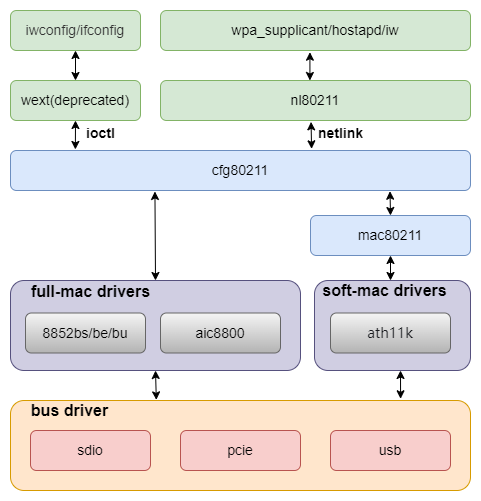
- cfg80211 / mac80211 / nl80211
Provides the Linux wireless protocol stack and the user-space control interface. - Module driver
The Wi-Fi module driver is typically provided by the module vendor and implements the main Wi-Fi functionality. - Interface controller
Provides the transport interface used by the Wi-Fi module, such as PCIe, SDIO, or USB.
Source Tree Overview
The main source locations involved are listed below:
linux-6.18/
|-- drivers/net/wireless/          # Wi-Fi drivers (vendor or mainline)
|-- drivers/mmc/                   # SDIO / MMC host controllers
|-- drivers/regulator/             # Module power control
|-- drivers/mmc/core/pwrseq*       # Generic mmc-pwrseq power-up and reset logic
`-- arch/riscv/boot/dts/spacemit/  # Board-level DTS configuration
Wi-Fi driver source code is usually placed in the following directories:
drivers/net/wireless/realtek/
|-- rtl8852bs/          # rtl8852bs SDIO driver (vendor-provided)
`-- rtw89/              # rtw89 framework driver (mainline)
Key Features
Platform Interface Features
SDIO Interface
| Feature | Description |
|---|---|
| SDIO 3.0 compatible | Compatible with the 4-bit SDIO Specification Version 3.00 |
| SD 3.0 modes supported | Supports UHS modes, up to SDR104 |
| PIO/DMA supported | Supports PIO, SDMA, ADMA, and ADMA2 transfer modes |
PCIe Interface
The K3 PCIe controller supports up to PCIe Gen3 x8. Wi-Fi modules such as the rtl8852be typically use Gen2 x1 mode. For complete controller details, including modes, link rates, PHY configuration, and power management, see the PCIe Development Guide.
Module Performance
| Module | Interface | Driver | TX (Mb/s) | RX (Mb/s) |
|---|---|---|---|---|
| rtl8852bs | SDIO | rtl8852bs (vendor driver) | 460 | 480 |
| rtl8852be | PCIe | rtw89 (mainline driver) | 870 | 880 |
Configuration
The configuration consists primarily of kernel and DTS settings.
Kernel Configuration
Wireless Stack Configuration
CONFIG_NET, CONFIG_WIRELESS, and CONFIG_CFG80211 provide basic Wi-Fi support and must be set to Y:
Networking support (NET [=y])
    Wireless (WIRELESS [=y])
        cfg80211 - wireless configuration API (CFG80211 [=y])
Some drivers, such as rtw89, also depend on CONFIG_MAC80211, which must be enabled:
Networking support (NET [=y])
    Wireless (WIRELESS [=y])
        Generic IEEE 802.11 Networking Stack (mac80211 [=y])
SDIO Interface Configuration
CONFIG_MMC enables MMC bus protocol support and is typically set to Y:
Device Drivers
    MMC/SD/SDIO card support (MMC [=y])
CONFIG_MMC_SDHCI, CONFIG_MMC_SDHCI_PLTFM, and CONFIG_MMC_SDHCI_OF_K1 enable support for the SpacemiT SDHCI controller and should be set to Y:
Device Drivers
    MMC/SD/SDIO card support (MMC [=y])
        Secure Digital Host Controller Interface support (MMC_SDHCI [=y])
            SDHCI platform and OF driver helper (MMC_SDHCI_PLTFM [=y])
                SDHCI OF support for the SpacemiT SDHCI controller (MMC_SDHCI_OF_K1 [=y])
PCIe Interface Configuration
CONFIG_PCI and CONFIG_PCIE_SPACEMIT_K1 provide support for the K3 PCIe controller:
Device Drivers
    PCI support (PCI [=y])
        PCI controller drivers
            DesignWare-based PCIe controllers
                SpacemiT K1 PCIe controller (host mode) (PCIE_SPACEMIT_K1 [=y])
CONFIG_RTW89 and CONFIG_RTW89_8852BE provide support for the rtl8852be PCIe Wi-Fi module:
Device Drivers
    Network device support (NETDEVICES [=y])
        Wireless LAN (WLAN [=y])
            Realtek devices (WLAN_VENDOR_REALTEK [=y])
                Realtek 802.11ax wireless chips support (RTW89 [=y])
                    Realtek 8852BE PCI wireless network (Wi-Fi 6) adapter (RTW89_8852BE [=m])
SDIO Driver Configuration
CONFIG_RTL8852BS provides support for the rtl8852bs SDIO Wi-Fi module:
Device Drivers
    Network device support (NETDEVICES [=y])
        Wireless LAN (WLAN [=y])
            Realtek devices (WLAN_VENDOR_REALTEK [=y])
                Realtek 8852B SDIO Wireless driver (RTL8852BS [=m])
DTS Configuration
SDIO Interface Configuration Example
SDIO Controller Configuration
An example &sdio node in k3_evb.dts is shown below:
&sdio {
        pinctrl-names = "default";
        pinctrl-0 = <&mmc2_cfg>;
        bus-width = <4>;
        non-removable;
        vmmc-supply = <&vmmc_sdio>;
        vqmmc-supply = <&p1v8>;
        mmc-pwrseq = <&sdio_pwrseq>;
        no-mmc;
        no-sd;
        keep-power-in-suspend;
        clock-frequency = <375000000>;
        #address-cells = <1>;
        #size-cells = <0>;
        status = "disabled";

        wifi@1 {
            reg = <1>;
            compatible = "realtek,rtl8852bs";
            pinctrl-names = "default";
            pinctrl-0 = <&wifi_hostwake_cfg>;
            interrupts-extended = <&pinctrl 101 IRQ_TYPE_EDGE_FALLING>;
        };
};
On K3, the SDIO Wi-Fi driver no longer needs to manage board-level resources such as regulators and GPIOs directly. These resources are managed uniformly at the bus level.
Place power-related regulator and GPIO configuration in vmmc-supply and vqmmc-supply. Place Wi-Fi REG_ON and RESET configuration in sdio_pwrseq.
Specifically:
wifi@1is the SDIO Wi-Fi child node. Itscompatiblevalue must match the driver, andregspecifies the SDIO function number, typically1.interrupts-extendedspecifies the interrupt pin used by the Wi-Fi module to wake the host. The driver obtains this interrupt throughof_irq_get().wifi_hostwake_cfginpinctrl-0configures the pad for the host-wake pin.
Wi-Fi Host-Wake pinctrl Configuration
The corresponding wifi_hostwake_cfg configuration in k3_evb.dts is:
wifi_hostwake_cfg: wifi-hostwake-cfg {
    wifi-hostwake-pins {
        pinmux = <K3_PADCONF(101, 0)>;

        bias-pull-up;
        drive-strength = <25>;
        power-source = <1800>;
    };
};
PAD 101 must match the interrupt number specified in interrupts-extended.
SDIO Power Configuration
vmmc_sdio is used to encapsulate the regulators and GPIOs required by the Wi-Fi module power rail. Some modules depend not only on regulators but also on specific GPIO states during power-up. For this reason, regulator-fixed is recommended for this configuration.
vmmc_sdio: regulator-vmmc-sdio {
        compatible = "regulator-fixed";
        regulator-name = "vmmc-sdio";
        regulator-min-microvolt = <3300000>;
        regulator-max-microvolt = <3300000>;
        enable-active-high;
        gpio = <&gpio 3 6 GPIO_ACTIVE_HIGH>;
};
Wi-Fi REG_ON Configuration
sdio_pwrseq defines the reset pin used for Wi-Fi REG_ON:
sdio_pwrseq: sdio-pwrseq {
        compatible = "mmc-pwrseq-simple";
        reset-gpios = <&gpio 3 4 GPIO_ACTIVE_LOW>;
};
PCIe Interface Configuration Example
PCIe Wi-Fi modules such as the rtl8852be connect through a PCIe controller. Confirm the specific port used by the module against the board schematic. On the K3 Pico series, for example, the Wi-Fi module is connected to Port E (pcie4_rc), with the following configuration:
&pcie4_rc {
        pinctrl-names = "default";
        pinctrl-0 = <&pcie4_1_cfg>;
        phys = <&phy5>;
        phy-names = "phy5";
        num-lanes = <1>;
        status = "okay";
};
k3-pinctrl.dtsi provides multiple selectable pinctrl configurations for each PCIe controller. These configurations correspond to different pad groups for the sideband signals. The following example shows two configurations for pcie4:
pcie4_0_cfg: pcie4-0-cfg {
        pcie4-0-pins {
                pinmux = <K3_PADCONF(31, 4)>,   /* pcie4 perst */
                         <K3_PADCONF(32, 4)>,   /* pcie4 wake */
                         <K3_PADCONF(33, 4)>;   /* pcie4 clkreq */

                bias-disable;
                drive-strength = <25>;
        };
};

pcie4_1_cfg: pcie4-1-cfg {
        pcie4-0-pins {
                pinmux = <K3_PADCONF(76, 5)>,   /* pcie4 perst */
                         <K3_PADCONF(77, 5)>,   /* pcie4 wake */
                         <K3_PADCONF(78, 5)>;   /* pcie4 clkreq */

                bias-disable;
                drive-strength = <25>;
        };
};
Select the configuration group that matches the board wiring. For example, select pcie4_1_cfg when the sideband signals are connected to pads 76, 77, and 78. If the electrical parameters (bias, drive-strength, or power-source) in the common configuration do not match the board's voltage domain, redefine the node with the same name in the board DTS to override it.
The relevant properties are as follows:
pinctrl-0configures the pads for the PCIe sideband signals: PERST, WAKE, and CLKREQ.physandphy-namesbind the controller to its PHY. Their order must match the hardware lane wiring.num-lanesspecifies the expected number of lanes and must match the actual board wiring.
The controller driver manages PCIe PERST# by default through PMU registers. You can use reset-gpios to switch to GPIO control. For controller-side configuration such as reset timing, PHY binding, and lane bifurcation, see the PCIe Development Guide.
Wi-Fi Module Enable Configuration
The enable pin of a PCIe Wi-Fi module is typically wrapped with rfkill-gpio and controlled by the upper layer through RFKILL. The k3-pico.dtsi configuration is as follows:
rfkill-pcie-wlan {
        compatible = "rfkill-gpio";
        label = "rfkill-pcie-wlan";
        pinctrl-names = "default";
        pinctrl-0 = <&wlan_en_cfg>;
        radio-type = "wlan";
        shutdown-gpios = <&gpio 1 3 GPIO_ACTIVE_HIGH>;
};
The corresponding pinctrl configuration is:
wlan_en_cfg: wl-en-cfg {
        wlan-en-pins {
                pinmux = <K3_PADCONF(35, 0)>;

                bias-pull-up;
                drive-strength = <38>;
                power-source = <3300>;
        };
};
Configure shutdown-gpios and wlan_en_cfg according to the Wi-Fi module's actual enable pin. After the module is enabled, PCIe enumerates the device and automatically loads the rtw89 driver. No Wi-Fi child node is required in the DTS.
Interface
User-Space Interface
For user-space access, the nl80211 interface is recommended for Wi-Fi device management. Common tools include the following:
wpa_supplicantwpa_cliiwip
The legacy wext interface is not enabled by default. If required, CONFIG_CFG80211_WEXT can be enabled:
cfg80211 wireless extensions compatibility (CFG80211_WEXT [=n])
Debugging
1. Check the controller state
SDIO Controller
dmesg | grep -i mmc1
The MMC subsystem creates an mmcN directory for each host under the debugfs root. Use this directory to verify that the controller registered successfully:
ls -d /sys/kernel/debug/mmc*
PCIe Controller
Check PCIe device enumeration:
lspci
Under normal conditions, the output includes the Root Complex and the Wi-Fi device attached to it:
0000:00:00.0 PCI bridge: SpacemiT X100 PCIe Root Complex (rev 01)
0002:00:00.0 PCI bridge: SpacemiT X100 PCIe Root Complex (rev 01)
0002:01:00.0 Ethernet controller: Realtek Semiconductor Co., Ltd. RTL8127 10GbE Controller (rev 08)
0004:00:00.0 PCI bridge: SpacemiT X100 PCIe Root Complex (rev 01)
0004:01:00.0 Network controller: Realtek Semiconductor Co., Ltd. RTL8852BE PCIe 802.11ax Wireless Network Controller
The domain number in the BDF corresponds to linux,pci-domain in the DTS. pcie0_rc through pcie4_rc correspond to domains 0 through 4, respectively. In the example above, the Wi-Fi device is at 0004:01:00.0, under pcie4_rc (Port E).
View detailed PCIe device information:
lspci -vvv -s 0004:01:00.0
Check the kernel log:
dmesg | grep -E "pcie|rtw89"
2. Check whether the Wi-Fi module is detected
The following messages are typically visible in dmesg:
- SDIO, USB, or PCIe card/function enumeration logs
- subsequent probe logs from the vendor Wi-Fi driver
If the Wi-Fi module is not detected, check the following items:
vmmc-supplyfor SDIOvqmmc-supplyfor SDIOreset-gpiosfor SDIO, or the pinctrl configuration for PCIespacemit,tx_delaycodefor SDIOstatus = "okay"
3. Check the bus operating state
SDIO Bus State
cat /sys/kernel/debug/mmc1/ios
Check the following information:
clockbus widthtiming specsignal voltage
PCIe Link State
View the link state:
lspci -vvv -s 0004:01:00.0 | grep -E "LnkCap|LnkSta"
Check the following information:
LnkCap: The capabilities advertised by the controller and device, including maximum link speed and width.LnkSta: The negotiated link state. Pay particular attention toSpeedandWidth.
If the negotiated speed or width is lower than expected, check the board-level lane wiring, the num-lanes setting, and signal integrity.
Test Guide
Scan and Connection Test
First, confirm that wpa_supplicant is running correctly.
wpa_supplicant -iwlan0 -Dnl80211 -c/etc/wpa_supplicant.conf -B
The basic wpa_supplicant.conf configuration is shown below:
ctrl_interface=/var/run/wpa_supplicant
update_config=1

network={
    ssid="your_wifi_ssid"
    psk="your_password"
}
ctrl_interface: Specifies the control interface path used for communication betweenwpa_supplicantandwpa_cli. If the path is not the default/var/run/wpa_supplicant, use-pwithwpa_clito specify it explicitly.update_config: Allowswpa_supplicantto update the configuration file dynamically, for example, when adding a network throughwpa_cli.network: Defines a Wi-Fi network.ssidspecifies the network name, andpskspecifies the WPA/WPA2 password.
The following advanced options are optional and can be enabled as needed:
disable_scan_offload=1       # Disable hardware scanning and force software scanning.
filter_rssi=-75              # Filter out APs with signal strength below -75 dBm.
pmf=1                        # Enable PMF (802.11w); 1 = optional, 2 = required.
sae_pwe=2                    # Use only H2E for SAE password-element derivation (WPA3).
wowlan_triggers=any          # Enable Wi-Fi wakeup; requires driver and hardware support.
bgscan="simple:11:-70:300"  # Scan every 300 s at >= -70 dBm, or every 11 s below -70 dBm.
gas_rand_addr_lifetime=0     # GAS random MAC address lifetime; 0 = permanent.
gas_rand_mac_addr=1          # Use a random MAC address during GAS interactions for privacy.
Scan with wpa_cli:
wpa_cli -iwlan0 -p/var/run/wpa_supplicant
scan
scan_results
A successful scan typically produces output similar to the following:
bssid / frequency / signal level / flags / ssid
f6:12:b3:d4:65:ef       2462    -37     [WPA2-PSK-CCMP][WPS][ESS][P2P]  wilson
78:85:f4:82:01:3c       2462    -66     [WPA2-PSK-CCMP][WPS][ESS]       HUAWEI-LX45AG_HiLink
02:0e:5e:76:a5:6e       2412    -69     [WPA-PSK-CCMP+TKIP][ESS]        ChinaNet-1mMr
30:8e:7a:2f:64:8c       2437    -69     [WPA-PSK-CCMP+TKIP][WPA2-PSK-CCMP+TKIP][ESS]    K03_1tlftb
dc:16:b2:57:9e:65       2437    -78     [WPA2-PSK-CCMP][ESS]    \x00\x00\x00\x00\x00\x00\x00\x00
dc:16:b2:57:9e:60       2437    -78     [WPA-PSK-CCMP][WPA2-PSK-CCMP][WPS][ESS] TK-ZJB
48:0e:ec:ad:52:4d       2462    -78     [WPA-PSK-CCMP][WPA2-PSK-CCMP][WPS][ESS] TP-LINK_524D
3c:d2:e5:c6:08:9b       2452    -83     [WPA2-PSK-CCMP][ESS]
3e:d2:e5:16:08:9b       2452    -83     [WPA-PSK-CCMP+TKIP][WPA2-PSK-CCMP+TKIP][ESS]    young
80:ea:07:dc:f2:be       2462    -88     [WPA-PSK-CCMP][WPA2-PSK-CCMP][ESS]      HZXF
9a:00:74:84:d1:60       2412    -85     [WPA-PSK-CCMP+TKIP][WPA2-PSK-CCMP+TKIP][ESS]   ChinaNet-ieR7
dc:f8:b9:46:ec:30       2472    -85     [WPA-PSK-CCMP+TKIP][WPA2-PSK-CCMP+TKIP][ESS]   ChinaNet-MiZK
Select the target AP and connect:
> add_network
0
> set_network 0 ssid "wilson"
OK
> set_network 0 key_mgmt WPA-PSK
OK
> set_network 0 psk "wilson2001"
OK
> enable_network 0
wpa_supplicant -iwlan0 -Dnl80211 -c/wpa_supplicant.conf -B
wpa_cli -iwlan0 -p/var/run/wpa_supplicant
Throughput Test
Within the same local network, iperf3 can be used for throughput testing as follows:
# Server
iperf3 -s

# Client
iperf3 -c <server-ip> -t 60
Signal Strength Check
After the connection is established, the following command can be used to check the current signal strength and link status:
iw dev wlan0 link
More detailed statistics can be viewed with:
iw dev wlan0 station dump
Focus on the following fields:
signal— current RSSI in dBm. In most cases, values higher than-70 dBmindicate acceptable signal quality.tx bitrate/rx bitrate— current negotiated transmit and receive rates.tx failed/tx retries— transmit failure and retry counters. Continuously increasing values usually indicate poor signal quality.
FAQ
1. Why is the controller running, but no wlan0 device appears after the driver is loaded?
Common checks include:
- Verify that the controller DTS node for the selected solution is enabled.
- Verify that the Wi-Fi firmware required by the module is present.
For SDIO, also check the following:
vmmc-supplyandvqmmc-supplyconfiguration and supply voltage.mmc-pwrseqconfiguration for the Wi-Fi moduleREG_ONandRESETpins.
For PCIe, also check the following:
- Use
lspcito verify that the device was enumerated. If it was not enumerated, the problem is at the link layer rather than the driver layer. - Use
rfkill listto verify that the module is not blocked, and check therfkill-gpioenable-pin configuration. - Verify that the PCIe controller's
physandnum-lanessettings match the board wiring.
2. Why do abnormal log messages appear during Wi-Fi operation even though Wi-Fi works?
For example:
[69686.314058] rtl8852bs mmc1:0001:1: rtw_sdio_raw_write: sdio write failed (-84)
[69686.314063] mmc1: set tx_delaycode: 127
[69686.314080] rtl8852bs mmc1:0001:1: RTW_SDIO: WRITE use CMD53
[69686.314085] rtl8852bs mmc1:0001:1: RTW_SDIO: WRITE to 0x1800a, 80 bytes
[69686.322783] mmc1: pretuned card, use select_delay[1]:200
[69686.328249] RTW_SDIO: WRITE 00000000: 00 64 48 00 00 00 00 00 1a 00 24 00 b9 23 00 00
[69686.341886] RTW_SDIO: WRITE 00000010: 00 00 00 00 00 00 00 00 00 00 00 40 00 00 00 00
[69686.349841] RTW: ERROR sdio_io: write FAIL! error(-2) addr=0x1800a 80 bytes, retry=0,0
[69686.349942] rtl8852bs mmc1:0001:1: rtw_sdio_raw_write: sdio write failed (-110)
Common causes include:
-84indicates an SDIO TX CRC error. The SDIOspacemit,tx_delaycodeparameter usually needs adjustment.-110indicates an SDIO operation timeout. This is commonly caused by signal integrity issues or timing mismatch. In this case, adjustment ofspacemit,tx_delaycodeor reduction of the SDIO clock frequency is recommended for troubleshooting.
3. Why is internet access unavailable after a successful AP connection?
Common causes include:
- no IP address has been assigned; this can be verified with
ip addr show wlan0 - the DHCP client, such as
udhcpcordhclient, is not running correctly - DNS is not configured correctly; check whether
/etc/resolv.confcontains a validnameserver - no default route is present; this can be checked with
ip route