Thermal
This document describes the thermal management functions of the K3 SoC and their usage model.
Overview
Thermal refers to a driver framework for temperature monitoring and thermal control. The Linux Thermal framework is the standard Linux architecture for temperature management and is mainly used to address the increasing thermal challenges that come with higher device performance.
Functionality
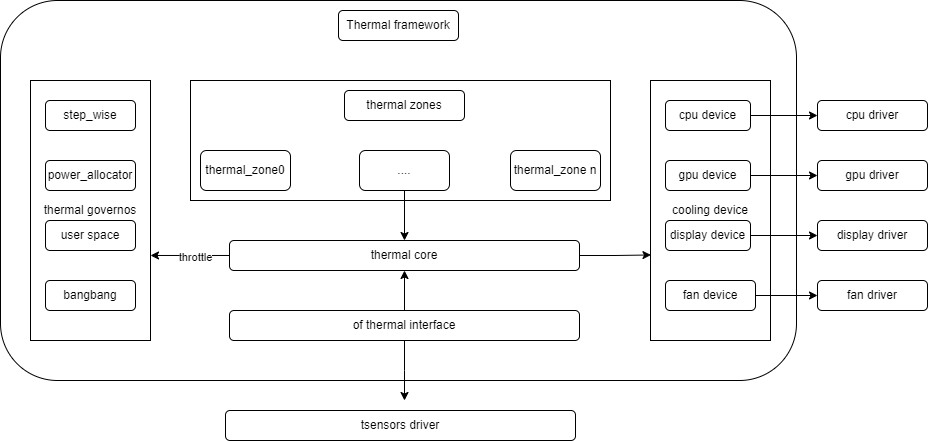
- thermal_cooling_device: the driver that applies cooling actions and acts as the execution layer of the thermal-control flow.
- thermal core: the core thermal framework. It handles driver initialization, maintains the relationships among thermal zones, governors, and cooling devices, and interacts with user space through
sysfs. - thermal governor: the thermal-control algorithm that determines which cooling state should be selected when thermal control is triggered.
- thermal zone device: mainly used to create thermal-zone nodes and connect thermal sensors. These nodes are created under
/sys/class/thermalbased on DTS configuration. - thermal sensor: the temperature sensor that provides temperature data to the thermal framework.
Source Tree Overview
The thermal driver directory structure is shown below:
drivers/thermal/
├── cpufreq_cooling.c
├── cpuidle_cooling.c
├── devfreq_cooling.c
├── gov_bang_bang.c
├── gov_fair_share.c
├── gov_power_allocator.c
├── gov_step_wise.c
├── gov_user_space.c
├── k3-thermal.c    --> K3 platform driver
├── k3-thermal.h
├── thermal_core.c
├── thermal_core.h
├── thermal_helpers.c
├── thermal_hwmon.c
├── thermal_hwmon.h
├── thermal_of.c
├── thermal_sysfs.c
K3 Thermal Sensor Overview
The K3 SoC integrates 8 temperature sensors (sensor 0 to sensor 7). These sensors are distributed across different chip regions and are used to monitor the temperature of major functional blocks. The driver determines which sensors are enabled through the sensor_range and tsensor_map properties.
In DTS, the tsensor node is configured with sensor_range = <0x0 0x7> and tsensor_map = <1 0 1 1 1 1 1 1>. This means that sensors 0 and 2 to 7 are enabled, while sensor 1 is disabled.
The monitored regions associated with each sensor are shown below, using k3_evb as an example:
| Sensor ID | Thermal Zone | Monitored Region |
|---|---|---|
| 0 | thermal_top | Top-level chip region |
| 2 | thermal_vpu | VPU region |
| 3 | thermal_gpu | GPU region |
| 4 | thermal_cluster0 | CPU Cluster 0(cpu_0~cpu_3) |
| 5 | thermal_cluster1 | CPU Cluster 1(cpu_4~cpu_7) |
| 6 | thermal_cluster2 | CPU Cluster 2(cpu_8~cpu_11) |
| 7 | thermal_cluster3 | CPU Cluster 3(cpu_12~cpu_15) |
Key Features
Features
- Supports multi-zone temperature monitoring
- Supports CPU thermal control
- Supports over-temperature shutdown at 115°C
Test Method
Use an external temperature measurement device or run high-load applications to create observable temperature variation. Then inspect the thermal and cpufreq nodes to confirm that thermal control behaves as expected.
-
Check the temperature of each thermal zone:
cat /sys/class/thermal/thermal_zone1/temp -
Check the CPU frequency-scaling nodes to confirm whether thermal throttling is taking effect:
cat /sys/devices/system/cpu/cpufreq/policy0/scaling_cur_freqcat /sys/devices/system/cpu/cpufreq/policy8/scaling_cur_freq -
Check the GPU cooling state.
CONFIG_POWERVR_THERMALmust be enabled:cat /sys/class/thermal/cooling_device*/type # Find the device whose type is devfreqcat /sys/class/thermal/cooling_device*/cur_state
Configuration
Configuration mainly includes driver enablement options and DTS configuration.
CONFIG Options
The THERMAL-related configuration is shown below:
CONFIG_K3_THERMAL:
Enable this option if you want to have support for thermal management
controller present in Spacemit SoCs

  Symbol: K3_THERMAL [=y]
  Type  : tristate
  Defined at drivers/thermal/Kconfig:420
  Prompt: Spacemit K3 Thermal Support
  Depends on: OF [=y] && SOC_SPACEMIT [=y]
  Location:
   -> Device Drivers
    -> Thermal drivers (THERMAL [=y])
     -> Spacemit K3 Thermal Support (K3_THERMAL [=y])
DTS Configuration
The tsensor hardware node is located in k3.dtsi:
thermal: thermal@d4018000 {
    compatible = "spacemit,k3-tsensor";
    reg = <0x0 0xd4018000 0x0 0x100>;
    interrupt-parent = <&saplic>;
    interrupts = <61 IRQ_TYPE_LEVEL_HIGH>;
    interrupt-names = "tsensor";
    clocks = <&syscon_apbc CLK_APBC_TSEN>,
             <&syscon_apbc CLK_APBC_TSEN_BUS>;
    clock-names = "func", "bus";
    resets = <&syscon_apbc RESET_APBC_TSEN>;
    sensor_range = <0x0 0x7>;
    tsensor_map = <1 0 1 1 1 1 1 1>;
    temperature_offset = <274>;
    #thermal-sensor-cells = <1>;
    status = "okay";
};
Thermal-zone configuration is defined in the board-level DTS files. The example below shows only the cluster1 section from k3_evb.dts:
&thermal_zones {
    thermal_cluster1 {
        polling-delay = <1000>;
        polling-delay-passive = <250>;
        thermal-sensors = <&thermal 5>;

        trips {
            thermal_cluster1_trip0: thermal_cluster1-trip0 {
                temperature = <85000>;
                hysteresis = <2000>;
                type = "active";
            };

            thermal_cluster1_trip1: thermal_cluster1-trip1 {
                temperature = <95000>;
                hysteresis = <2000>;
                type = "passive";
            };

            thermal_cluster1_trip2: thermal_cluster1-trip2 {
                temperature = <105000>;
                hysteresis = <2000>;
                type = "passive";
            };

            thermal_cluster1_trip3: thermal_cluster1-trip3 {
                temperature = <115000>;
                hysteresis = <2000>;
                type = "critical";
            };
        };

        cooling-maps {
            map0 {
                trip = <&thermal_cluster1_trip0>;
                cooling-device = <&cpu_0 2 2>,
                        <&cpu_1 2 2>,
                        ...
                        <&cpu_7 2 2>;
            };
            ...
        };
    };
};
Interface
API Overview
Refer to the following directory in the kernel documentation:
Documentation/driver-api/thermal/
Debugging
sysfs
All thermal-zone nodes are located under /sys/class/thermal/.
| Node | Description |
|---|---|
| thermal_zoneX/temp | Current temperature in milli-degrees Celsius |
| thermal_zoneX/type | Thermal-zone name |
| thermal_zoneX/trip_point_Y_temp | Temperature threshold of trip point Y |
| thermal_zoneX/trip_point_Y_type | Type of trip point Y |
| thermal_zoneX/policy | Active thermal governor |
| cooling_deviceX/cur_state | Current cooling-device state |
| cooling_deviceX/max_state | Maximum cooling-device state |
For more sysfs interfaces, refer to:
Documentation/driver-api/thermal/sysfs-api.rst
Test Guide
Validate the thermal driver according to the procedure described in the Test Method section above.