K3 GMAC DPDK User Guide
DPDK Overview
DPDK (Data Plane Development Kit) is an open source project hosted by the Linux Foundation. Originally created by Intel in 2010, it has become a widely adopted high-performance packet processing acceleration framework. DPDK is a collection of user-space libraries and drivers designed to accelerate packet processing workloads on various CPU architectures, including Intel x86, ARM, and RISC-V.
Official website: DPDK
DPDK Framework
DPDK is a highly modular, layered user-space data plane development framework. Its architecture follows the principles of low-level abstraction, core reusability, and upper-layer extensibility, providing end-to-end support from hardware acceleration to application logic.
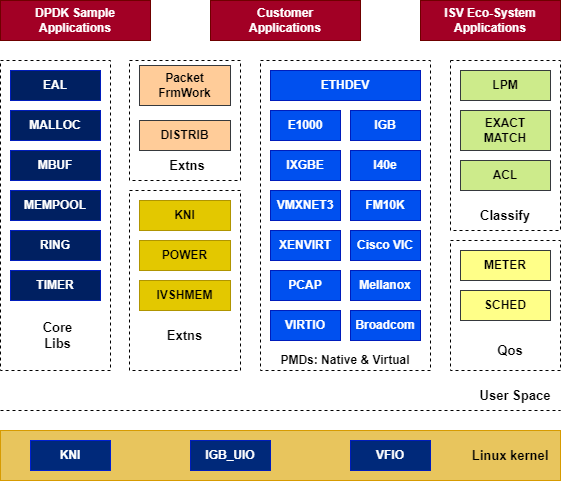
The DPDK framework is shown below:
DPDK Components
DPDK consists of multiple libraries and drivers that work together to form a complete high-performance packet processing framework.
Core Libraries
-
Environment Abstraction Layer (EAL)
Provides a hardware- and OS-independent interface for accessing low-level resources such as hardware devices and memory. -
Ring Buffer Library (RING)
Provides a lock-free, multi-producer, multi-consumer FIFO queue. -
Memory Pool Library (MEMPOOL)
Manages allocation and deallocation of packet buffers. -
Packet Buffer Library (MBUF)
Manages packet buffers (`mbuf`), including the allocation, deallocation, and manipulation of packet data. -
Timer Library (TIMER)
Provides asynchronous timer services based on the EAL time reference.
Poll Mode Driver (PMD)
PMDs are the core driver components for high-performance packet I/O in DPDK. DPDK includes PMDs for 1-Gigabit, 10-Gigabit, and 40-Gigabit interfaces, as well as para-virtualized virtio interfaces.
Classify Libraries
-
Exact Match
Used for exact-match flow-table lookups, such as OpenFlow 5-tuple matching, with very high lookup performance. -
LPM Library
Implements the Longest Prefix Match algorithm, primarily used for IPv4 routing lookups. -
ACL (Wildcard Match)
Provides access control lists with multi-field rule matching on source and destination IP addresses, ports, and protocols. Used for firewalls and access control.
QoS Library
The QoS (Quality of Service) framework provides traffic management capabilities, including policing, buffering, and scheduling.
Extension Libraries (Extns)
-
Packet Framework
Provides a standard method for building complex packet-processing pipelines by connecting input and output ports through lookup tables arranged in a tree topology. -
Kernel NIC Interface (KNI)
Works with the kernel KNI module to forward packets to the kernel networking stack from user space. -
Power Management
Provides CPU power management with load-based dynamic frequency scaling (C-states) and sleep strategies to reduce idle power consumption.
Applications
-
DPDK Sample Apps
Command-line test tools bundled with DPDK for validating NIC PMD functionality and performance. -
Customer Apps
Custom applications such as vSwitches, load balancers, firewalls, and IDS/IPS systems.
DPDK Core Principles
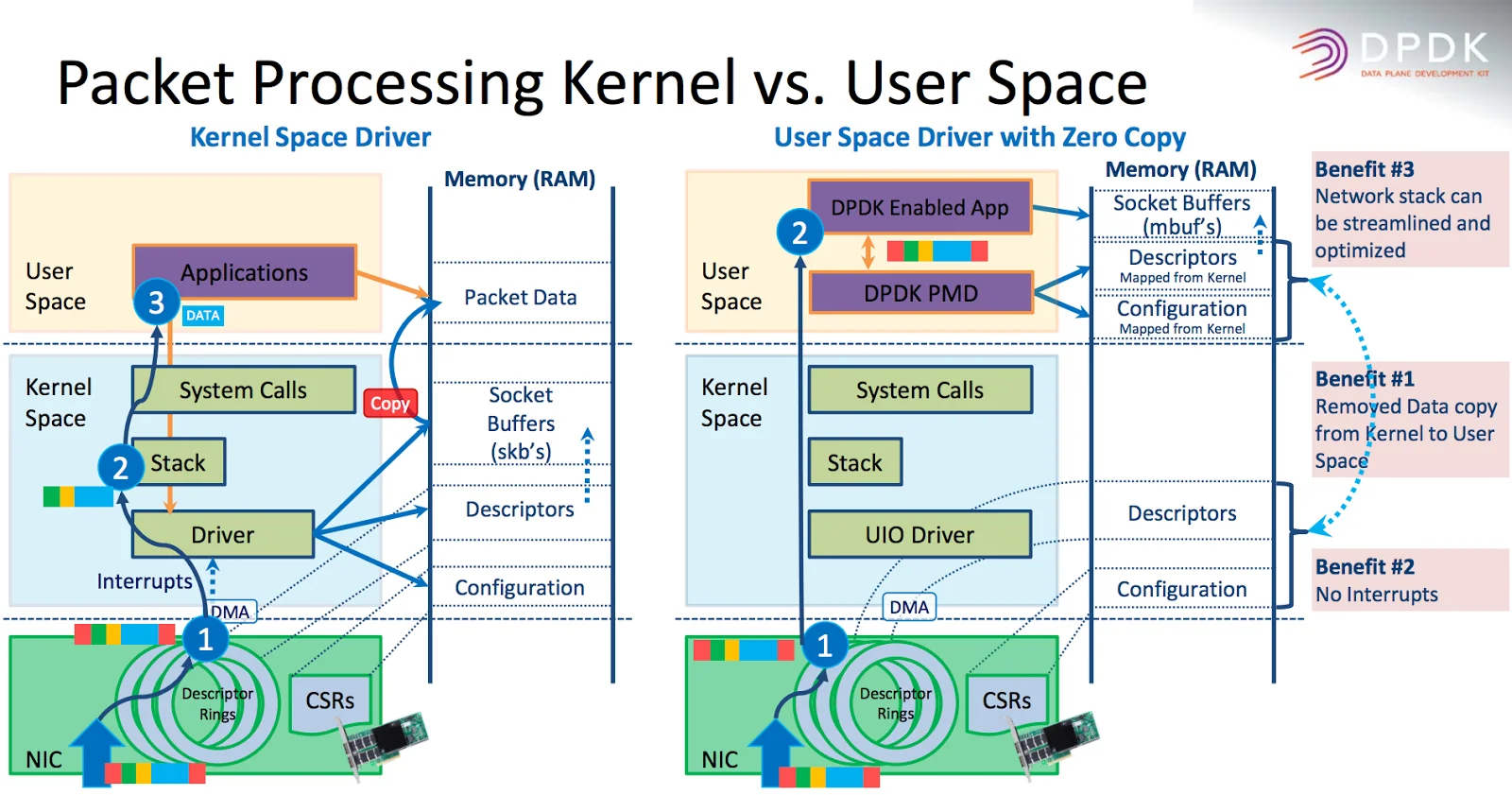
DPDK achieves microsecond-level latency and line-rate forwarding performance through two key techniques: kernel bypass and Poll Mode Drivers (PMDs).
-
Kernel Bypass
DPDK completely bypasses the Linux kernel network stack:
**1. User-space access:** Uses UIO (User Space I/O) or VFIO drivers to map NIC registers and I/O directly into user space.**2. Zero-copy:** The NIC uses DMA to copy packets directly into hugepage-backed memory buffers (`mbuf`) in user space. The DPDK-enabled application reads these buffers directly, eliminating data copies between kernel and user space. -
Poll Mode Driver (PMD)
In high-throughput scenarios, traditional interrupt-driven I/O causes excessive CPU interrupt overhead. DPDK addresses this with PMDs:**1. No interrupts:** The PMD runs in user space and dedicates CPU cores to continuously poll the NIC receive queues (Rx queues). Once a packet arrives, the PMD reads the descriptor ring directly in user space without waiting for an interrupt.**2. No system calls:** The entire packet I/O path requires no blocking system calls such as `recv` or `send`, eliminating kernel context-switch overhead.
Kernel Configuration
Configure and load the stmmac_uio driver as follows.
Kernel Configuration
CONFIG_HUGETLBFS=y
CONFIG_UIO=y
CONFIG_STMMAC_UIO=m
DTS Configuration
Enable the stmmac_uio driver in the board's DTS file.
&gmac_uio0 {
        status = "okay";
};

&gmac_uio1 {
        status = "okay";
};
Performance Tuning
CPU Isolation (isolcpus)
Isolate specific CPU cores from the kernel scheduler to prevent kernel threads and regular user-space processes from preempting them. The isolated cores are dedicated to DPDK data-plane processing.
Configuration: Add isolcpus=2,3 to the kernel boot parameters.
 chosen {
-               bootargs = "earlycon=sbi console=ttyS0,115200 loglevel=8 random.trust_bootloader=1 unaligned_scalar_speed=fast unaligned_vector_speed=fast";
+               bootargs = "earlycon=sbi console=ttyS0,115200 loglevel=8 isolcpus=2,3 nohz_full=2,3 rcu_nocbs=2,3 random.trust_bootloader=1 unaligned_scalar_speed=fast unaligned_vector_speed=fast";
                rng-seed = <0x25d69b2 0xff555073 0xd23238ea 0x57aa5455 0x792478ed 0xa744f28e 0x6ba4fc54 0xa2bf20fc>;
                stdout-path = "serial0:115200";
        };
This example isolates CPUs 2 and 3. The system scheduler will not automatically schedule tasks on the isolated cores.
Tickless Kernel (nohz_full)
Reduce timer interrupts on isolated cores by putting them into tickless mode. This significantly lowers interrupt overhead and improves the determinism of packet processing.
Kernel Configuration
CONFIG_NO_HZ_FULL=y
CONFIG_RCU_NOCB_CPU=y
Kernel Boot Arguments
Add the following parameters to the kernel command line for the cores that require tickless mode. The range must match the isolcpus setting.
bootargs = "earlycon=sbi console=ttyS0,115200 loglevel=8 isolcpus=2,3 nohz_full=2,3 rcu_nocbs=2,3 random.trust_bootloader=1 unaligned_scalar_speed=fast unaligned_vector_speed=fast";
rcu_nocbs=2,3 moves RCU callbacks to non-isolated cores.
Disable Serial Console
Disable the serial console to reduce CPU interference from console output.
Verification
To check CPU isolation, run cat /sys/devices/system/cpu/isolated. The command should output 2,3.
To check tickless mode, run cat /sys/devices/system/cpu/nohz_full. The command should output 2,3.
DPDK Installation
Download the Source Code
https://github.com/spacemit-com/dpdk-spacemit.git
Install the Dependencies
sudo apt update
sudo apt install -y build-essential clang llvm libelf-dev
sudo apt install -y meson ninja-build pkg-config libnuma-dev
sudo apt install -y python3-pyelftools libpcap-dev m4 libbsd-dev
Compile DPDK
cd /root/dpdk/dpdk
meson setup -Dplatform=spacemit_k3 build
cd build
ninja
ninja install
ldconfig
DPDK Testing
testpmd
Test Command
echo 1024 > /sys/kernel/mm/hugepages/hugepages-2048kB/nr_hugepages
sudo mkdir -p /mnt/huge
sudo mount -t hugetlbfs nodev /mnt/huge
modprobe uio
modprobe stmmac_uio
dpdk-testpmd --iova-mode=pa --vdev=net_stmmac0 --vdev=net_stmmac1 -l 0,2,3 --main-lcore=0 -- --nb-cores=2 -i --txd=1024 --rxd=1024
Description
Uses CPU cores 2 and 3 to poll and process packets on two stmmac virtual NICs at high speed. Interactive mode (-i) is enabled, allowing you to enter commands such as start, stop, and show port stats all at runtime to control forwarding and monitor packet drops and throughput in packets per second (PPS).
Parameter Reference
-
--iova-mode=paBecause the GMAC does not support an IOMMU, set IOVA mode to physical-address (PA) mode. -
--vdev=net_stmmac0 --vdev=net_stmmac1Specifies the virtual devices corresponding to `eth0` and `eth1`. -
-l 0,2,3Specifies the list of CPU cores available to DPDK. -
--main-lcore=0Uses core 0 for management and cores 2 and 3 for packet forwarding. -
--Separates EAL parameters from `testpmd` application parameters. -
--nb-cores=2Specifies the number of worker cores used for packet forwarding. -
-iStarts `dpdk-testpmd` in interactive command mode. -
--txd=1024Sets the number of transmit descriptors for each port to 1024. -
--rxd=1024Sets the number of receive descriptors for each port to 1024.
l2fwd
Test Command
echo 1024 > /sys/kernel/mm/hugepages/hugepages-2048kB/nr_hugepages
sudo mkdir -p /mnt/huge
sudo mount -t hugetlbfs nodev /mnt/huge
modprobe uio
modprobe stmmac_uio
./l2fwd -l 0,2,3 --main-lcore=0 --iova-mode=pa --vdev=net_stmmac0 --vdev=net_stmmac1 -- -p 0x3 -q 1
Description
Performs bidirectional Layer 2 forwarding, similar to a bridge, between two virtual NICs (net_stmmac0 and net_stmmac1). Packets received on port 0 are sent through port 1, and packets received on port 1 are sent through port 0.
Parameter Reference
-
EAL parameters
Parameters before `--`. Their meanings are the same as those of the `testpmd` options. -
-p 0x3Hexadecimal port mask that controls which NIC ports are enabled. In binary, `0x3` is `0011`, which enables Port 0 and Port 1, the two configured vdevs. -
-q 1Specifies the number of receive queues handled by each CPU core.
l3fwd
Test Command
echo 1024 > /sys/kernel/mm/hugepages/hugepages-2048kB/nr_hugepages
sudo mkdir -p /mnt/huge
sudo mount -t hugetlbfs nodev /mnt/huge
modprobe uio
modprobe stmmac_uio
./l3fwd -l 2 --iova-mode=pa --vdev=net_stmmac0 --vdev=net_stmmac1 -- -p 0x3 -P --config="(0,0,2),(1,0,2)" --parse-ptype
Description
Performs Layer 3 packet forwarding at the IP routing layer between two virtual NICs (net_stmmac0 and net_stmmac1). A single core (CPU 2) polls both NIC ports. After receiving a packet, the application parses the IP header and uses the built-in routing table to determine the forwarding port.
Parameter Reference
-
EAL parameters
Parameters before `--`. Their meanings are the same as those of the `testpmd` options. -
-p 0x3Hexadecimal port mask that controls which NIC ports are enabled. In binary, `0x3` is `0011`, which enables Port 0 and Port 1, the two configured vdevs. -
-PEnables promiscuous mode. The NIC accepts all incoming packets without checking whether the destination MAC address matches its own MAC address. -
--config="(0,0,2),(1,0,2)"Maps cores, ports, and NIC receive queues. `(0,0,2)` assigns receive queue 0 of Port 0 (`net_stmmac0`) to CPU 2. `(1,0,2)` assigns receive queue 0 of Port 1 (`net_stmmac1`) to CPU 2 as well. -
--parse-ptypeForces software packet-type parsing.
FAQ
Get The Detailed Log
-
dpdk-testpmd --log-level=helpDisplays all valid log types and levels supported by the current DPDK build.```textLog type is a pattern matching items of this list (plugins may be missing):bus.auxiliarybus.cdxbus.dpaabus.fslmcbus.ifpgabus.pcibus.platform...Syntax using globbing pattern: --log-level pattern:levelSyntax using regular expression: --log-level regexp,levelSyntax for the global level: --log-level levelLogs are emitted if allowed by both global and specific levels.Log level can be a number or the first letters of its name:1 emergency2 alert...``` -
--log-level=pmd.net.stmmac:debugRaises the log level for the DPDK `stmmac` driver to `debug`. The default level is `notice`.```dpdk-testpmd --iova-mode=pa --vdev=net_stmmac0 --vdev=net_stmmac1 -l 0,2,3 --main-lcore=0 -n 4 --log-level=pmd.net.stmmac:debug -- --forward-mode=flowgen --nb-cores=2 -i --txd=1024 --rxd=1024``` -
--log-level=pm.lib.eal:debugRaises the log level for the core `lib.eal` component to the most detailed `debug` level.
testpmd Fails to Start: Cannot Get Hugepage Information
-
Error output:
```# dpdk-testpmd --iova-mode=pa --vdev=net_stmmac0 --vdev=net_stmmac1 -l 0,2,3 --main-lcore=0 -n 4 -- --forward-mode=flowgen --nb-cores=2 -i --txd=1024 --rxd=1024EAL: Detected CPU lcores: 8EAL: Detected NUMA nodes: 1EAL: Detected static linkage of DPDKEAL: Multi-process socket /var/run/dpdk/rte/mp_socketEAL: Selected IOVA mode 'PA'EAL: Cannot get hugepage information.EAL: Error - exiting with code: 1Cannot init EAL: Permission denied``` -
Cause:
No hugepages are reserved in the kernel, or the hugepage filesystem is not mounted at `/dev/hugepages`. -
Resolution:
**Check the current hugepage state:**```bashcat /proc/meminfo | grep -i huge```Check whether `HugePages_Total` and `HugePages_Free` are 0. If both values are 0, no hugepages have been allocated.**Allocate 2 MB hugepages dynamically:**```bashecho 256 > /sys/kernel/mm/hugepages/hugepages-2048kB/nr_hugepages```**Check and manually mount the hugetlbfs filesystem:**DPDK reads memory segment information through files at the mount point. Run the following commands to mount the filesystem manually:```bashmkdir -p /dev/hugepagesmount -t hugetlbfs nodev /dev/hugepages```After mounting, retry starting `testpmd` to confirm that the error is resolved.