I2C
This document describes the I2C driver features and how to use them.
Module Overview
The K3 I2C module is compliant with the I2C bus specification. On the K3 platform, the module is accessed by the RCPU and implemented on top of the RT-Thread I2C driver framework, providing a complete I2C master interface for communication with a wide range of I2C slave devices such as EEPROMs and sensors. The driver also provides an RPMsg-based I2C interrupt forwarding service to support coordinated I2C access between the main cores and the small core.
Architecture
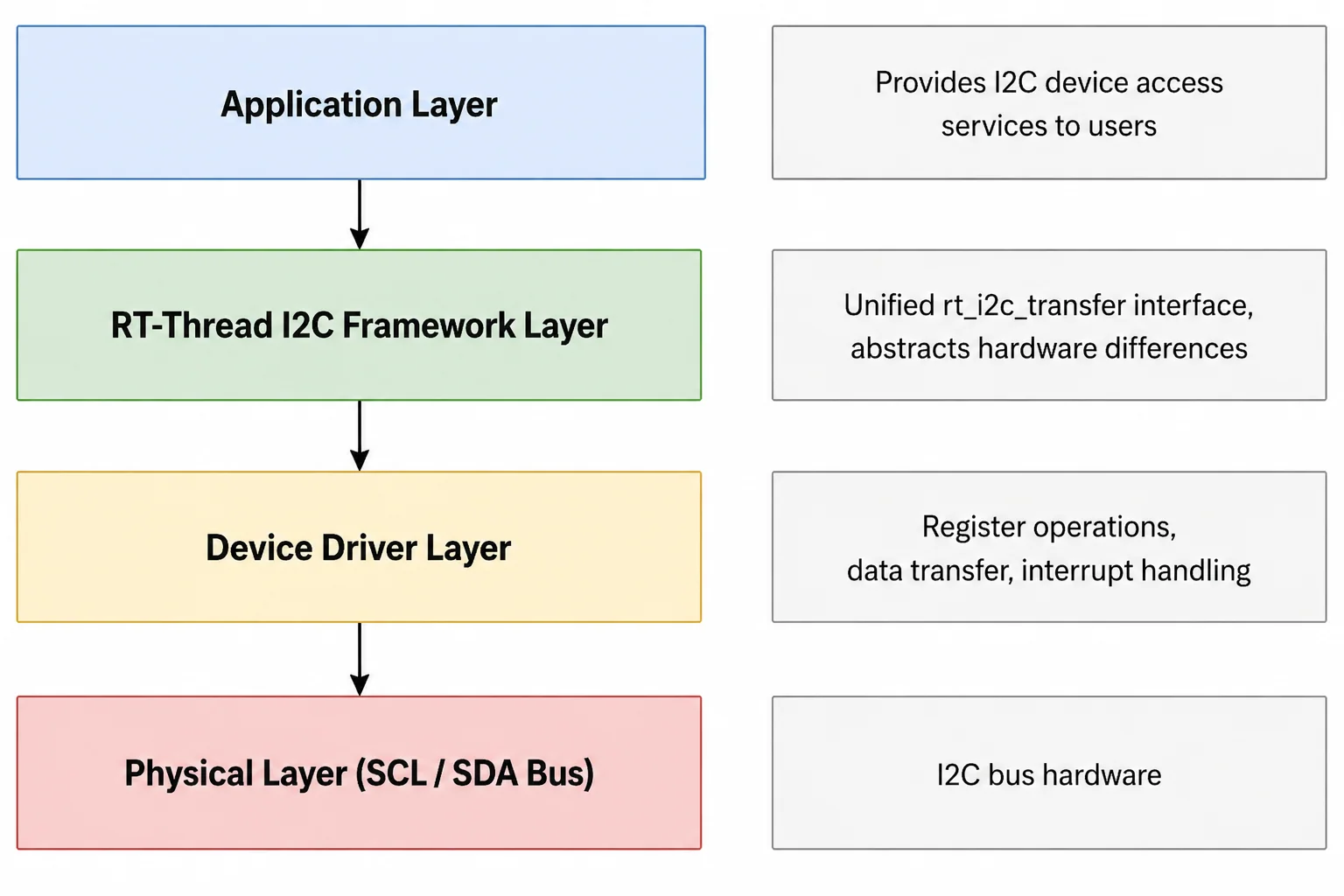
- Application layer: Provides I2C device access services for applications.
- RT-Thread I2C framework layer: Provides the unified
rt_i2c_transferinterface and abstracts underlying hardware differences. - Device driver layer: Implements I2C controller register access, data transfer, and interrupt handling.
- Physical layer: I2C bus hardware (SCL/SDA).
Source Code Structure
The driver source code is located in esos/bsp/spacemit/drivers/i2c. The main files are listed below:
esos/bsp/spacemit/drivers/i2c
.
|-- i2c-k1.c            # Core I2C controller driver
|-- i2c-k1.h            # I2C controller register definitions and data structures
|-- i2c-test.c          # I2C test utility for debugging and basic functional tests
|-- i2c_service.c       # RPMsg-based I2C interrupt forwarding service for heterogeneous core scenarios
`-- SConscript
Key Features
| Feature | Description |
|---|---|
| Standard mode support (100 KHz) | Default speed mode |
| Fast mode support (400 KHz) | Enabled through the DTS property spacemit,i2c-fast-mode |
| High-speed mode support (1.5 MHz) | Enabled through the DTS property spacemit,i2c-high-mode; requires a configured master code |
| Interrupt-based transfer mode | Byte-by-byte interrupt-driven transfer, suitable for messages of any length |
| FIFO transfer mode | When intr_enable = false and the total message length does not exceed the FIFO depth (8), the driver automatically selects FIFO mode to reduce interrupt overhead |
| SMBus block read support | Supports the RT_I2C_M_RECV_LEN flag, allowing the slave device to return the data length dynamically |
| Bus recovery support | When the bus is held by a slave device, the driver automatically sends up to 9 clock pulses for recovery |
| Multi-instance support | Supports three I2C controller instances: ri2c0, ri2c1, and ri2c2 |
Configuration
-
BSP_USING_I2C: Enables the I2C driver.config BSP_USING_I2Cbool "Enable I2C"default n -
BSP_I2C_TEST: Enables the I2C test utility.if BSP_USING_I2Cconfig BSP_I2C_TESTbool "Enable I2C test driver"default nendif
DTS Properties
| Property | Description |
|---|---|
spacemit,i2c-fast-mode | Enables fast mode (400 KHz) |
spacemit,i2c-high-mode | Enables high-speed mode (1.5 MHz) |
spacemit,i2c-master-code | Master code used in high-speed mode (default: 0x0e) |
spacemit,i2c-clk-rate | I2C operating clock frequency |
spacemit,i2c-lcr | Load Count Register value used to control clock timing |
spacemit,i2c-wcr | Wait Count Register value used to control wait timing |
spacemit,sda-glitch-nofix | Bypasses the SDA glitch-fix logic. In some hardware scenarios, the SDA glitch-fix logic can cause transfer timeouts. When this property is set, the driver sets the RCR_SDA_GLITCH_NOFIX bit in the RST_CYC register |
Usage Examples
The I2C driver integrates with the RT-Thread I2C framework. Applications can perform I2C communication through the standard interface.
- Find an I2C bus device
struct rt_i2c_bus_device *bus = rt_i2c_bus_device_find("ri2c0");
- Perform I2C data transfer with combined messages
struct rt_i2c_msg msgs[2];
/* Write: send register address */
msgs[0].addr = slave_addr;
msgs[0].flags = RT_I2C_WR;
msgs[0].buf = ®_addr;
msgs[0].len = 1;
/* Read: receive data */
msgs[1].addr = slave_addr;
msgs[1].flags = RT_I2C_RD;
msgs[1].buf = recv_buf;
msgs[1].len = recv_len;
rt_i2c_transfer(bus, msgs, 2);
- Single-byte write
rt_uint8_t buf[2] = {reg_addr, value};
struct rt_i2c_msg msg = {
    .addr  = slave_addr,
    .flags = RT_I2C_WR,
    .buf   = buf,
    .len   = 2,
};

rt_i2c_transfer(bus, &msg, 1);
Debugging
Test Utilities
Basic functional testing can be performed on the small-core serial console by using the I2C test utility. The common commands are as follows:
-
List available I2C bus devices.
i2c_list -
Run a full read/write verification test (default slave address:
0x50).i2c_test <bus>Example:
i2c_test ri2c1This command performs the following steps in sequence:
- back up the original data
- write a pattern (
0x00to0xFF) - read the data back for verification
- restore the original data
Note: This test is intended for EEPROM-type devices with an 8-bit register address and a capacity of at least 256 bytes. After each write, the test waits 50 ms for the EEPROM write cycle to complete. It is not suitable for general I2C slave devices.
-
Read data of a specified length.
i2c_read <bus> <addr> <len>Example:
i2c_read ri2c0 0x50 64This command reads 64 bytes starting from register address
0x00, one byte at a time, and prints the result in hexadecimal format.Note: This command assumes that the slave device uses an 8-bit register address. It is not suitable for devices without register addresses or with a different register address width.
Transfer Mode Selection
The driver internally supports both FIFO mode and interrupt mode:
- FIFO mode is used when
intr_enable = falseand the total message length ≤ 8 bytes, reducing interrupt overhead. - Interrupt mode is used when the total message length > 8 bytes, when an SMBus block read (
RT_I2C_M_RECV_LEN) is included, or whenintr_enable = true.
Note: In the current driver implementation,
intr_enable = trueis set by default during probe, so interrupt mode is always used by default. To enable automatic FIFO mode selection, the internalintr_enableflag in the driver must be modified.
FAQ
I2C Transfer Timeout
When an I2C transfer times out, the serial console prints the following log:
msg completion timeout
Possible causes include the following:
-
The slave device is not responding
Check whether the slave address is correct and whether the slave device is powered on properly. The
i2c_readcommand can be used to confirm whether the device is present on the bus. -
The bus is stuck
The driver automatically attempts bus recovery by sending up to 9 clock pulses. If recovery fails, the following log is printed:
bus reset clk reaches the max 9-clocksIn this case, the hardware connection should be checked.
-
Clock configuration is incorrect
Check whether
spacemit,i2c-clk-rateis configured correctly in the DTS, and whether the timing parametersspacemit,i2c-lcr(Load Count Register) andspacemit,i2c-wcr(Wait Count Register) match the target speed.
I2C Transfer Errors
When a transfer error occurs, the serial console prints the following log:
i2c error status: 0x00400000
The status bits can be interpreted as follows:
- SR_BED (Bus Error): A bus error occurred because the expected ACK/NAK was not received. Check whether the slave device is present and whether the address is correct.
- SR_ALD (Arbitration Loss): Arbitration was lost. This can occur in a multi-master environment. The current driver does not enable automatic retry, so the upper layer must initiate the transfer again.
- SR_RXOV (RX Overrun): The receive FIFO overflowed. This should not normally occur. If it does, check whether interrupt handling is responding in time.