OpenHarmony
1. Environment
1.1 Computer Hardware Configuration
Recommended hardware configuration for compiling Ubuntu development environment:
- 64-bit CPU
- Ubuntu 18.04, do not use Windows Subsystem (WSL)
- 16GB of RAM
- 80GB free space for compiling
- Normal user to compile, do not use root user to compile
1.2 Computer Software Configuration
Installation packages
sudo apt-get update && \
    apt-get install -y  apt-utils autoconf  bash-completion bc bison  build-essential  ccache  cmake  curl  cpio  debootstrap \
  device-tree-compiler  dosfstools   flex  git  gperf  gnupg  libncurses5-dev  libgl1-mesa-dev  libxml2-utils libssl-dev   locales lunzip mtools net-tools parted  pkg-config pxz rsync sudo unzip vim  wget zip zlib1g-dev \
crossbuild-essential-armhf  crossbuild-essential-arm64 python  qemu-user-static live-build gcc-arm-none-eabi python-pyelftools liblz4-tool  liblz4-dev python3 gawk  time  texinfo  expect \
uuid-dev u-boot-tools && \
    apt-get autoclean

sudo apt-get install python3 python3-pip python3-setuptools python3-wheel ninja-build

sudo pip3 install meson

sudo apt install -y ruby ruby-dev autopoint libtool gettext pkg-config automake po4a

sudo apt install -y libelf-dev default-jdk genext2fs mtd-utils scons
2. SDK
购买了Neardi的产品后, 发送邮件到support@neardi.com申请SDK.
2.1 Prepare SDK
-
- 解压HiYearningOH V100R001C01SPCxxx版本HiYearningOH_V100R001C01SPCxxx.tar.gz,得到middleware.tar.gz、patch_build.sh、patch.tar.gz三个文件,将提前下载好的OpenHarmony 4.0代码压缩包文件code-v4.0-Release.tar.gz文件放到同级目录下,执行./patch_build.sh命令,得到ohos目录以及middleware目录。
-
- 将Hi3519D V500R001C01SPC020版本包的SMP_Linux_GCC_musl/01.software/board/Hi3519DV500_SDK_V1.0.2.0.tgz包拷贝到和ohos平级的目录,解压Hi3519DV500_SDK_V1.0.2.0.tgz,并进入Hi3519DV500_SDK_V1.0.2.0目录执行./sdk.unpack
-
- 将Hi3519DV500_SDK_V1.0.2.0目录改名为sdk.
SDK目录结构如下:
linx@ubuntu2204-docker:~/HiYearningOH_V100R001C01SPC011_OH4.0$ tree -L 2
.
├── middleware
│   ├── base.mak
│   ├── cfg.mak
│   ├── chip_base_in.mak
│   ├── common
│   ├── component
│   ├── hi3516dv500_linux_readme_cn.txt
│   ├── hi3516dv500_linux_readme_en.txt
│   ├── Makefile
│   ├── os_base_in.mak
│   ├── platform.mak
│   ├── release_middleware.sh
│   ├── ss928v100_linux_readme_cn.txt
│   └── ss928v100_linux_readme_en.txt
├── ohos
│   ├── applications
│   ├── arkcompiler
│   ├── base
│   ├── build
│   ├── build.py -> build/build_scripts/build.py
│   ├── build.sh -> build/build_scripts/build.sh
│   ├── commonlibrary
│   ├── developtools
│   ├── device
│   ├── docs
│   ├── domains
│   ├── drivers
│   ├── foundation
│   ├── ide
│   ├── interface
│   ├── kernel
│   ├── napi_generator
│   ├── ohos_config.json
│   ├── out
│   ├── prebuilts
│   ├── productdefine
│   ├── test
│   ├── third_party
│   └── vendor
├── sdk
│   ├── open_source
│   ├── package
│   ├── patches
│   ├── platform
│   ├── scripts
│   ├── sdk.cleanup
│   ├── sdk.unpack
│   └── smp
└── toolchain
    └── gcc-20240819-aarch64-v01c01-linux-musl
2.2 Build OpenHarmony
2.2.1 Build the kernel
在编译之前, 确保交叉编译工具在系统目录中, 也可以执行下面命令以便确保编译时能找到编译器:
linx@ubuntu1804-docker:~/HiYearningOH_V100R001C01SPC011_OH4.0/toolchain/gcc-20240819-aarch64-v01c01-linux-musl$ sudo ./install_gcc_toolchain.sh
export path /opt/linux/x86-arm/aarch64-v01c01-linux-musl-gcc/bin
安装编译器后, 会在/etc/profile最后导出编译器的路径, 如下:
linx@ubuntu1804-docker:~/HiYearningOH_V100R001C01SPC011_OH4.0$ cat /etc/profile
# /etc/profile: system-wide .profile file for the Bourne shell (sh(1))
# and Bourne compatible shells (bash(1), ksh(1), ash(1), ...).
if [ "${PS1-}" ]; then
  if [ "${BASH-}" ] && [ "$BASH" != "/bin/sh" ]; then
    # The file bash.bashrc already sets the default PS1.
    # PS1='\h:\w\$ '
    if [ -f /etc/bash.bashrc ]; then
      . /etc/bash.bashrc
    fi
  else
    if [ "`id -u`" -eq 0 ]; then
      PS1='# '
    else
      PS1='$ '
    fi
  fi
fi

if [ -d /etc/profile.d ]; then
  for i in /etc/profile.d/*.sh; do
    if [ -r $i ]; then
      . $i
    fi
  done
  unset i
fi

# Wed Dec 25 16:53:17 CST 2024
# LiteOS Linux, Cross-Toolchain PATH
export PATH="/opt/linux/x86-arm/aarch64-mix210-linux/bin:$PATH"
#
# Thu Apr 16 15:36:38 CST 2026
# aarch64-v01c01-linux-musl-gcc, Cross-Toolchain PATH
export PATH="/opt/linux/x86-arm/aarch64-v01c01-linux-musl-gcc/bin:$PATH"
#
接下来需要下载linux kernel源代码, 把下载的linux-5.10.221.tar.gz放在sdk/open_source/linux
linx@ubuntu1804-docker:~/HiYearningOH_V100R001C01SPC011_OH4.0/sdk/open_source/linux$ ls
linux-5.10.221.patch  linux-5.10.221.tar.gz  linux-5.10.y  Makefile
最后切换到SDK如下路径HiYearningOH_V100R001C01SPC011_OH4.0/sdk/smp/a55_linux/source/bsp, 执行:
linx@ubuntu1804-docker:~/HiYearningOH_V100R001C01SPC011_OH4.0/sdk/smp/a55_linux/source/bsp$ make BOOT_MEDIA=emmc LIB_TYPE=musl CHIP=hi3519dv500 all
---------task [0.0]    toolchain_version_check
---------task [0.1]    prepare
mkdir /HiYearningOH_V100R001C01SPC011_OH4.0/sdk/smp/a55_linux/source/bsp/pub/hi3519dv500_emmc_image_musl -p
mkdir /HiYearningOH_V100R001C01SPC011_OH4.0/sdk/smp/a55_linux/source/bsp/pub/bin/board_musl_arm64 -p
mkdir /HiYearningOH_V100R001C01SPC011_OH4.0/sdk/smp/a55_linux/source/bsp/pub/bin/pc -p
---------task [0.2]    regbin_prepare
---------TARGET_XLSM: Hi3519DV500-DMEBPLUS_6L_T_LPDDR4X_2933M-2GB_32bit-A55_1G.xlsm
rm /HiYearningOH_V100R001C01SPC011_OH4.0/sdk/smp/a55_linux/source/bsp/tools/pc/boot_tools/RegBin -rf
tar xzf /HiYearningOH_V100R001C01SPC011_OH4.0/sdk/smp/a55_linux/source/bsp/tools/pc/boot_tools/RegBin-v5.2.18_linux-x86_64.tgz -C /HiYearningOH_V100R001C01SPC011_OH4.0/sdk/smp/a55_linux/source/bsp/tools/pc/boot_tools
chmod 777 /HiYearningOH_V100R001C01SPC011_OH4.0/sdk/smp/a55_linux/source/bsp/tools/pc/boot_tools/RegBin/regbin
cp /HiYearningOH_V100R001C01SPC011_OH4.0/sdk/smp/a55_linux/source/bsp/tools/pc/boot_tools/Hi3519DV500-DMEBPLUS_6L_T_LPDDR4X_2933M-2GB_32bit-A55_1G.xlsm /HiYearningOH_V100R001C01SPC011_OH4.0/sdk/smp/a55_linux/source/bsp/tools/pc/boot_tools/RegBin
cd /HiYearningOH_V100R001C01SPC011_OH4.0/sdk/smp/a55_linux/source/bsp/tools/pc/boot_tools/RegBin && ./regbin Hi3519DV500-DMEBPLUS_6L_T_LPDDR4X_2933M-2GB_32bit-A55_1G.xlsm hi3519dv500_reg_info.bin -magic 2b8c6e1a1a6e8c2b;cd -
2b8c6e1a1a6e8c2b
V2.1
2026/04/16 15:29:49
Hi3519DV500-DMEBPLUS_6L_T_LPDDR4X_2933M-2GB_32bit-A55_1G.xlsm
Generate regbin file successfully.
/HiYearningOH_V100R001C01SPC011_OH4.0/sdk/smp/a55_linux/source/bsp
mv /HiYearningOH_V100R001C01SPC011_OH4.0/sdk/smp/a55_linux/source/bsp/tools/pc/boot_tools/RegBin/hi3519dv500_reg_info.bin /HiYearningOH_V100R001C01SPC011_OH4.0/sdk/smp/a55_linux/source/bsp/tools/pc/boot_tools
rm /HiYearningOH_V100R001C01SPC011_OH4.0/sdk/smp/a55_linux/source/bsp/tools/pc/boot_tools/RegBin -rf
---------task [1]       build boot64  /HiYearningOH_V100R001C01SPC011_OH4.0/sdk/smp/a55_linux/source/bsp/../../../../open_source/u-boot
make -C /HiYearningOH_V100R001C01SPC011_OH4.0/sdk/smp/a55_linux/source/bsp/../../../../open_source/u-boot CHIP=hi3519dv500 CHIP_FAMILY=hi3519dv500 BOOT_MEDIA=emmc LLVM= LIB_TYPE=musl \
                ARCH_TYPE=arm64 all
make[1]: Entering directory '/mnt/data/linx/HiYearningOH_V100R001C01SPC011_OH4.0/sdk/open_source/u-boot'
-------- uboot : u-boot-2022.07
...
DEBUG: ============================================================
DEBUG:                      Build Boot Image
DEBUG: ------------------------------------------------------------
DEBUG:         Input                |          File
DEBUG: -----------------------------+------------------------------
DEBUG: ree_root_pub_key Area        | oem/tmp/ree_root_pub_key_area.bin
DEBUG: tee_root_pub_key Area        | oem/tmp/tee_root_pub_key_area.bin
DEBUG: cfct Area                    | oem/tmp/cfct_area.bin
DEBUG: gsl_key Area                 | oem/tmp/gsl_key_area.bin
DEBUG: gsl_code_info Area           | oem/tmp/gsl_code_and_info_area.bin
DEBUG: ree_boot_key Area            | oem/tmp/ree_boot_key_area.bin
DEBUG: boot_params_info Area        | oem/tmp/boot_params_and_info_area.bin
DEBUG: ree_boot_code_info Area      | oem/tmp/ree_boot_code_and_info_area.bin
DEBUG: ----------------------------------------------------------
INFO : Writing Boot Image to image/oem/boot_image.bin
DEBUG: Done
Done.
~/HiYearningOH_V100R001C01SPC011_OH4.0/sdk/smp/a55_linux/source/bsp
cp HiYearningOH_V100R001C01SPC011_OH4.0/sdk/smp/a55_linux/source/bsp/tools/pc/image_tool/image/oem/boot_image.bin /HiYearningOH_V100R001C01SPC011_OH4.0/sdk/smp/a55_linux/source/bsp/pub/hi3519dv500_emmc_image_musl/boot_image.bin;
---------finish osdrv work
---------task [12] build u-boot env
make -C /HiYearningOH_V100R001C01SPC011_OH4.0/sdk/smp/a55_linux/source/bsp/tools/pc/uboot_env ENVTXT=/HiYearningOH_V100R001C01SPC011_OH4.0/sdk/smp/a55_linux/source/bsp/tools/pc/uboot_env/env_text/hi3519dv500/emmc_env.txt
make[1]: Entering directory '/HiYearningOH_V100R001C01SPC011_OH4.0/sdk/smp/a55_linux/source/bsp/tools/pc/uboot_env'
Generate env.bin
Generate burn_table.xml
make[1]: Leaving directory '/HiYearningOH_V100R001C01SPC011_OH4.0/sdk/smp/a55_linux/source/bsp/tools/pc/uboot_env'
2.2.2 Build the OpenHarmony
进入SDK/ohos目录,执行./build.sh --product-name=ipcamera_hispark_hi3519dv500_linux --ccache:
wumingfeng@ubuntu1804-docker:~/hisi/openharmony011/HiYearningOH_V100R001C01SPC011_OH4.0/ohos$ ./build.sh --product-name=ipcamera_hispark_hi3519dv500_linux --ccache
++++++++++++++++++++++++++++++++++++++++
The system shell is bash 4.4.20(1)-release
++++++++++++++++++++++++++++++++++++++++
2026-04-16 16:15:47
--product-name=ipcamera_hispark_hi3519dv500_linux --ccache
Current Node.js version is v14.21.1
Node.js version check passed
lockfile=false
 gcc-arm-linux-gnueabi is not installed. please install it.
 Missing dependencies, please check!
[OHOS INFO] Set cache size limit to 100.0 GB

...

[OHOS INFO] ---------------------------------------------
[OHOS INFO] c targets overlap rate statistics
[OHOS INFO] subsystem           files NO.       percentage      builds NO.      percentage      overlap rate
[OHOS INFO] ability                   81        1.6%          81        1.6%    1.00
[OHOS INFO] applications               3        0.1%           3        0.1%    1.00
[OHOS INFO] arkui                    227        4.4%         227        4.4%    1.00
[OHOS INFO] bundlemanager             38        0.7%          38        0.7%    1.00
[OHOS INFO] commonlibrary             11        0.2%          11        0.2%    1.00
[OHOS INFO] communication            333        6.4%         333        6.4%    1.00
[OHOS INFO] developtools               7        0.1%           7        0.1%    1.00
[OHOS INFO] distributeddatamgr         2        0.0%           2        0.0%    1.00
[OHOS INFO] distributedhardware       53        1.0%          53        1.0%    1.00
[OHOS INFO] global                    17        0.3%          17        0.3%    1.00
[OHOS INFO] graphic                   36        0.7%          36        0.7%    1.00
[OHOS INFO] hdf                       70        1.4%          70        1.4%    1.00
[OHOS INFO] hiviewdfx                 65        1.3%          65        1.3%    1.00
[OHOS INFO] multimedia                19        0.4%          19        0.4%    1.00
[OHOS INFO] powermgr                  20        0.4%          20        0.4%    1.00
[OHOS INFO] security                 318        6.2%         318        6.2%    1.00
[OHOS INFO] startup                   78        1.5%          78        1.5%    1.00
[OHOS INFO] systemabilitymgr          25        0.5%          25        0.5%    1.00
[OHOS INFO] test                      35        0.7%          35        0.7%    1.00
[OHOS INFO] thirdparty              3427        66.4%       3427        66.4%   1.00
[OHOS INFO] window                    19        0.4%          19        0.4%    1.00
[OHOS INFO] xts                       35        0.7%          35        0.7%    1.00
[OHOS INFO]
[OHOS INFO] c overall build overlap rate: 1.00
[OHOS INFO]
[OHOS INFO]
[OHOS INFO] ipcamera_hispark_hi3519dv500_linux build success
[OHOS INFO] Cost time:  0:01:19
=====build  successful=====
生成的镜像在out/hispark_hi3519dv500/ipcamera_hispark_hi3519dv500_linux目录, 同时会生成下载emmc_burn_table.xml配置文件, 如下:
<Partition_Info>
    <Part Sel="1" PartitionName="boot" FlashType="emmc" FileSystem="none" Start="0x0" Length="0x80000" SelectFile="boot_image.bin" />
	<Part Sel="1" PartitionName="env" FlashType="emmc" FileSystem="none" Start="0x80000" Length="0x80000" SelectFile="emmc_env.bin" />
	<Part Sel="1" PartitionName="bl31" FlashType="emmc" FileSystem="none" Start="0x100000" Length="0x80000" SelectFile="bl31.bin" />
	<Part Sel="1" PartitionName="kernel" FlashType="emmc" FileSystem="none" Start="0x180000" Length="0xd00000" SelectFile="uImage-fdt" />
	<Part Sel="1" PartitionName="rootfs" FlashType="emmc" FileSystem="ext4" Start="0xe80000" Length="0x6000000" SelectFile="rootfs_ext4.img" />
	<Part Sel="1" PartitionName="userdata" FlashType="emmc" FileSystem="ext4" Start="0x6e80000" Length="0xa00000" SelectFile="userdata_ext4.img" />
</Partition_Info>
3. Build for different DDR size
由于海思SDK对DDR的配置是通过excel表格, 不同DDR大小是由不同的excel表格来设定, 此excel配置在HiYearningOH_V100R001C01SPC011_OH4.0/sdk/smp/a55_linux/source/bsp/Makefile, 如下:
ifeq ($(CHIP),hi3519dv500)
#REGBIN_XLSM ?=Hi3519DV500-DMEBPLUS_6L_T_LPDDR4_2933M-2GB_32bit-A55_1G.xlsm
#REGBIN_XLSM ?=Hi3519DV500-DMEB_6L_T_DDR4_2666M-2GB_16bitx2-A55_1G.xlsm
REGBIN_XLSM ?=Hi3519DV500-DMEBPLUS_6L_T_LPDDR4X_2933M-2GB_32bit-A55_1G.xlsm
else ifeq ($(CHIP),hi3516dv500)
REGBIN_XLSM ?=Hi3516DV500-DMEBPLUS_6L_T_LPDDR4X_2400M-1GB_32bit-A55_850M.xlsm
else
$(error you must set valid CHIP: hi3519dv500 | hi3516dv500)
endif
不同大小的DDR, 在此选择对应的excel表格即可。
4. Download OpenHarmony
下载镜像之前, 需要先获取下载工具及安装USB驱动, 请参考upgraded。加载emmc_burn_table.xml, 如下:
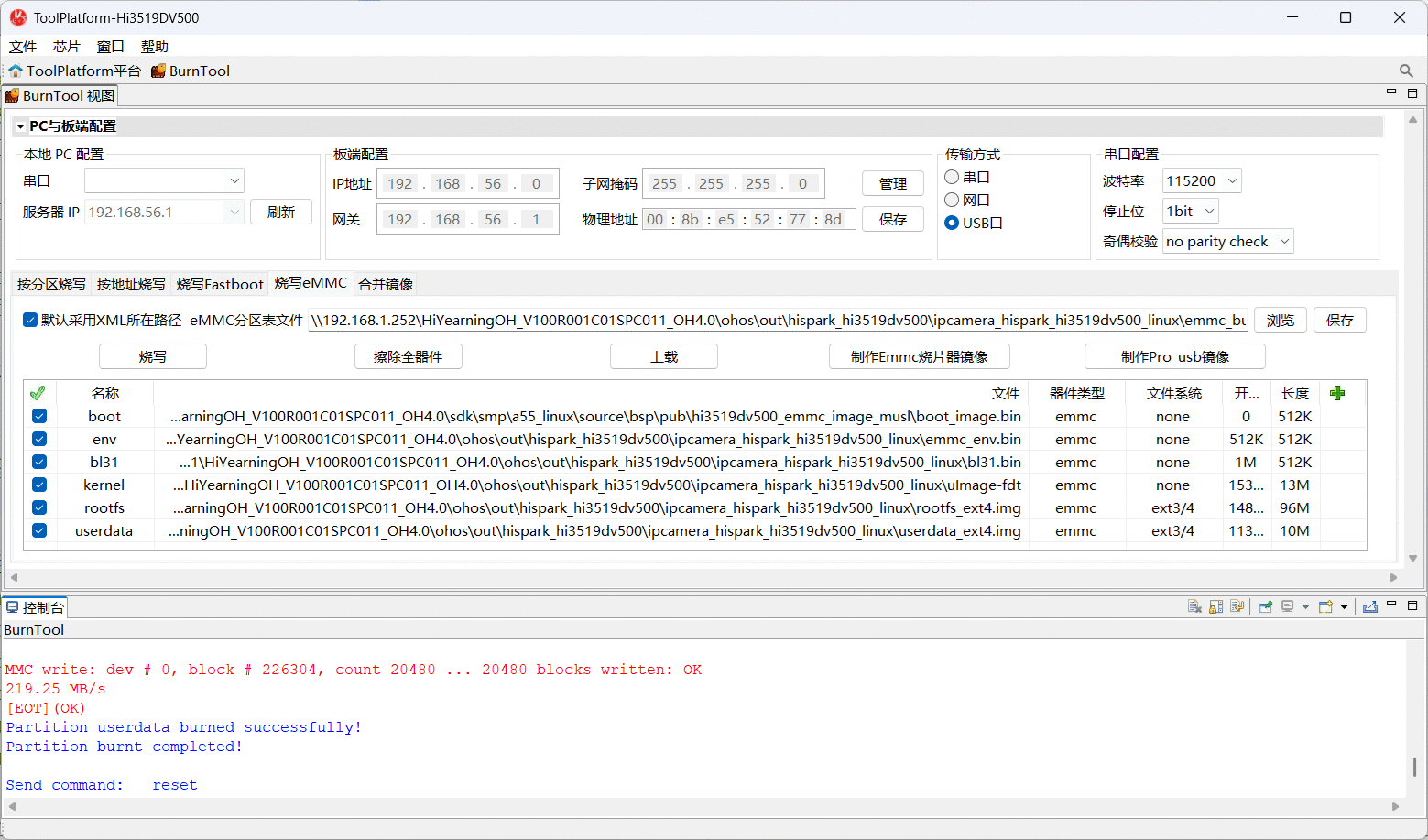
系统起来后, 可以查看版本信息, 如下:
# cat /system/etc/param/ohos.para
# Copyright (c) 2021 Huawei Device Co., Ltd.
# Licensed under the Apache License, Version 2.0 (the "License");
# you may not use this file except in compliance with the License.
# You may obtain a copy of the License at
#
#     http://www.apache.org/licenses/LICENSE-2.0
#
# Unless required by applicable law or agreed to in writing, software
# distributed under the License is distributed on an "AS IS" BASIS,
# WITHOUT WARRANTIES OR CONDITIONS OF ANY KIND, either express or implied.
# See the License for the specific language governing permissions and
# limitations under the License.
const.actionable_compatible_property.enabled=false
const.postinstall.fstab.prefix=/system
const.secure=0
security.perf_harden=1
const.allow.mock.location=0
const.debuggable=1

const.sandbox=enable
const.product.devicetype=default

const.product.incremental.version=default

const.product.build.type=release:nolog
const.product.build.user=default
const.product.build.host=default
const.product.build.date=default

const.ohos.buildroothash=default
const.product.cmcversion=YearningOH_SPC011