AHD摄像头
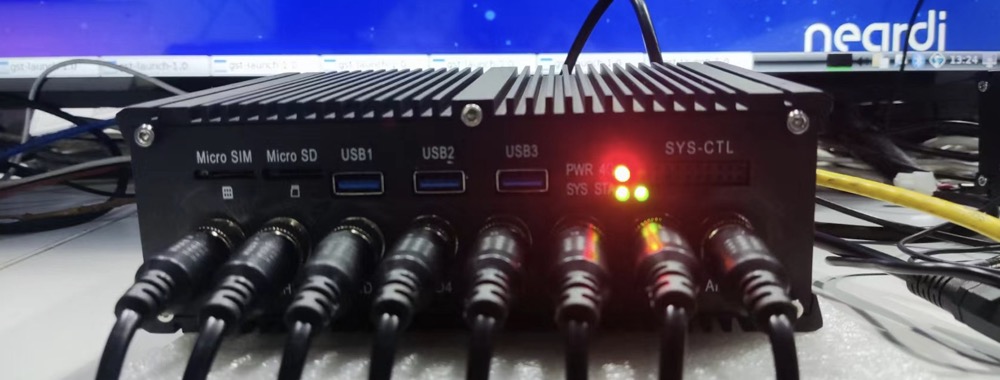
支持8路航插接口AHD摄像头输入点击购买,每路支持720/1080p@25/30fps分辨率。
AHD摄像头连接图片
更新固件
20230314版本之前默认不带AHD*8功能,通过uname -a查询版本;
若不符合,烧录 最新标准固件 烧录方法参阅 《使用Type-C线升级固件》一章。
AHD摄像头对应设备节点
| AHD | 设备节点 |
|---|---|
| AHD1 | /dev/video11 |
| AHD2 | /dev/video12 |
| AHD3 | /dev/video13 |
| AHD4 | /dev/video14 |
| AHD5 | /dev/video3 |
| AHD6 | /dev/video2 |
| AHD7 | /dev/video1 |
| AHD8 | /dev/video0 |
修改测试脚本
修改/rockchip-test/camera/camera_rkisp_test.sh
打开camera_rkisp_test.sh,然后去掉里面的最后一行后加入:
DISPLAY=:0.0 gst-launch-1.0 v4l2src device=/dev/video0 ! video/x-raw,format=NV12,width=640,height=480, framerate=30/1 ! fpsdisplaysink&
gst-launch-1.0 v4l2src device=/dev/video1 ! video/x-raw,format=NV12,width=640,height=480, framerate=30/1 ! fpsdisplaysink &
gst-launch-1.0 v4l2src device=/dev/video2 ! video/x-raw,format=NV12,width=640,height=480, framerate=30/1 ! fpsdisplaysink &
gst-launch-1.0 v4l2src device=/dev/video3 ! video/x-raw,format=NV12,width=640,height=480, framerate=30/1 ! fpsdisplaysink &
gst-launch-1.0 v4l2src device=/dev/video11 ! video/x-raw,format=NV12,width=640,height=480, framerate=30/1 ! fpsdisplaysink &
gst-launch-1.0 v4l2src device=/dev/video12 ! video/x-raw,format=NV12,width=640,height=480, framerate=30/1 ! fpsdisplaysink &
gst-launch-1.0 v4l2src device=/dev/video13 ! video/x-raw,format=NV12,width=640,height=480, framerate=30/1 ! fpsdisplaysink &
gst-launch-1.0 v4l2src device=/dev/video14 ! video/x-raw,format=NV12,width=640,height=480, framerate=30/1 ! fpsdisplaysink
若单独测试一路AHD:
- 命令
- Python
sudo gst-launch-1.0 v4l2src device=/dev/video11 ! video/x-raw,format=NV12,width=640,height=480, framerate=30/1 ! fpsdisplaysink
# `/home/neardi` 目录新建 `camera_display.py` 文件,内容如下:
import gi
gi.require_version('Gst', '1.0')
from gi.repository import Gst, GObject

# 初始化 GStreamer
Gst.init(None)

def start_pipeline():
    # 创建 GStreamer 管道
    pipeline = Gst.parse_launch(
        'v4l2src device=/dev/video11 ! '
        'video/x-raw,format=NV12,width=640,height=480,framerate=30/1 ! '
        'fpsdisplaysink'
    )

    # 开始播放管道
    pipeline.set_state(Gst.State.PLAYING)

    # 创建主循环
    loop = GObject.MainLoop()
    try:
        loop.run()
    except KeyboardInterrupt:
        # 停止管道并退出循环
        pipeline.set_state(Gst.State.NULL)
        print("管道已停止")

if __name__ == "__main__":
    start_pipeline()
验证测试脚本
- 命令
- Python
sudo /rockchip-test/camera/camera_rkisp_test.sh
python3 camera_display.py
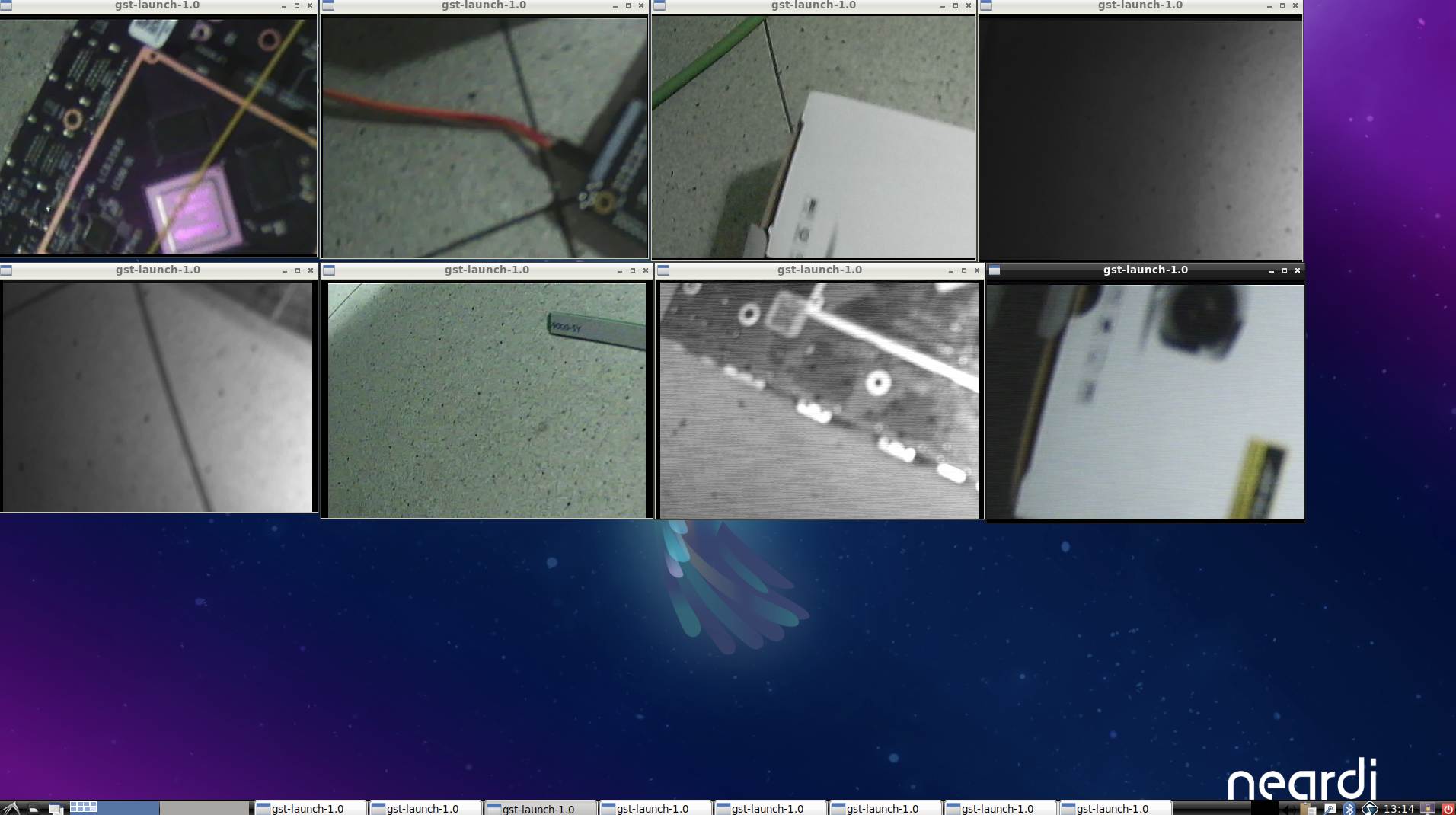
执行成功结果:
- 命令
- Python
neardi@LPA3588:~$ sudo /rockchip-test/camera/camera_rkisp_test.sh
Start RKISP Camera Preview!
Setting pipeline to PAUSED ...
Pipeline is live and does not need PREROLL ...
Pipeline is PREROLLED ...
Setting pipeline to PLAYING ...
New clock: GstSystemClock
Setting pipeline to PAUSED ...
...
Redistribute latency...
0:22:57.3 / 99:99:99.
/
FAQ
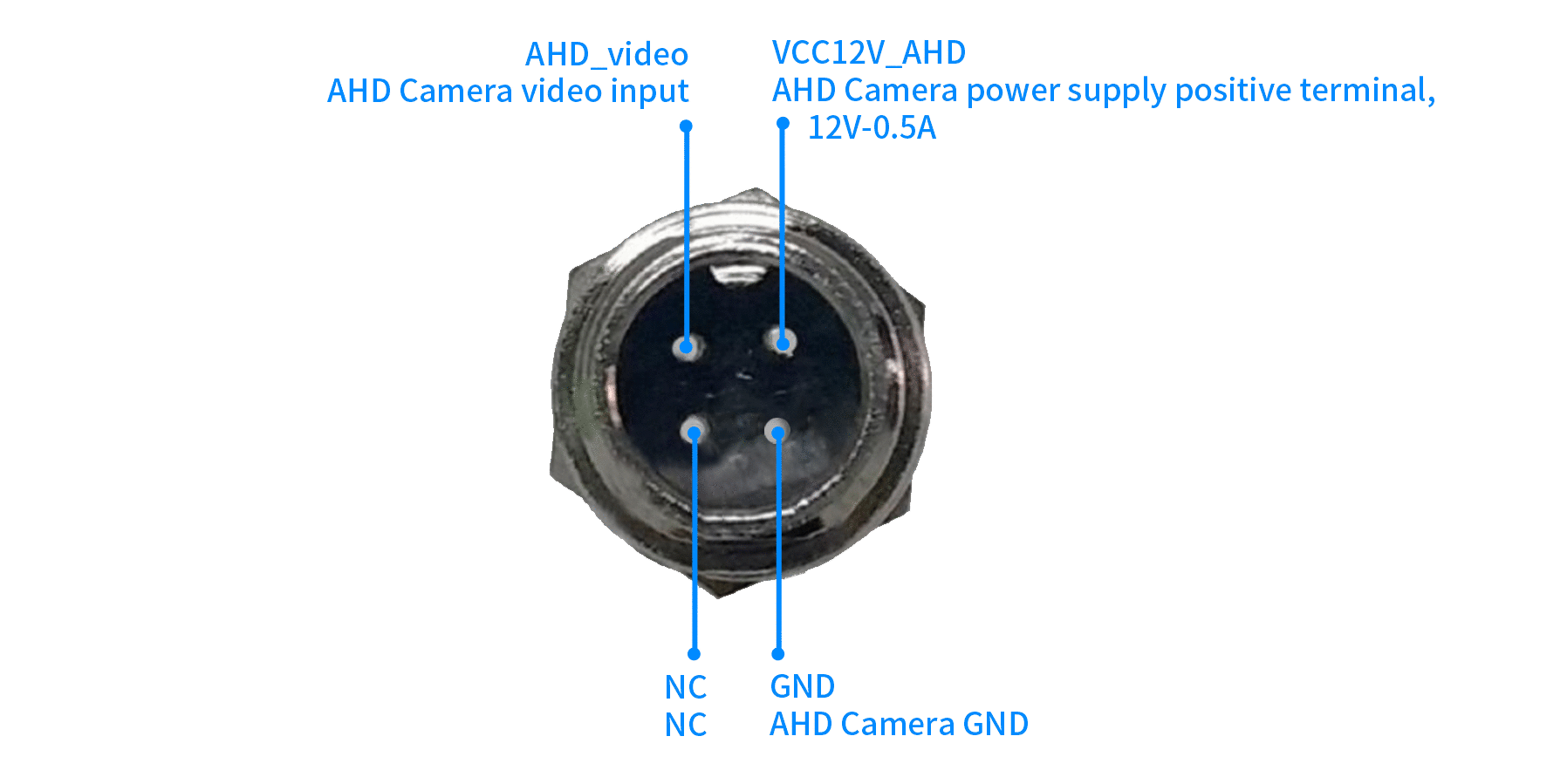
AHD摄像头pin脚如何定义的?
有没有C++的demo?
AHD摄像头为什么不出图?
简单排查
- 摄像头确保是
720/1080p@25/30fps分辨率。 - 8路摄像头使用同一分辨率和帧率;不要混用,例如AHD1接720p,AHD2接1080p。
- 不能热插拔。
- 若固件是自行编译的,确保SDK升级到最新的,
V4.0或r5及以上。 - 检查电源,使用
DC 9-36V电源。 - 测试Neardi配套的摄像头,再对比自行购买的摄像头。
抓图排查
使用v4l2-ctl工具抓图测试
AHD1抓图
v4l2-ctl -d /dev/video11 --set-fmt-video=width=1920,height=1080,pixelformat=NV12 --stream-mmap=3 --stream-skip=3 --stream-to=/tmp/ahd.out --stream-count=1 --stream-poll
抓图正常返回结果,否则为异常:
<<<<
播放抓图结果
sudo apt update;
sudo apt install ffmpeg;
ffplay -f rawvideo -pixel_format nv12 -video_size 1920x1080 /tmp/ahd.out;
内核打印
开机执行 dmesg | grep -i jaguar,需要开机立马执行,否则内核打印可能会被冲掉,输出以下结果:
neardi@LPA3588:/# dmesg | grep -i jaguar
[    5.256354] jaguar1 2-0030: driver version: 00.01.01
[    5.256396] jaguar1 2-0030: no pinctrl
[    5.256412] jaguar1 2-0030: get module rockchip,default_rect from dts, wxh(1920x1080)!
[    5.256442] jaguar1 2-0030: can not find pd-gpios, error -2
[    5.256464] jaguar1 2-0030: can not find pd2-gpios, error -2
[    5.256485] jaguar1 2-0030: can not find rst-gpios, error -2
[    5.256505] jaguar1 2-0030: can not find rst2-gpios, error -2
[    5.256558] jaguar1 2-0030: can not find pwd-gpios, error -2
[    5.256578] jaguar1 2-0030: can not find pwd2-gpios, error -2
[    5.271100] ERROR: could not find jaguar1 devices:0x0
[    5.271192] jaguar1 2-0030: Failed to init jaguar1
[    5.271282] jaguar1 2-0031: driver version: 00.01.01
[    5.271316] jaguar1 2-0031: no pinctrl
[    5.271330] jaguar1 2-0031: get module rockchip,default_rect from dts, wxh(1920x1080)!
[    5.271359] jaguar1 2-0031: can not find pd-gpios, error -2
[    5.271381] jaguar1 2-0031: can not find pd2-gpios, error -2
[    5.271401] jaguar1 2-0031: can not find rst-gpios, error -2
[    5.271421] jaguar1 2-0031: can not find rst2-gpios, error -2
[    5.271440] jaguar1 2-0031: can not find brst-gpios, error -2
[    5.271460] jaguar1 2-0031: can not find brst2-gpios, error -2
[    5.271479] jaguar1 2-0031: can not find pwd-gpios, error -2
[    5.271498] jaguar1 2-0031: can not find pwd2-gpios, error -2
[    5.280979] ERROR: could not find jaguar1 devices:0x0
[    5.281067] jaguar1 2-0031: Failed to init jaguar1
其中 jaguar1 2-0030: Failed to init jaguar1 说明 驱动初始化失败。
2-0031解释:
- 2:代表该设备连接在 i2c-2 总线上;
- 0031:是设备的 I2C 从地址(十六进制)0x31; 驱动在初始化 i2c-2 总线上的地址为 0x31 的设备时失败。
I2C 通讯检查
从内核打印 jaguar1 2-0031: Failed to init jaguar1 可以看出 I2C 总线号为 i2c-2,
执行 sudo busybox i2cdetect -y 2,输出以下结果:
错误反馈:
neardi@LPA3588:/# sudo busybox i2cdetect -y 2
     0  1  2  3  4  5  6  7  8  9  a  b  c  d  e  f
00:          03 04 05 06 07 08 09 0a 0b 0c 0d 0e 0f
10: 10 11 12 13 14 15 16 17 18 19 1a 1b 1c 1d 1e 1f
20: 20 21 22 23 24 25 26 27 28 29 2a 2b 2c 2d 2e 2f
30: 30 31 32 33 34 35 36 37 38 39 3a 3b 3c 3d 3e 3f
40: 40 41 42 43 44 45 46 47 48 UU 4a 4b 4c 4d 4e 4f
50: 50 51 52 53 54 55 56 57 58 59 5a 5b 5c 5d 5e 5f
60: 60 61 62 63 64 65 66 67 68 69 6a 6b 6c 6d 6e 6f
70: 70 71 72 73 74 75 76 77
I2C 总线返回了 大量设备地址响应(异常),而不是 -- 或少量 UU;说明 I2C 总线上可能有设备 总线冲突、挂死、或应答乱发,导致 i2cdetect 误认为所有地址都有效;
发现此种情况,反复开机测试多次,若每次都这样,联系售后走维修。
正常反馈:
neardi@LPA3588:~$ sudo busybox i2cdetect -y 2
     0  1  2  3  4  5  6  7  8  9  a  b  c  d  e  f
00:          -- -- -- -- -- -- -- -- -- -- -- -- --
10: -- -- -- -- -- -- -- -- -- -- -- -- -- -- -- --
20: -- -- -- -- -- -- -- -- -- -- -- -- -- -- -- --
30: UU UU -- -- -- -- -- -- -- -- -- -- -- -- -- --
40: -- -- -- -- -- -- -- -- 48 UU 4a 4b -- -- -- --
50: -- -- -- -- -- -- -- -- -- -- UU -- -- -- -- --
60: -- -- -- -- -- -- -- -- -- -- -- -- -- -- -- --
70: -- -- -- -- -- -- -- --
摄像头驱动 正常注册了特定的 I2C 地址设备(如 0x30、0x31、0x49)。
AHD摄像头接720P开机第一次概率性不出图
在系统启动完成后,延迟重新配置 media format,强制重新下发 720P 格式参数,可稳定恢复图像输出。
可先执行如下命令:
media-ctl -d /dev/media0 --set-v4l2 '"m00_b_jaguar1 2-0030":0[fmt:UYVY8_2X8/1280x720@10000/250000 field:none colorspace:srgb]'
sleep 1
media-ctl -d /dev/media1 --set-v4l2 '"m01_f_jaguar1 2-0030":0[fmt:UYVY8_2X8/1280x720@10000/250000 field:none colorspace:srgb]'
sleep 1