定向边框对象检测
定向边框对象检测1、模型介绍2、定向边框对象检测:图像效果预览3、定向边框对象检测:视频效果预览4、定向边框对象检测:实时检测4.1、USB摄像头效果预览4.2、CSI摄像头效果预览资料参考
使用Python演示Ultralytics :Oriented Bounding Boxes Object Detection在图像、视频、实时检测的效果。
1、模型介绍
定向边框对象检测也叫定向物体检测,比标准物体检测更进一步,它引入了一个额外的角度来更准确地定位图像中的物体。
定向物体检测器的输出是一组精确包围图像中物体的旋转边界框,以及每个边界框的类别标签和置信度分数。当物体以不同角度出现时,定向边界框尤其有用,例如在航空图像中,传统的轴对齐边界框可能会包含不必要的背景。
简单来说,定向物体检测能够用倾斜的框 来精准包围倾斜的物体 ,从而减少不必要的背景区域,提高检测精度。
2、定向边框对象检测:图像
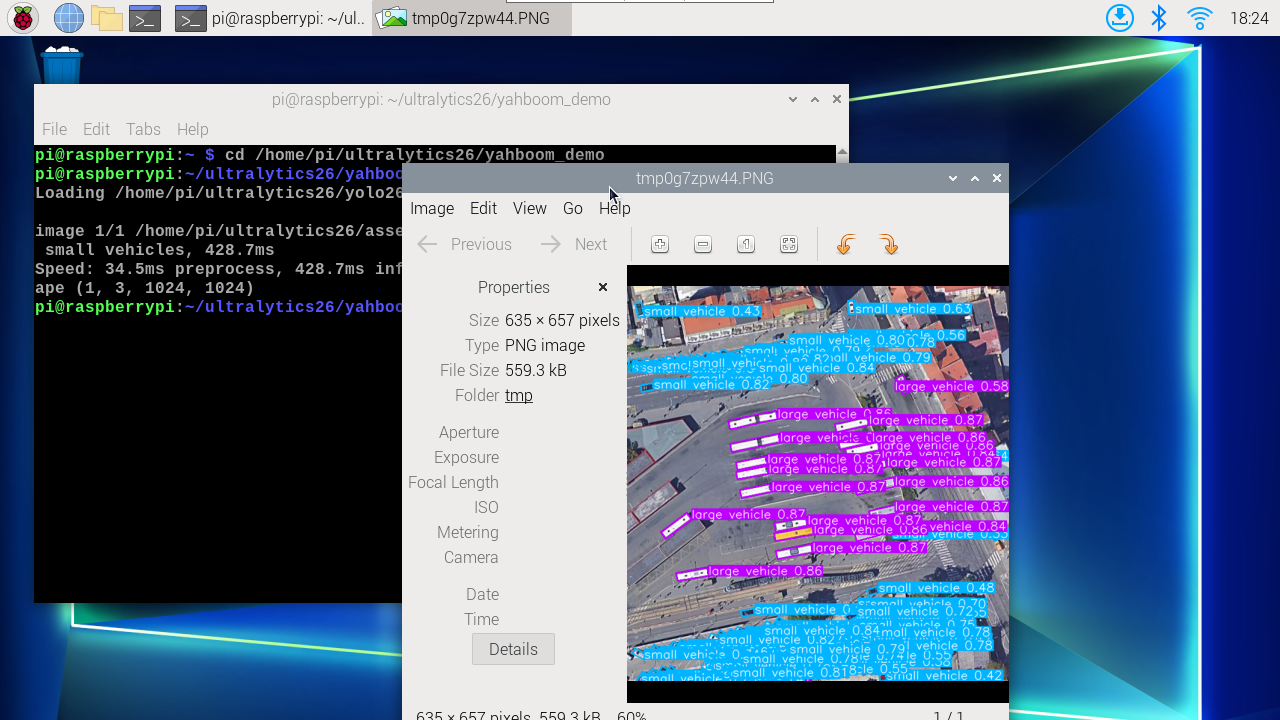
使用yolo26n-obb_ncnn_model预测ultralytics26文件夹下的图片(非ultralytics自带图片)。
进入代码文件夹:
cd /home/jetson/ultralytics/yahboom_demo
运行代码:
xxxxxxxxxx python3 05.obb_image.py
效果预览
yolo识别输出的图片位置:/home/jetson/ultralytics/output/
示例代码:
x from ultralytics import YOLO # Load a model model = YOLO ( "/home/jetson/ultralytics/yolo26n-obb.engine" ) # Run batched inference on a list of images results = model ( "/home/jetson/ultralytics/assets/bus.jpg" ) # return a list of Results objects # Process results list for result in results : # boxes = result.boxes # Boxes object for bounding box outputs # masks = result.masks # Masks object for segmentation masks outputs # keypoints = result.keypoints # Keypoints object for pose outputs # probs = result.probs # Probs object for classification outputs obb = result . obb # Oriented boxes object for OBB outputs # Print OBB results if obb is not None : print ( "OBB boxes:" , obb . xyxy ) print ( "OBB angles:" , obb . angle ) print ( "OBB classes:" , obb . cls ) print ( "OBB confidences:" , obb . conf ) result . show () # display to screen result . save ( filename = "/home/jetson/ultralytics/output/bus_obb.jpg" ) # save to disk
3、定向边框对象检测:视频
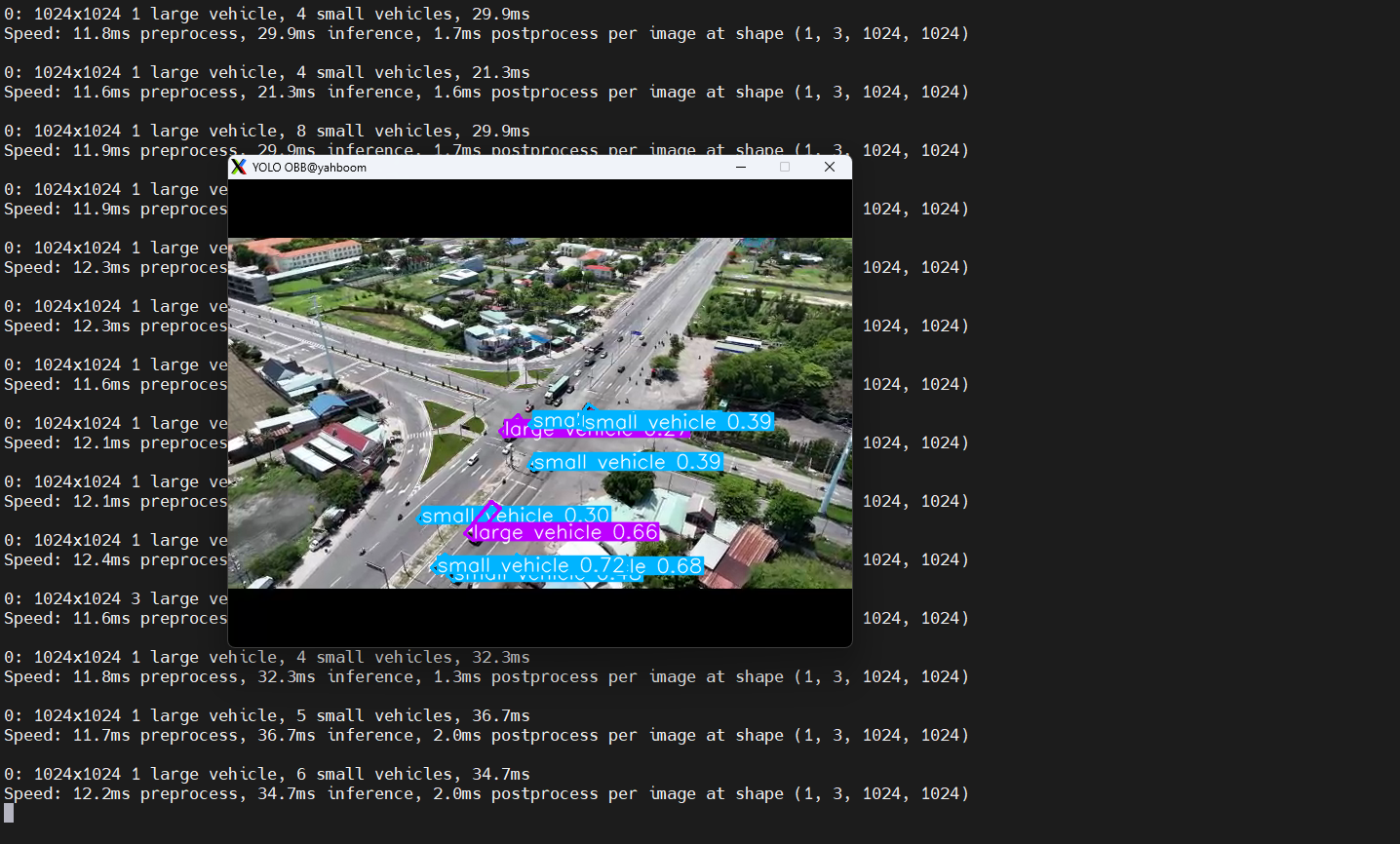
使用yolo26n-obb_ncnn_model预测ultralytics26文件夹下的视频(非ultralytics自带视频)。
进入代码文件夹:
xxxxxxxxxx cd /home/jetson/ultralytics/yahboom_demo
运行代码:
xxxxxxxxxx python3 05.obb_video.py
效果预览
yolo识别输出的视频位置:/home/jetson/ultralytics/output/
示例代码:
xxxxxxxxxx import cv2 from ultralytics import YOLO # Load the YOLO OBB model model = YOLO ( "/home/jetson/ultralytics/yolo26n-obb.engine" ) # Open the video file video_path = "/home/jetson/ultralytics/ultralytics/videos/people_animals.mp4" cap = cv2 . VideoCapture ( video_path ) # Get the video frame size and frame rate frame_width = int ( cap . get ( cv2 . CAP_PROP_FRAME_WIDTH )) frame_height = int ( cap . get ( cv2 . CAP_PROP_FRAME_HEIGHT )) fps = int ( cap . get ( cv2 . CAP_PROP_FPS )) # Define the codec and create a VideoWriter object to output the processed video output_path = "/home/jetson/ultralytics/output/05.obb_video_output.mp4" fourcc = cv2 . VideoWriter_fourcc ( * 'mp4v' ) # You can use 'XVID' or 'mp4v' depending on your platform out = cv2 . VideoWriter ( output_path , fourcc , fps , ( frame_width , frame_height )) # Loop through the video frames while cap . isOpened (): # Read a frame from the video success , frame = cap . read () if success : # Run YOLO OBB inference on the frame results = model ( frame ) # Visualize the OBB results on the frame annotated_frame = results [ 0 ]. plot () # Write the annotated frame to the output video file out . write ( annotated_frame ) # Display the annotated frame cv2 . imshow ( "YOLO OBB" , cv2 . resize ( annotated_frame , ( 640 , 480 ))) # Break the loop if 'q' is pressed if cv2 . waitKey ( 1 ) & 0xFF == ord ( "q" ): break else : # Break the loop if the end of the video is reached break # Release the video capture and writer objects, and close the display window cap . release () out . release () cv2 . destroyAllWindows ()
4、定向边框对象检测:实时检测
4.1、USB摄像头
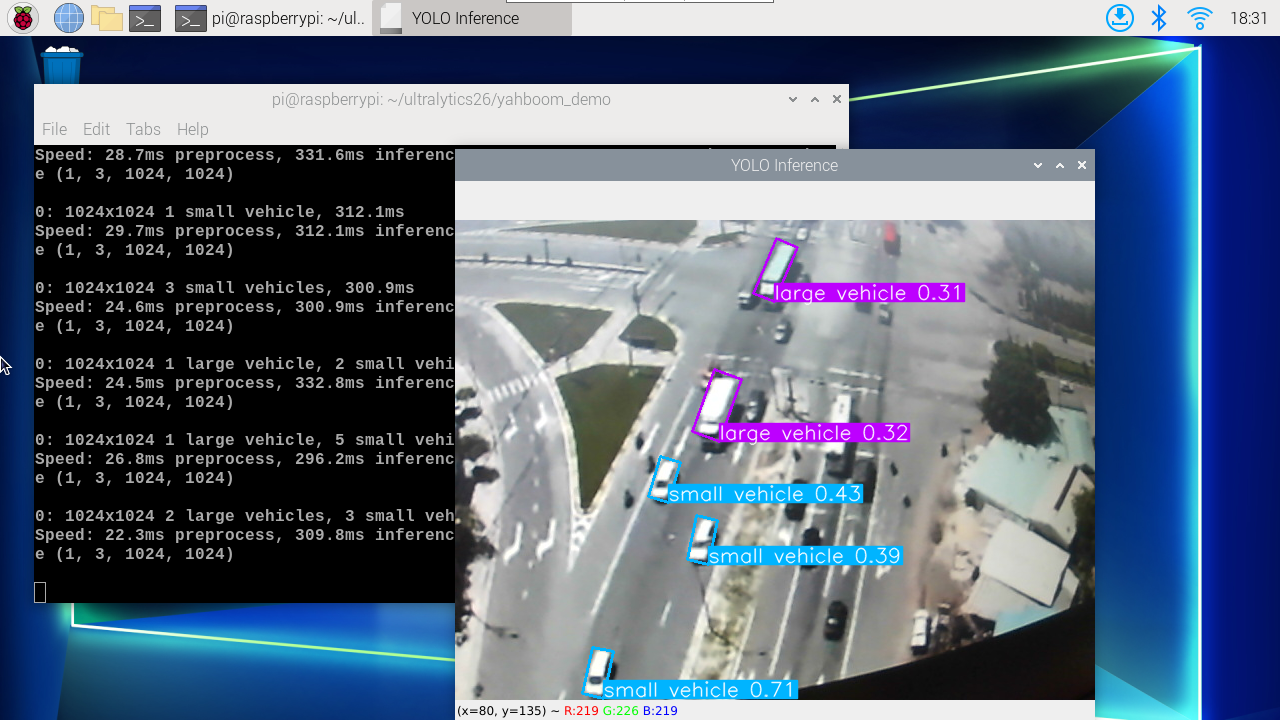
使用yolo26n-obb_ncnn_model预测USB摄像头画面。
进入代码文件夹:
xxxxxxxxxx cd /home/jetson/ultralytics/yahboom_demo
运行代码:点击预览画面,按q键可以终止程序!
xxxxxxxxxx python3 05.obb_camera_usb.py
效果预览
yolo识别输出的视频位置:/home/jetson/ultralytics/output/
示例代码:
xxxxxxxxxx import cv2 from ultralytics import YOLO # Load the YOLO OBB model model = YOLO ( "/home/jetson/ultralytics/yolo26n-obb.engine" ) # Open the camera cap = cv2 . VideoCapture ( 0 ) cap . set ( 6 , cv2 . VideoWriter . fourcc ( 'M' , 'J' , 'P' , 'G' )) cap . set ( cv2 . CAP_PROP_FRAME_WIDTH , 640 ) cap . set ( cv2 . CAP_PROP_FRAME_HEIGHT , 480 ) # Get the video frame size and frame rate frame_width = int ( cap . get ( cv2 . CAP_PROP_FRAME_WIDTH )) frame_height = int ( cap . get ( cv2 . CAP_PROP_FRAME_HEIGHT )) fps = int ( cap . get ( cv2 . CAP_PROP_FPS )) # Define the codec and create a VideoWriter object to output the processed video output_path = "/home/jetson/ultralytics/output/05.obb_camera_usb.mp4" fourcc = cv2 . VideoWriter_fourcc ( * 'mp4v' ) # You can use 'XVID' or 'mp4v' depending on your platform out = cv2 . VideoWriter ( output_path , fourcc , fps , ( frame_width , frame_height )) # Loop through the video frames while cap . isOpened (): # Read a frame from the video success , frame = cap . read () if success : # Run YOLO OBB inference on the frame results = model ( frame ) # Visualize the OBB results on the frame annotated_frame = results [ 0 ]. plot () # Write the annotated frame to the output video file out . write ( annotated_frame ) # Display the annotated frame cv2 . imshow ( "YOLO OBB" , cv2 . resize ( annotated_frame , ( 640 , 480 ))) # Break the loop if 'q' is pressed if cv2 . waitKey ( 1 ) & 0xFF == ord ( "q" ): break else : # Break the loop if the end of the video is reached break # Release the video capture and writer objects, and close the display window cap . release () out . release () cv2 . destroyAllWindows ()
4.2、CSI摄像头
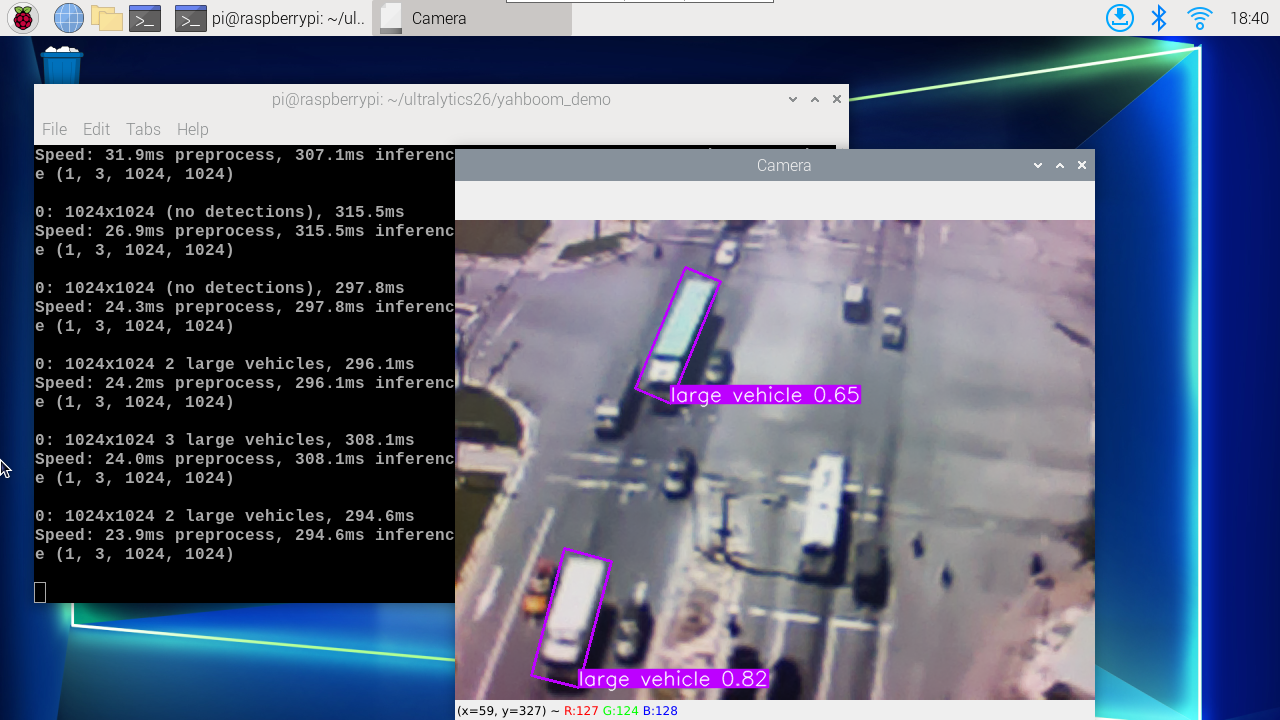
使用yolo26n-obb_ncnn_model预测CSI摄像头画面。
进入代码文件夹:
xxxxxxxxxx cd /home/jetson/ultralytics/yahboom_demo
运行代码:点击预览画面,按q键可以终止程序!
xxxxxxxxxx python3 05.obb_camera_csi.py
效果预览
yolo识别输出的视频位置:/home/jetson/ultralytics/output/
示例代码:
xxxxxxxxxx import cv2 from ultralytics import YOLO from jetcam . csi_camera import CSICamera # Load the YOLO OBB model model = YOLO ( "/home/jetson/ultralytics/yolo26n-obb.engine" ) # Open the camera (CSI Camera) cap = CSICamera ( capture_device = 0 , width = 640 , height = 480 ) # Get the video frame size and frame rate frame_width = 640 frame_height = 480 fps = 30 # Define the codec and create a VideoWriter object to output the processed video output_path = "/home/jetson/ultralytics/output/05.obb_camera_csi.mp4" fourcc = cv2 . VideoWriter_fourcc ( * 'mp4v' ) # You can use 'XVID' or 'mp4v' depending on your platform out = cv2 . VideoWriter ( output_path , fourcc , fps , ( frame_width , frame_height )) # Loop through the video frames while True : # Read a frame from the camera frame = cap . read () if frame is not None : # Run YOLO OBB inference on the frame results = model ( frame ) # Visualize the OBB results on the frame annotated_frame = results [ 0 ]. plot () # Write the annotated frame to the output video file out . write ( annotated_frame ) # Display the annotated frame cv2 . imshow ( "YOLO OBB" , cv2 . resize ( annotated_frame , ( 640 , 480 ))) # Break the loop if 'q' is pressed if cv2 . waitKey ( 1 ) & 0xFF == ord ( "q" ): break else : # Break the loop if no frame is received (camera error or end of stream) print ( "No frame received, breaking the loop." ) break # Release the video capture and writer objects, and close the display window cap . release () out . release () cv2 . destroyAllWindows ()